
In April, Uber's chief technology officer, Praveen Neppalli Naga, told The Information that the company had already used up its AI budget for the whole of 2026. Forbes' write-up gives the shape of it: Claude Code spread across roughly 5,000 engineers faster than the finance model expected, with average spend of $150 to $250 per engineer a month and power users at $500 to $2,000.
Nobody was attacking Uber. Nothing was broken. The spend simply had no ceiling that matched the plan.
So how do you stop runaway AI agent costs? Send every model call through one AI gateway, give each agent or team its own virtual key with a budget, a rate limit and a model allow-list, and have the gateway reserve the worst-case cost of each call before it forwards it. A budget that is only checked after the money is spent is a report, not a control.
I ran this end to end with LiteLLM on my laptop, with a fake model and no API keys, and the most useful thing I learned was the gap between those two kinds of budget. The numbers below are real output from that run.
Key takeaways
- Agent cost is a loop problem. Each step resends a longer context, so cost per step goes up, not just the step count.
- Put budgets on keys you hand to agents, not on the provider account. One key per agent or team makes the bill readable and the blast radius small.
- Check how your gateway enforces a budget. In my test, LiteLLM's default let one call cross a $0.001 cap by 42%; with strict enforcement it refused the call before it was sent.
- Rate limits and model allow-lists are cheap insurance. They stop the loop that never trips a budget because each step is small.
What does a runaway agent actually look like?
Uber's story is about people using a coding agent. The agent version is worse, because there is no person in the loop to get bored.
An agent calls a model, calls a tool, reads the result and calls the model again with everything so far. When the tool keeps returning "no change", a badly written stop condition never fires. Retries make it worse: a timeout, a retry with the same 30,000-token context, another timeout. Two agents that hand work back to each other can do it forever.
OWASP files this under LLM10:2025 Unbounded Consumption, and names the money version "denial of wallet": "By initiating a high volume of operations, attackers exploit the cost-per-use model of cloud-based AI services, leading to unsustainable financial burdens." Their fix list starts with "Apply rate limiting and user quotas to restrict the number of requests a single source entity can make in a given time period."
The attacker is optional. A bug in your own agent produces the same invoice.
Why put the limits in a gateway and not in the agent?
You can write if total_cost > budget: stop() inside the agent. You should. But it is the agent's own code checking itself, and the agent is the thing that is misbehaving. It also only knows about its own calls, not the other three agents sharing the same provider key.
A gateway sits between every agent and every model provider. The agents get gateway keys; only the gateway holds the real provider keys (which is also a good secrets story, see keeping API keys away from AI agents). Because every call passes through one place, that place can answer four questions before a single token is bought.
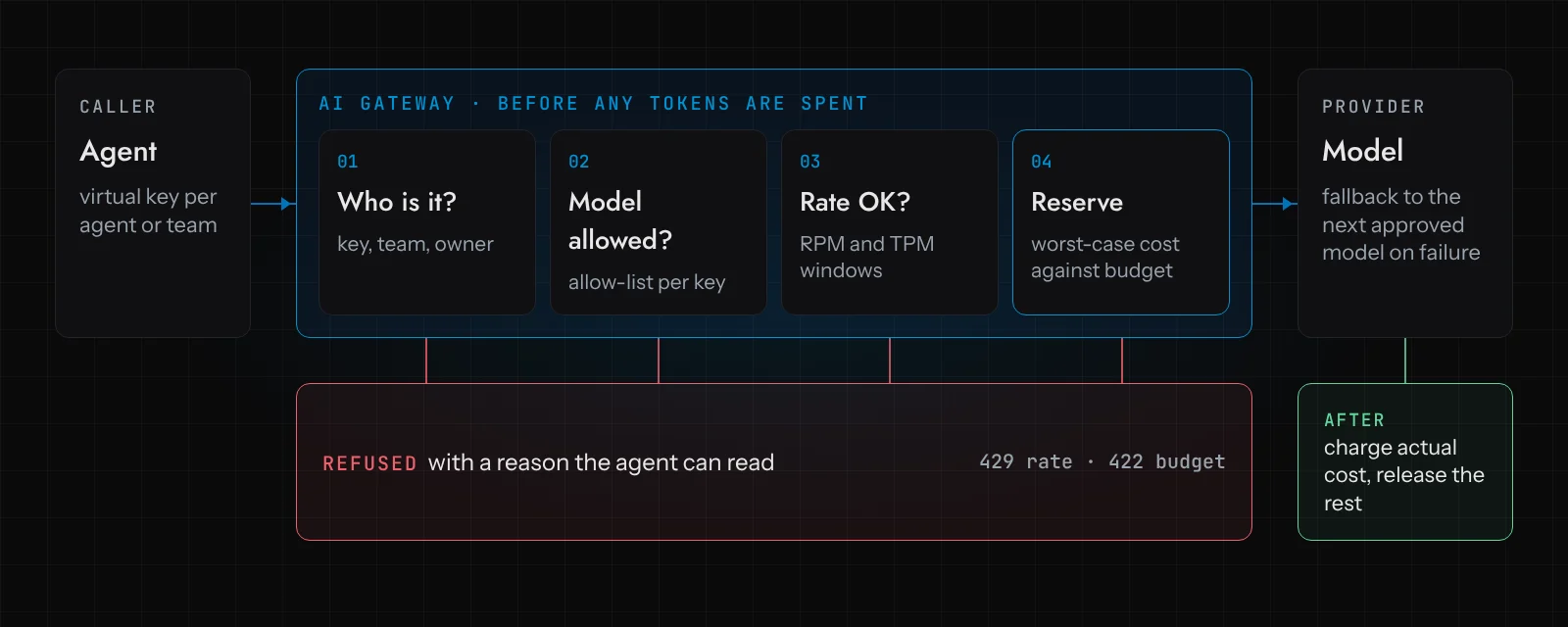
- Who is calling? A virtual key per agent, per team or per customer. This is what makes the spend attributable.
- Is this model allowed for this key? A triage agent has no business calling the most expensive model you have.
- Is there room in the rate window? Requests per minute (RPM) and tokens per minute (TPM).
- Does the worst case fit in the budget? Reserve the maximum this call could cost, then settle the real cost when the answer comes back.
Fallbacks live here too: when one provider fails, the gateway retries on the next approved model instead of the agent retrying the same failing call in a tight loop.
This is the pattern we build with at Devs Core. On our AI governance page it is one line: "Model spend is capped per run and per day, with the worst case reserved before each call." Ware, our simulated warehouse demo with a real recovery agent, works this way, and unknown costs stay reserved until they are reconciled. The reason for that last detail is the rest of this article.
How do you set a token budget in LiteLLM?
LiteLLM is the open-source option you can run yourself, which made it the one I could test properly. I installed version 1.106.6 into a Python virtual environment and pointed it at a fake model. LiteLLM supports a mock_response on a model, which returns a fixed answer without calling any provider but still prices it as if it were the real model (here, gpt-4o rates).
One thing to know before you start: budgets need a database. The docs are blunt about it. On a deployment without one, the global max_budget "fails open", and key, team and user budgets are unavailable. I ran a local PostgreSQL 16 for the test.
This is the config I ran:
model_list:
  - model_name: agent-model
    litellm_params:
      model: openai/gpt-4o
      api_key: not-a-real-key
      mock_response: 'Checked stock levels. Calling the inventory tool again to confirm.'

general_settings:
  master_key: sk-local-master-demo
  database_url: postgresql://litellm@127.0.0.1:55432/litellm
Then a virtual key for one agent, allowed one model, with a budget of one tenth of a cent so the test finishes quickly:
curl -s localhost:4000/key/generate \
  -H "Authorization: Bearer sk-local-master-demo" \
  -H "Content-Type: application/json" \
  -d '{"key_alias":"looping-agent-fast","max_budget":0.001,"models":["agent-model"]}'
And a deliberately broken agent. It never decides it is done, and every step appends to the conversation, which is what real agents do:
# A deliberately broken "agent": it never decides it is done,
# so it keeps calling the model until something outside it says no.
import sys, httpx

GATEWAY = "http://localhost:4000/v1/chat/completions"
KEY = sys.argv[1]
MAX_TOKENS = int(sys.argv[2]) if len(sys.argv) > 2 else None  # cap on output per call

messages = [{"role": "user", "content": "Order 4471 is short. Find stock and reallocate."}]
total = 0.0
for step in range(1, 51):
    r = httpx.post(GATEWAY, headers={"Authorization": f"Bearer {KEY}"},
                   json={"model": "agent-model", "messages": messages,
                         **({"max_tokens": MAX_TOKENS} if MAX_TOKENS else {})}, timeout=30)
    if r.status_code != 200:
        print(f"step {step:>2}  HTTP {r.status_code}")
        print(r.json()["error"]["message"])
        break
    cost = float(r.headers["x-litellm-response-cost"])
    total += cost
    print(f"step {step:>2}  HTTP 200  cost ${cost:.5f}  running total ${total:.5f}")
    messages.append(r.json()["choices"][0]["message"])
    messages.append({"role": "user", "content": "Tool result: stock unchanged. Continue."})
Does the budget actually hold?
Here is what happened, twice.
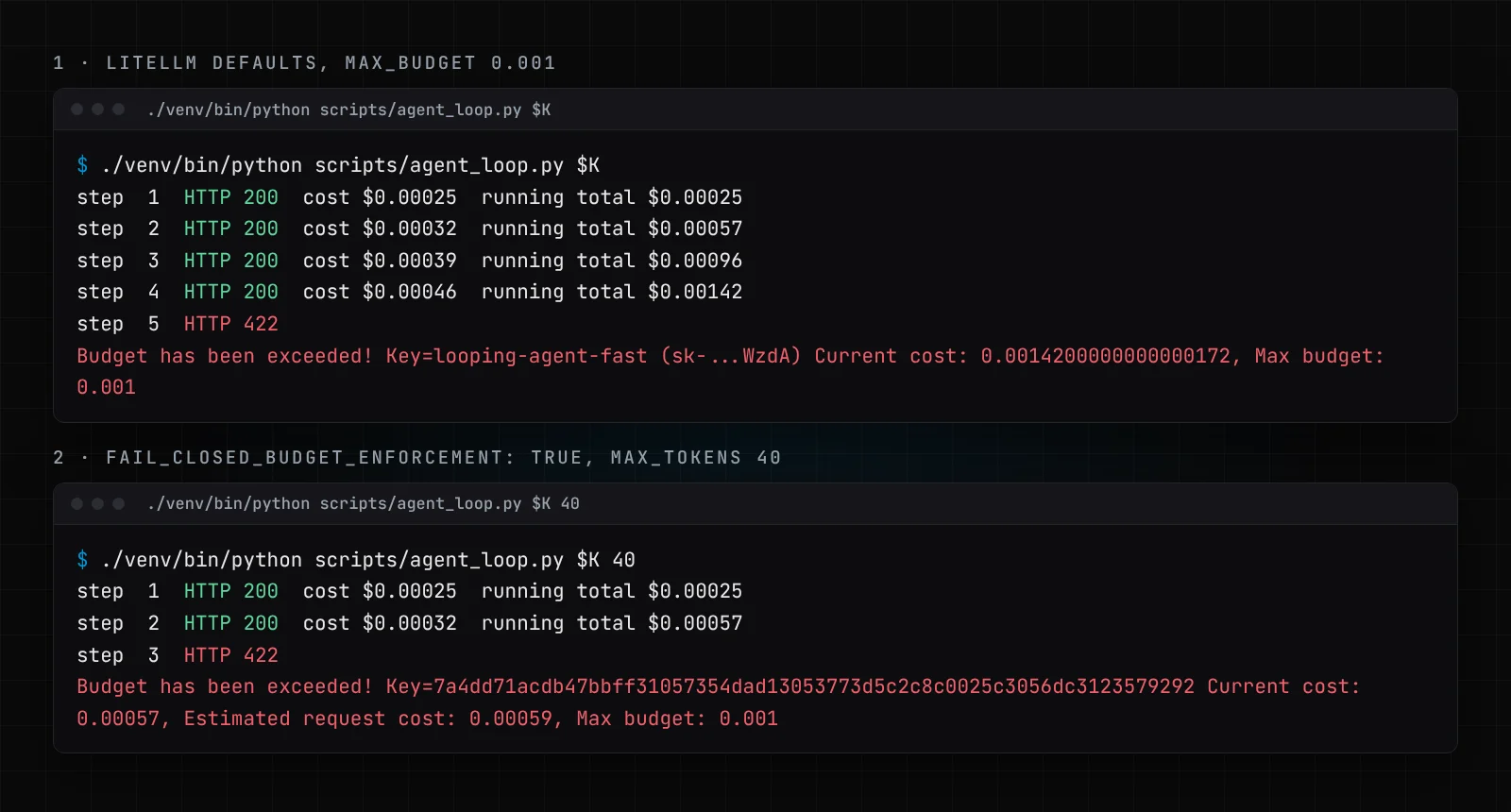
The first run used LiteLLM's defaults. The agent was stopped, which is the good news. But it was stopped at $0.00142 on a $0.001 budget, 42% over. Step 4 went through with only $0.00004 left in the budget.
That surprised me, because LiteLLM does reserve budget before a call. Its docs describe it: estimate the request's maximum cost, reserve it, reject if it would exceed the budget, then replace the reservation with the actual cost. So I read the code. In the default mode, when the estimate does not fit but some budget is left, LiteLLM shrinks the reservation to whatever remains and lets the request through. Concurrent requests cannot all squeeze past (the first one takes the remainder), but a single call can still land well past the line.
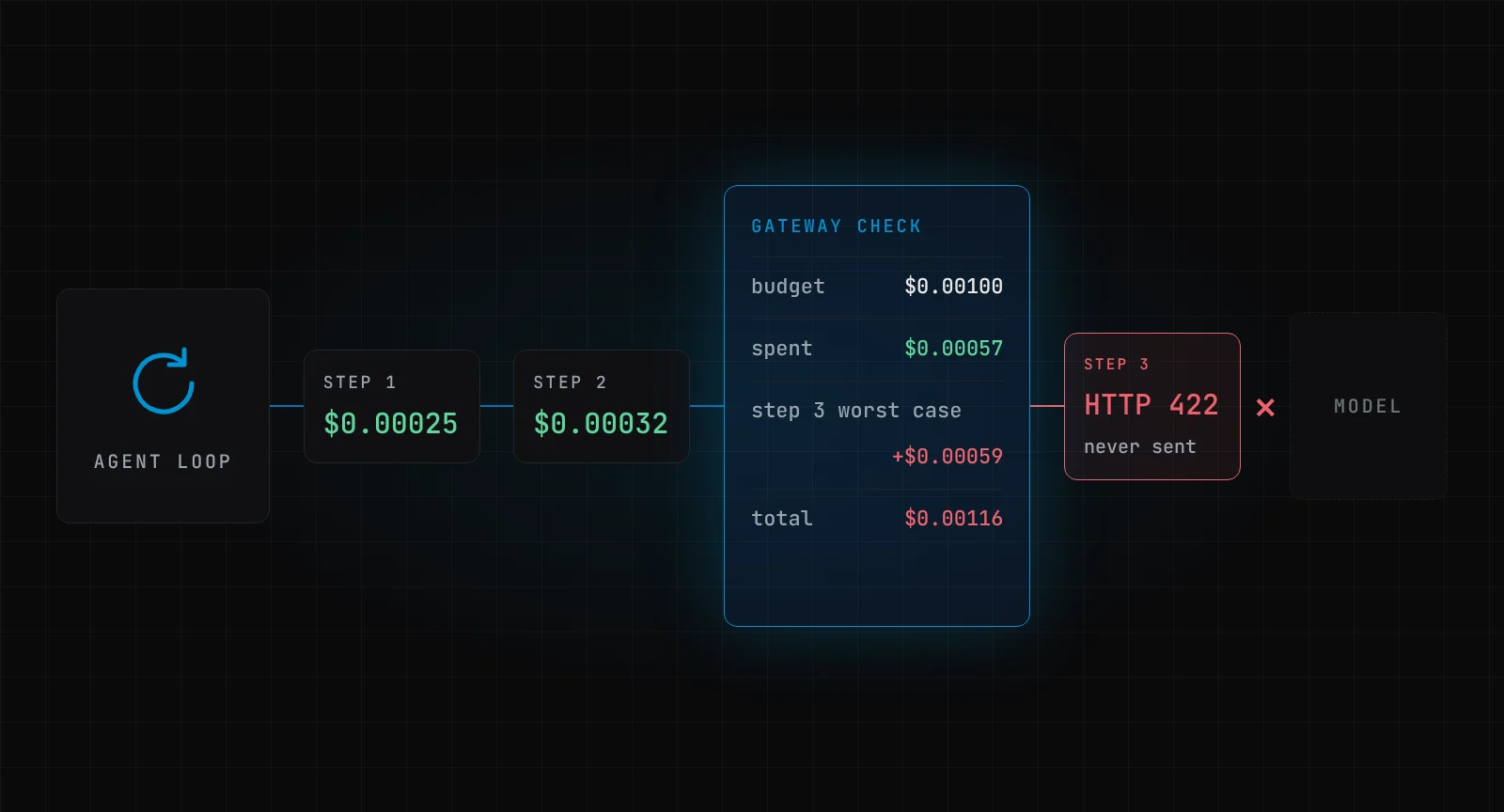
The second run added one setting, fail_closed_budget_enforcement: true under general_settings, and passed max_tokens: 40 so the estimate is honest. Now step 3 is refused before it is sent: $0.00057 spent plus an estimated $0.00059 would not fit, so the gateway says no. The error message even tells the agent why.
Why does max_tokens matter? Without it, LiteLLM has to assume the model's full output limit, and for gpt-4o that worst case was about $0.16 per call in my logs, which is 160 times this budget. In strict mode every call would be refused. That is correct behaviour, and also a hint: cap output tokens on every agent call. It makes the worst case small enough to reserve.
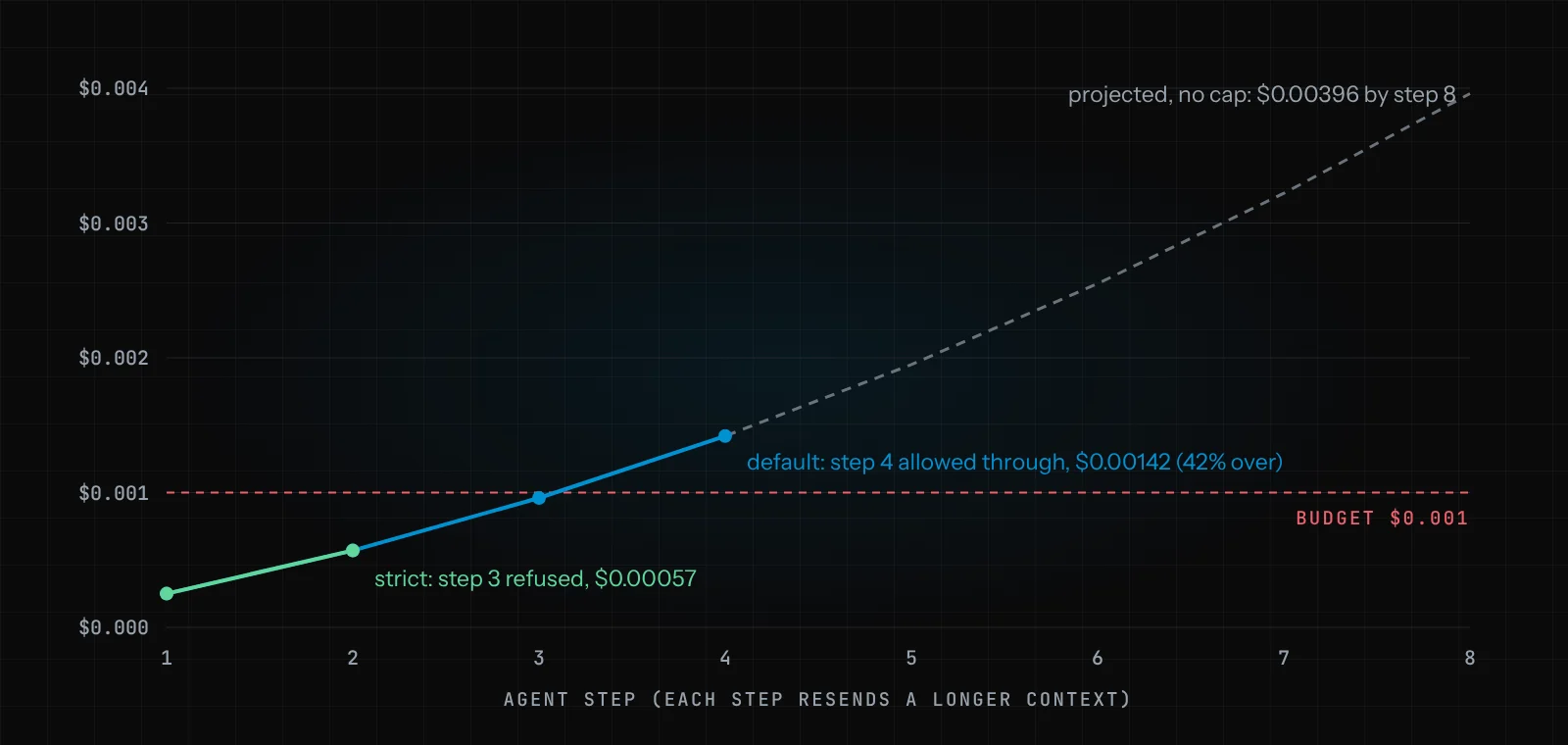
The curve matters more than the cents. Each step cost more than the one before ($0.00025, $0.00032, $0.00039, $0.00046) because the context grew by one answer and one tool result each time. The grey line is a projection, not a measurement: the same growth with no cap. It gets steep. Multiply by real context sizes and a few hundred steps overnight, and you understand why "we'll look at the bill on Monday" is not a control.
The LiteLLM admin UI runs once there is a database, and it shows the same story per key. The red bar is the agent that went over.
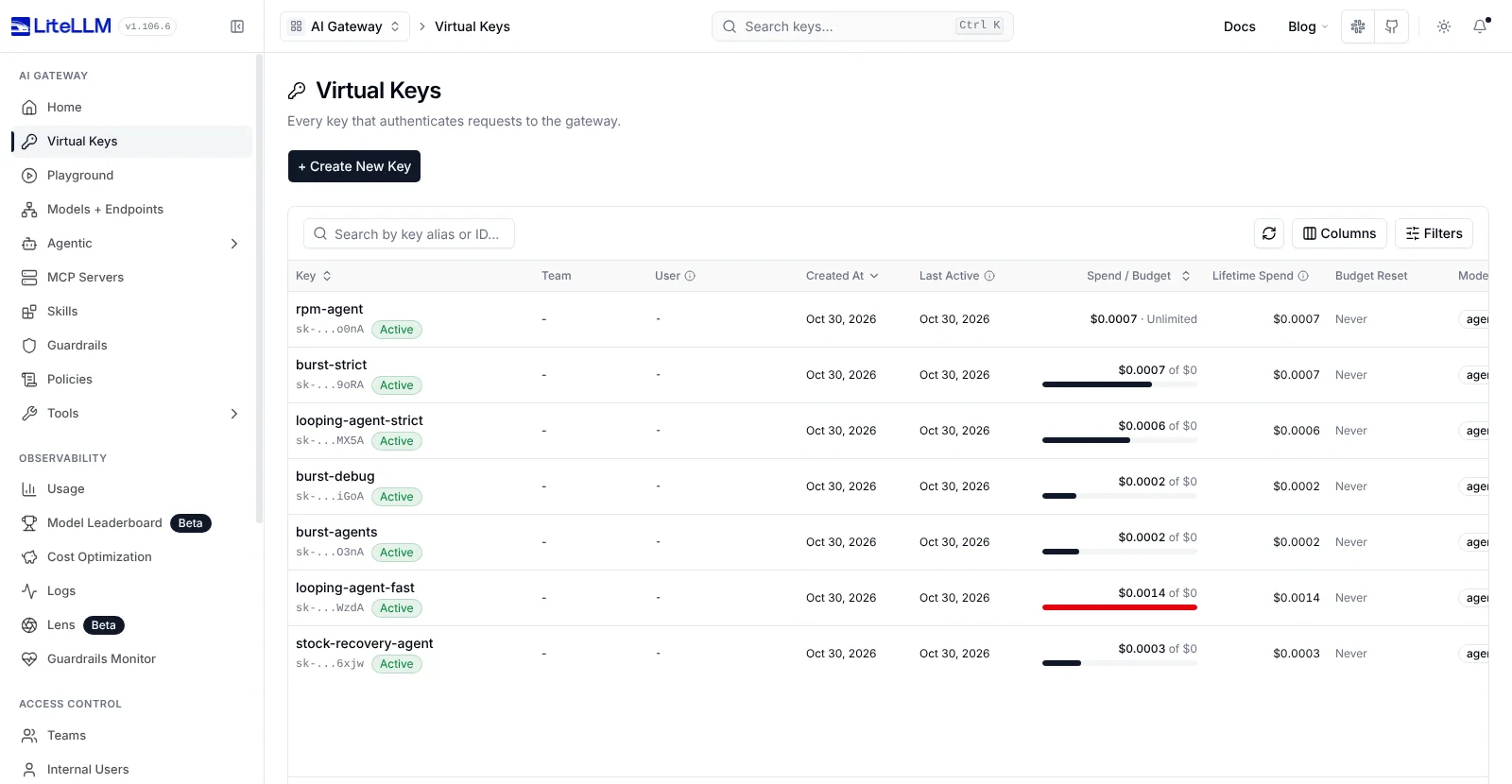
One quibble: the UI rounds a $0.001 budget to "$0". Real budgets will be larger, but check the API (/key/info) when the numbers matter.
What about parallel agents, rate limits and model allow-lists?
Budgets catch expensive loops. They do not catch the cheap loop that runs 10,000 times, or 20 agents firing at once. So I tried both.
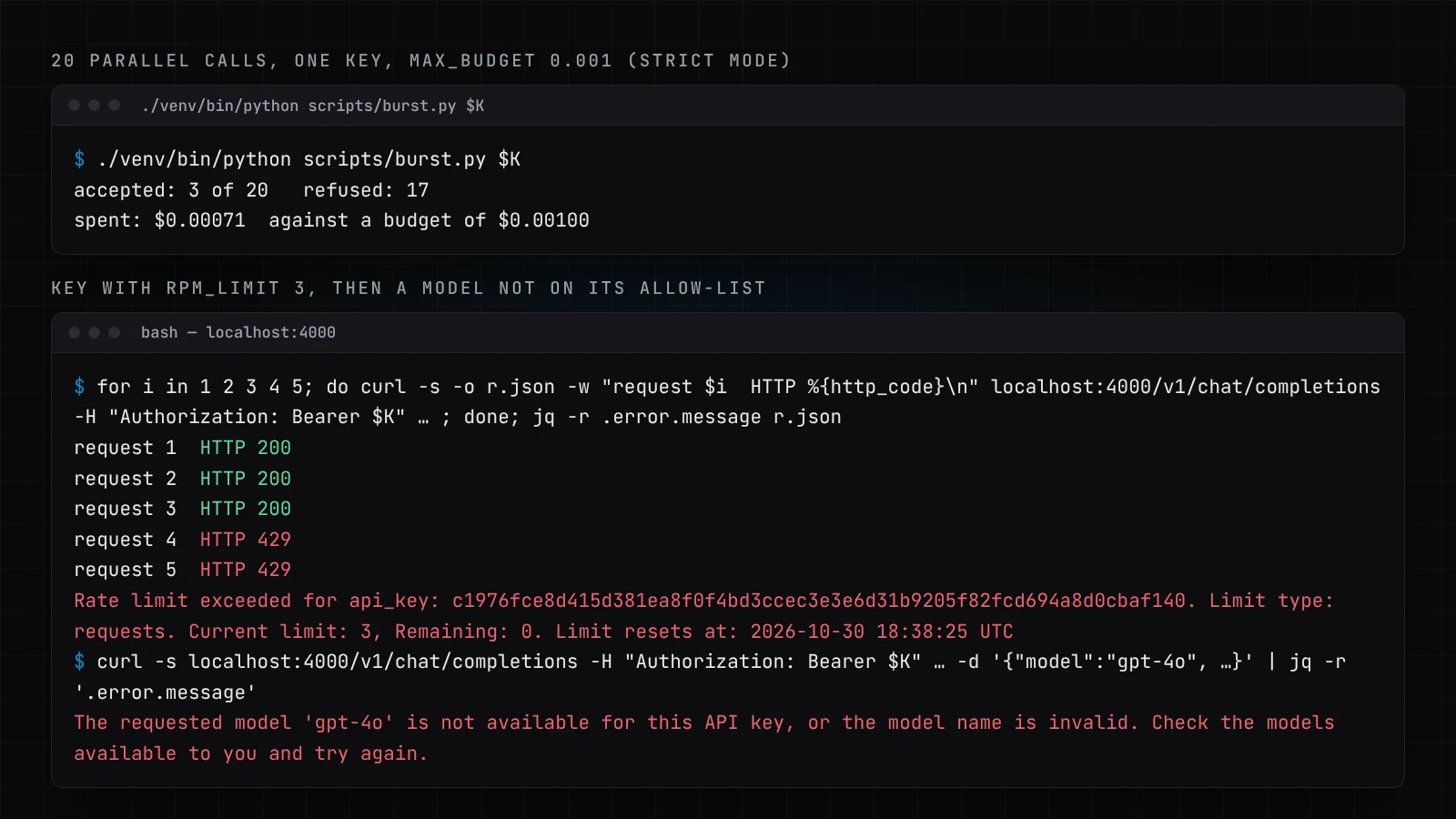
Twenty simultaneous calls on one $0.001 key (strict mode, max_tokens: 40): three accepted, seventeen refused, $0.00071 spent. The reservations are what make this hold. Without them, each call is checked only against spend already recorded, and LiteLLM's own docs warn that this lets concurrent requests exceed the budget.
A key with rpm_limit: 3 let three requests through and returned HTTP 429 for the fourth, with a reset time in the message. And a key allowed only agent-model could not call gpt-4o at all. Neither of these is clever. Both would have saved real teams real money.
LiteLLM, Portkey, Kong, Azure or Cloudflare: which AI gateway?
All five can put a ceiling on agent spend. They differ in where they run and what a "limit" means. This is from each vendor's own documentation, not from running all five; I only ran LiteLLM.
| Gateway | Runs where | Budget in dollars? | Rate limits | Worth knowing |
|---|---|---|---|---|
| LiteLLM | Self-hosted, open source | Yes, per key, user, team, with reset windows | RPM, TPM per key and model | Needs Postgres for budgets. Check the enforcement mode (above). |
| Portkey | Hosted service | Yes, cost or token limits; the key expires when reached | Requests or tokens per minute | Minimum cost limit is $1. Now part of Palo Alto Networks (Prisma AIRS). |
| Kong AI Gateway | Self-hosted or Konnect | Yes, via the cost counting strategy in AI Rate Limiting Advanced |
Token and request windows | Strong if Kong already fronts your APIs. You set input and output prices per model yourself. |
| Azure API Management | Azure | No, tokens: token-quota per hour to year |
tokens-per-minute per counter key |
Natural fit if you are on Azure OpenAI and already use APIM. |
| Cloudflare AI Gateway | Cloudflare edge, hosted | Yes, spend limits added in June 2026 | Request rate limiting | Up to 20 spend limit rules per gateway; only for models with known pricing. |
Two caveats about the self-hosted route. First, you run it, so you patch it. LiteLLM had two supply-chain compromises on PyPI this year: versions 1.82.7 and 1.82.8 in March (PyPI's incident report) and version 1.107.0 on 21 October (Datadog Security Labs). A gateway holds every provider key you own, so pin versions and verify what you install. Second, Portkey's acquisition by Palo Alto Networks closed on 29 May 2026. That is not a reason to avoid it, but it is a reason to read the roadmap before you sign a long contract.
My honest view: if you are already deep in Azure or Kong, use what you have and add dollar budgets in your own code where the gateway only counts tokens. If you are starting fresh and want to own it, LiteLLM is the easiest to try. Whichever you pick, run the test above against it before you trust it.
What should a budget refusal do to the agent?
This is the part most coverage misses. A refused call is not the end of the story; it is an event your agent has to handle.
The wrong behaviour is to retry. A 422 or a 429 inside a loop that retries on errors just hammers the gateway, and if the retry logic falls back to a different key or provider, it walks straight around the limit. The right behaviour is to stop, keep the state, and hand the run to a person with the reason attached. In our builds that hand-off goes through the same approval path as any other action that needs a human, which is how the Autonomy Ladder is meant to work: an agent earns more budget by staying inside the one it has.
Then make the numbers visible. Per-key spend in the gateway, traces per step (see AI agent observability with OpenTelemetry and Langfuse), and an alert well before the hard limit, not at it. If you are still working out what those limits should be, our piece on budgeting for AI agent development covers running costs as well as build costs.
If you want help putting this in front of agents that touch real systems, it is part of what we do in AI integration services and the Agent Pilot.
Frequently asked questions
What is the difference between a rate limit and a token budget?
A rate limit caps how fast a key can call (requests or tokens per minute) and resets every window. A budget caps how much a key can spend in total, in dollars or tokens, over a period such as a day or a month. Agents need both: the rate limit stops bursts, the budget stops the slow overnight loop.
Does LiteLLM need a database for budgets?
Yes. LiteLLM's documentation says every budget is enforced against spend read from the database, and without one the global budget fails open and virtual keys cannot be resolved. A small Postgres instance is enough.
Why reserve the worst-case cost before the call?
Because the real cost is only known after the model answers. If the gateway checks spend so far, a single call or a burst of parallel calls can pass the check and land past the limit. Reserving the maximum first, then settling the actual cost, keeps the budget a ceiling. Capping max_tokens keeps that maximum small enough to reserve.
Can I control AI agent costs without a gateway?
Partly. Provider-side spend limits and caps in your own agent code help, but each one only sees part of the traffic. A gateway is the one place that sees every call from every agent, so it is where per-agent budgets, rate limits and model allow-lists are easiest to enforce and audit.