
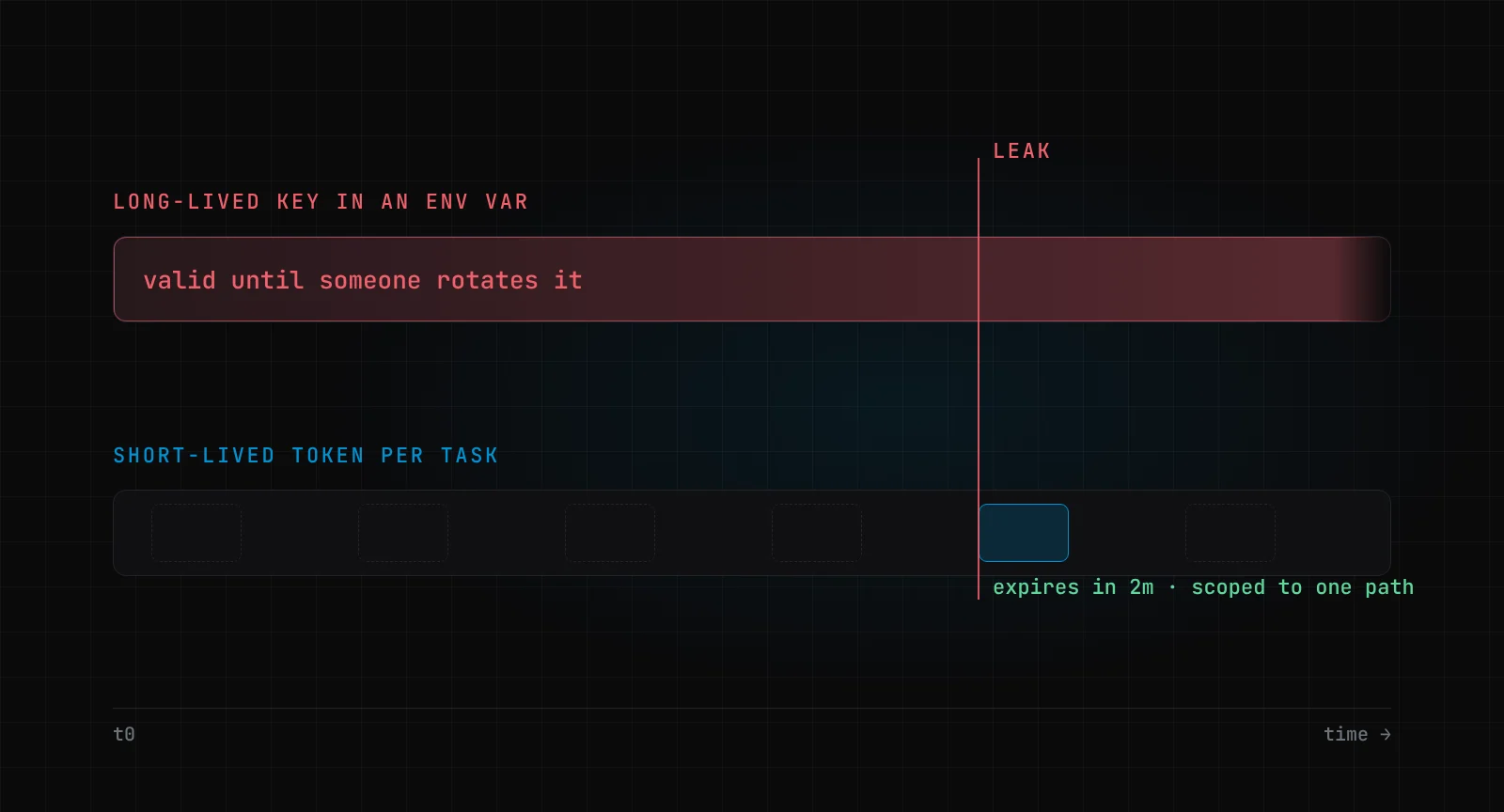
On Wednesday 21 October, Railway told its customers that someone may have accessed their encrypted environment variables and, for some of them, obtained the decrypted contents. The advice was the right advice: roll every environment variable, every API key, every registry credential. The next line was the problem: "All deployments are paused while we investigate."
Think about what that means on a Wednesday afternoon. You can rotate your database password, but your running app still has the old one, and you can't ship the new one because deploys are frozen. Gergely Orosz summed it up in The Pragmatic Engineer: customers could either rotate and take themselves offline, or stay up and hope their key wasn't one of the leaked ones. It took Railway close to 20 hours to restore deploys.
The short answer to how you should store API keys for AI agents: don't give the agent the key at all. Keep secrets in a secret manager, let a broker make the call on the agent's behalf, and when an agent does need a credential, make it short-lived, scoped to one task, and replaceable without a redeploy.
Key takeaways
- A secret in an env var or a file is readable by every process on that machine, and every tool your agent can run is one of those processes.
- The safest key is one the agent never sees. Put a broker between the agent and the API.
- Where an agent must hold a credential, give it minutes of life and one path of scope. I show this below with a real HashiCorp Vault run.
- If rotating a key means redeploying, you will put off rotating, and Railway's customers learnt the cost of that in one afternoon.
- Scan the agent's workspace and your git history, not just the current tree. Deleting the file does not delete the secret.
What actually happened in October?
It was a bad week. Four days before Railway, on 17 October, OpenCode was breached and its customers' AI API keys were stolen, according to Orosz's account of that week. Railway's own disclosure links its incident to the same pattern: "We believe this is part of a series of attacks recently targeting platform companies with the aim of compromising AI inference providers."
Read that twice. The attackers wanted the AI provider keys sitting next to customers' apps, because a stolen inference key is spendable money.
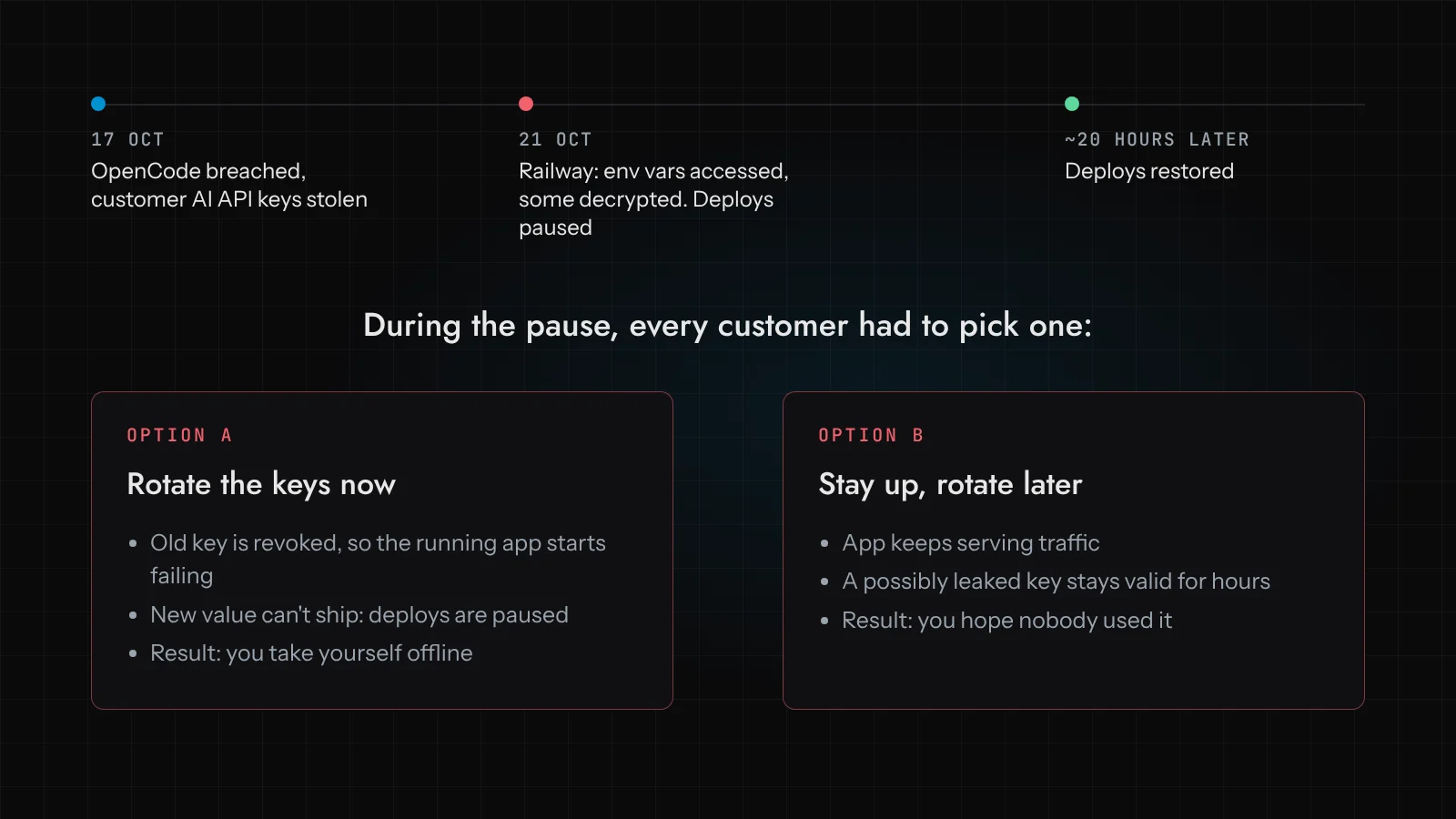
I don't want to pile on Railway. Pausing deploys while you check whether new secrets would leak too is defensible, and they disclosed fast. The dilemma their customers faced was set up long before that Wednesday, by a design almost all of us use: the secret is a static string in an environment variable, and the only way to change it is to redeploy.
Why should AI agents change how you think about secrets?
Because the threat used to be "an attacker gets onto the box". Now there is something on the box, on purpose, that reads files, runs shell commands and calls APIs, and decides for itself which of those to do.
You will remember PocketOS from April. A Cursor agent working on a staging task hit a credential mismatch, went looking for a token, and found one in a file that had been created to manage custom domains through the Railway CLI. It used that token to call volumeDelete on a production volume. Railway's own write-up adds the detail that matters here: the token was account-scoped, "the maximum access possible", even though workspace and project-scoped tokens existed. The happier ending is that Railway recovered the database and the customer got all their data back. The lesson stands anyway. Nobody stole that token. The agent simply found it, because it was on disk where the agent could read it.
That is the part most coverage misses. We talk about agents and secrets as a prompt-injection problem, where an attacker tricks the agent into exfiltrating a key. That is real (see our piece on prompt injection in AI agents). But the PocketOS agent was not tricked. It was being helpful with whatever credential it could reach.
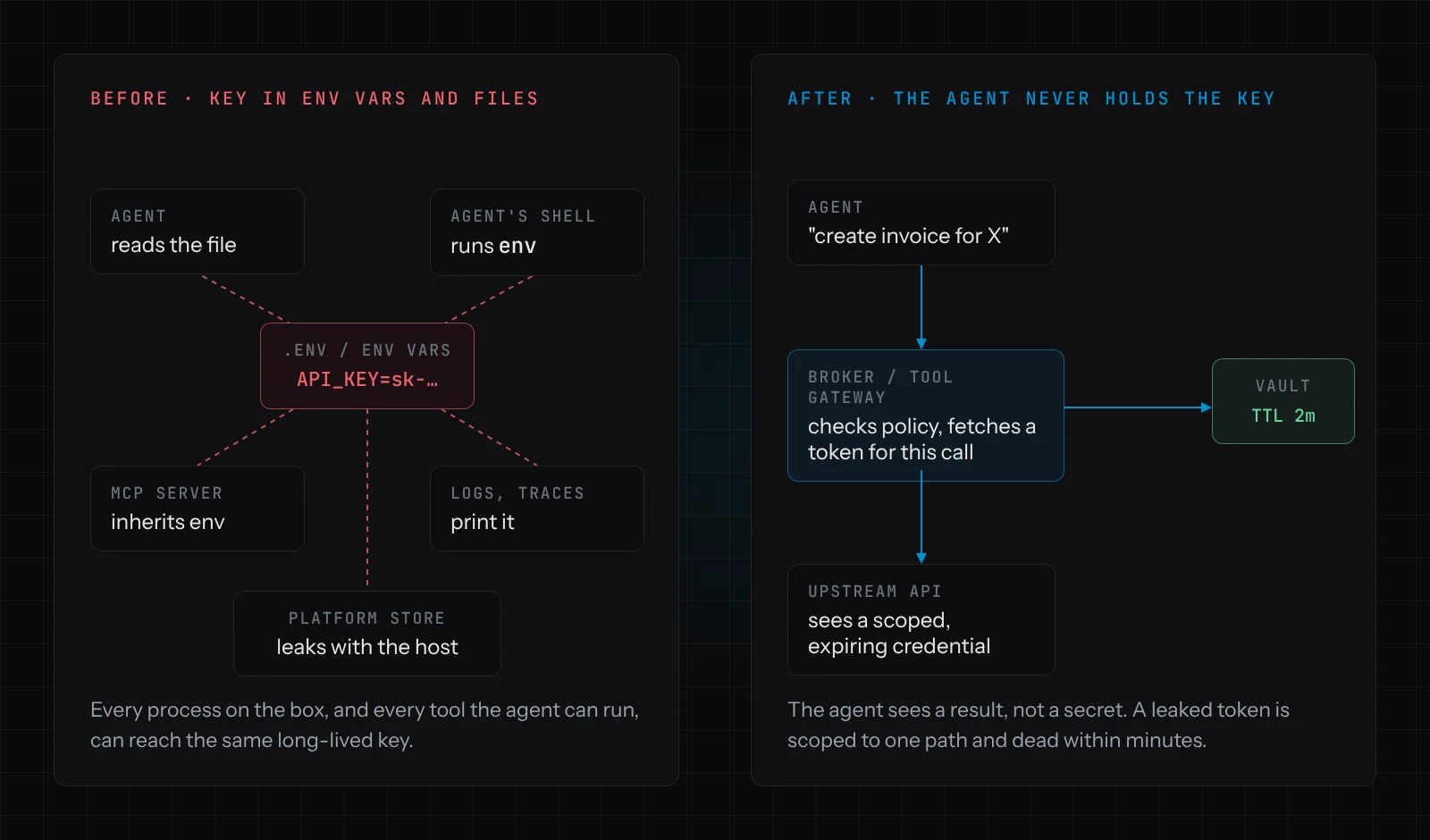
So the question for any agent you run is simple: what can it reach? If the answer includes .env, ~/.config, the CI variables, or the process environment its MCP servers inherit, then every secret in those places is, in practice, the agent's secret too.
The pattern: the agent never holds a long-lived secret
At Devs Core our rule is that the model proposes and deterministic code decides. Secrets fall straight out of that rule. The agent asks for an operation ("create a draft invoice for customer 4471"). A broker, which is ordinary code and not a model, checks the request against policy, fetches the credential it needs for that single call, makes the call, and returns the result. The agent sees "invoice draft created". It never sees the ERP key.
In our builds this broker is the same access layer that enforces per-operation permissions and approvals (we describe it on the Access Layer package page). Doing secrets there is cheap because the layer already exists. If you have to build it from scratch just for secrets, it is still worth it.
A few things this buys you:
- The key is not in the agent's context window, so it can't end up in a prompt, a model provider's logs, a trace, or a chat transcript someone pastes into a ticket.
- The key is not in the agent's environment, so
env,cat .envand a curious MCP server all come up empty. - One place to rotate. The broker fetches the secret from the manager on each call, or caches it briefly, so a rotation takes effect without anyone touching the agent.
Railway moved this way after PocketOS. Its remote MCP server authenticates in the browser "without any tokens on disk", with short-lived tokens scoped to the workspaces and projects you pick. That is the shape you want from every tool an agent touches.
When the agent does need a credential: short TTLs and one path of scope
Sometimes a broker for every call is impractical. A coding agent running tests against a staging database needs a connection string. In that case, give it a credential that expires on its own and can only do one thing.
HashiCorp Vault does this natively. Every dynamic secret and service token has a lease with a time-to-live, and when the lease expires Vault revokes it. Dynamic secrets engines go further: the database engine, for example, creates a fresh database user per request and drops it when the lease ends.
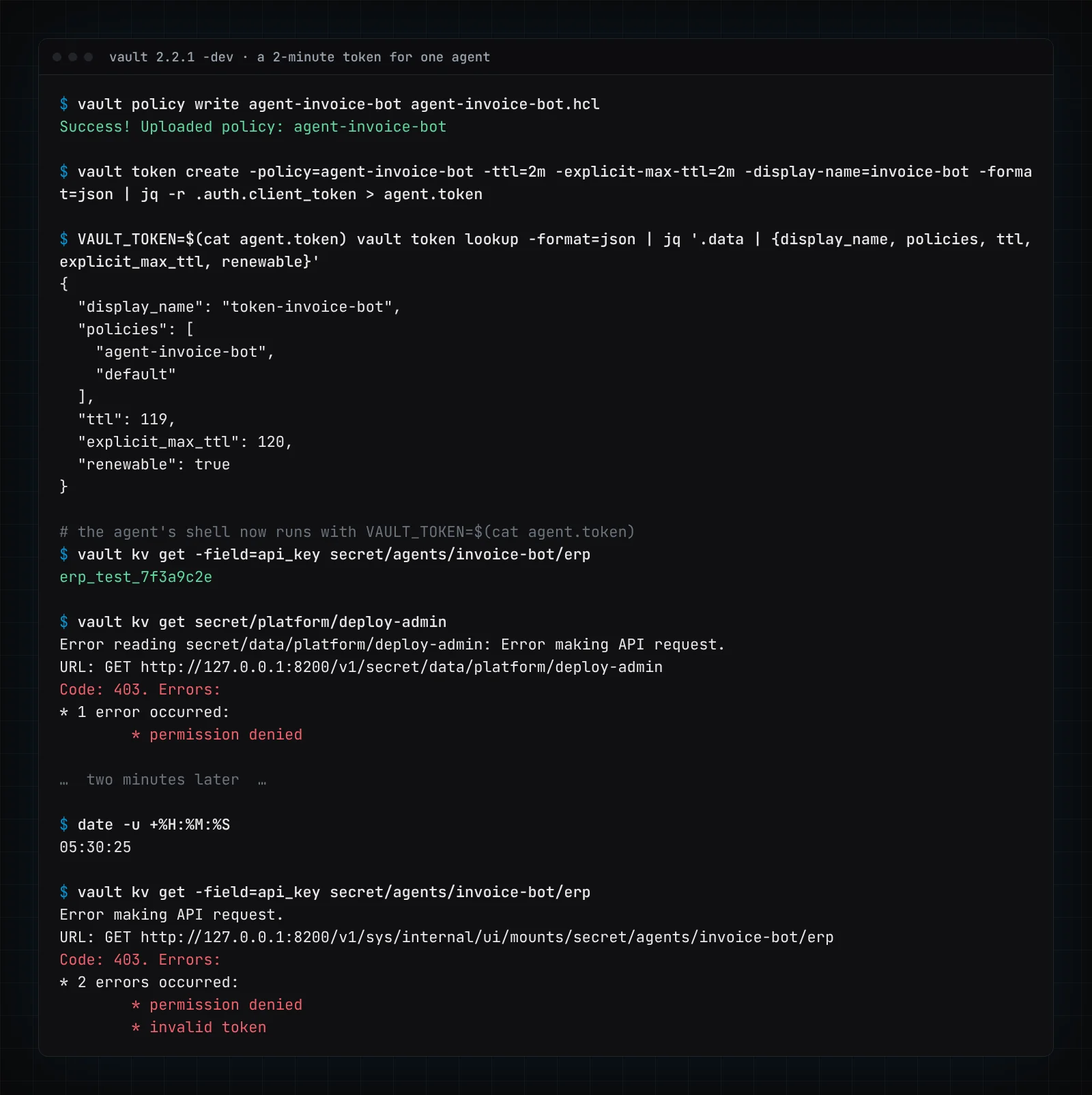
I wanted to see this rather than describe it, so I downloaded the official Vault 2.2.1 binary from releases.hashicorp.com (checksum verified), ran vault server -dev in a sandbox, and gave a pretend invoice agent a token that lives for two minutes. The policy is three lines:
path "secret/data/agents/invoice-bot/*" {
  capabilities = ["read"]
}
Then the token, with a two-minute TTL and a two-minute hard ceiling so it can't be renewed past that:
vault policy write agent-invoice-bot agent-invoice-bot.hcl
vault token create -policy=agent-invoice-bot -ttl=2m -explicit-max-ttl=2m \
  -display-name=invoice-bot -format=json | jq -r .auth.client_token > agent.token
Here is the real terminal output. The agent can read its own ERP test key. It cannot read the deploy-admin token stored in the same Vault. And two minutes later it cannot read anything, because the token is gone:
The Vault UI tells the same story. This is the policy page in the dev server's UI, and the same token pasted into the sign-in form after it expired:
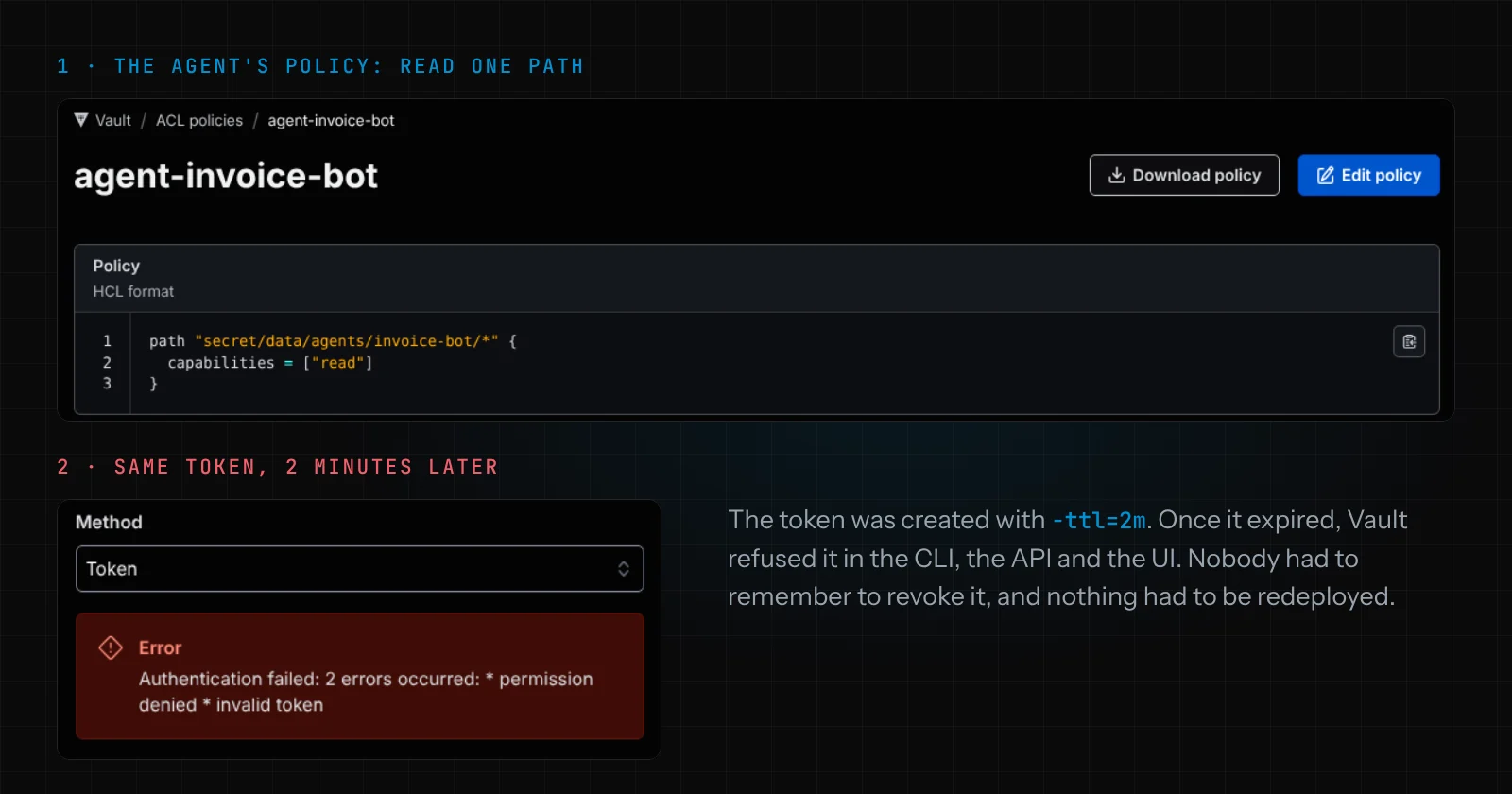
Now replay PocketOS with this setup. The agent finds a token in a file. If it is older than two minutes, it is dead. If it is fresh, it can read one path. It certainly cannot delete a volume. The agent can still make a bad decision, but the credential limits how much damage that decision can do.
One honest caveat: two minutes is a demo number. Real TTLs depend on how long a task runs. We set them per operation, aiming for minutes rather than hours, and we treat any request for an hours-long token as a design smell worth questioning.
Can you rotate without a redeploy?
This is the question Railway's customers were stuck on, and it's the one I'd ask of any system before an incident, not during one.
If your app reads a secret from an environment variable at boot, rotation means restart, and restart means deploy. If your app (or broker) reads the secret from a manager at call time, or caches it for a few minutes, rotation means writing a new version. The running process picks it up. No deploy, no outage.
All the major clouds support this, and none of it requires a model:
- AWS Secrets Manager rotates on a schedule by calling a Lambda function that creates the new secret, sets it on the database or service, tests it, and promotes it.
- Azure Key Vault documents a two-credential rotation where the primary and secondary keys alternate, so apps get a full cycle to pick up the new one before the old one is regenerated. Microsoft's own advice on that page is to prefer managed identities where you can and avoid the key altogether.
- Google Secret Manager lets you set rotation schedules that send a Pub/Sub notification, and your function does the actual rotation.
- HashiCorp Vault can revoke every lease under a prefix in one command, which is the incident-day button you want:
vault lease revoke -prefix aws/.
The two-key pattern deserves more attention than it gets. If every upstream credential has an A and a B slot, you can always rotate one while the other serves traffic. In Railway's situation, a team that read keys at call time from a manager outside Railway could have rotated during the pause and kept running.
Secret scanning: check where the agent works, and check history
Even with a broker, secrets leak into places you didn't plan: a one-off script, a debug log, a notes file the agent wrote to itself. You need a scanner on the repo and on the agent's working directory.
To check what this looks like, I built gitleaks v8.30.1 from its official source and pointed it at a tiny repo. The first commit adds a domain-setup script with a fake GitHub token in it (a nod to PocketOS). The second commit deletes the script. The working tree is clean. Gitleaks still finds it:
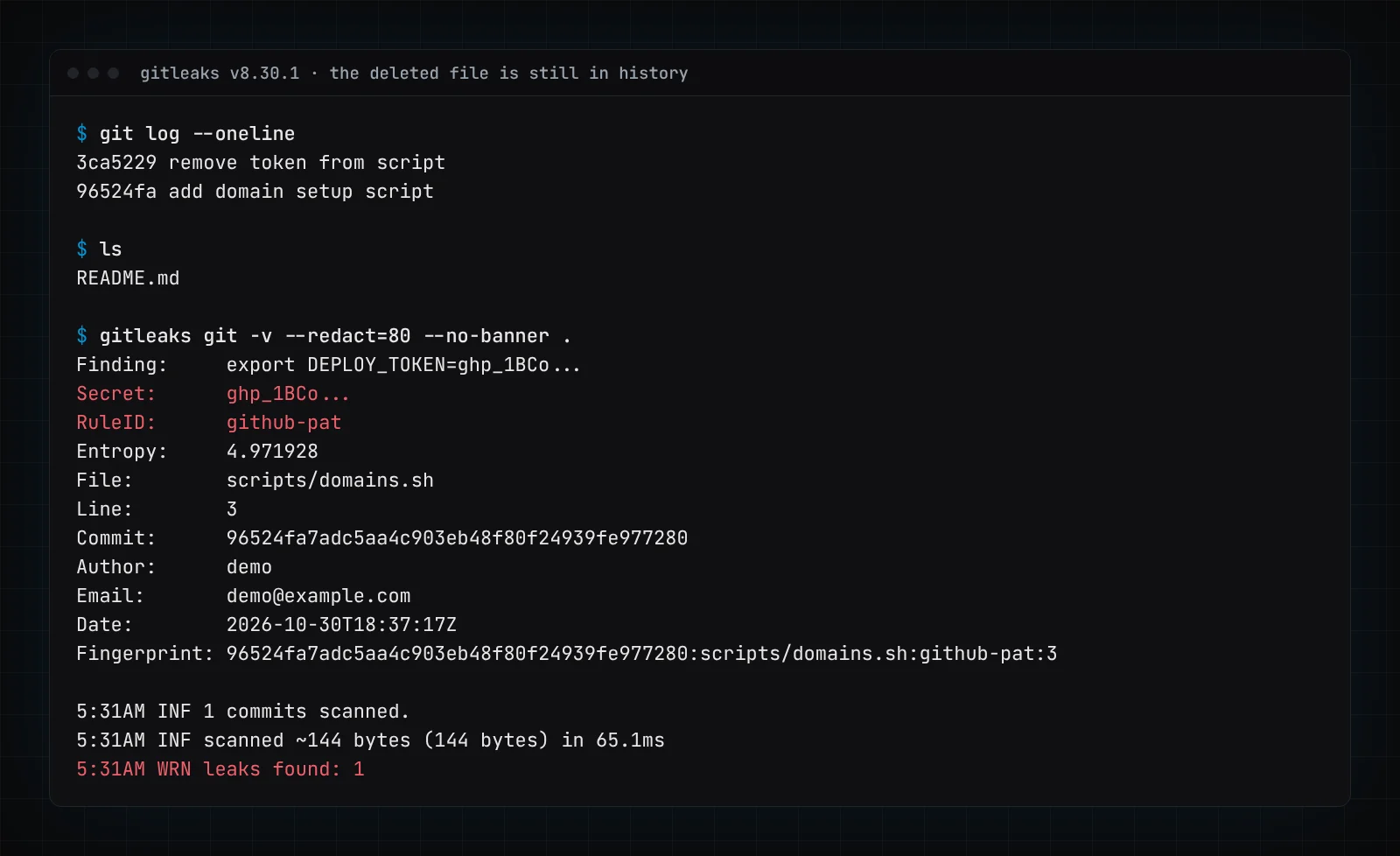
That is exactly what an agent with repo access can do too: git log -p is one tool call away. Deleting a secret from a file is not rotating it. If gitleaks finds a live key in history, revoke the key; rewriting history is housekeeping, not the fix.
Two settings I would make defaults:
- Run the scanner as a pre-commit hook and in CI, and also over the agent's scratch directory at the end of each session.
- Use redaction (
--redact) so the scanner's own output doesn't become the next leak. Note the finding above shows only the first characters of the token.
Keep secrets out of prompts, logs and traces
The last leak path is the one teams build themselves. You add tracing to your agent, which you should (see AI agent observability with OpenTelemetry and Langfuse), and now every tool call's arguments and results are stored in a third-party system. If a tool result contains a connection string, so does your trace store.
The broker pattern mostly solves this, because the secret never appears in a tool argument or result. For the cases it doesn't cover, scrub at the boundary: the broker redacts known secret patterns from anything it returns to the agent, and your logger does the same before export. And never put a key in the system prompt "so the agent can use it". A prompt is not a vault; it is text that gets logged, cached and sometimes echoed back.
Where to start this week
If you run agents today and want to do one thing per day:
- List every secret your agents can reach: env vars, files in their working directory, CI variables, MCP server configs. Expect the list to be longer than you'd like.
- Run gitleaks over those repos and the agents' workspaces, including history. Revoke anything live.
- Move the highest-value key (usually the AI provider key or the production database) behind a broker, so the agent calls an operation rather than holding the key.
- Switch the app to read that secret from a manager at call time, and rotate it once on purpose to prove you can do it without a deploy.
- Replace any agent credential that doesn't expire with one that does.
If you are planning a new agent rather than fixing an old one, this belongs in the design, alongside who may approve what. Our AI agent development work starts there, and the Agent Pilot is how we run a first agent with these limits in place from day one.
Frequently asked questions
How should I store API keys for AI agents?
Store them in a secret manager such as HashiCorp Vault, AWS Secrets Manager, Azure Key Vault or Google Secret Manager, never in the agent's environment, files or prompt. Have a broker fetch the key and make the API call for the agent, so the agent only ever sees the result.
What should I do if my secrets were in Railway environment variables?
Follow Railway's own guidance: roll every environment variable, API key and registry credential stored there, and check those services' logs for unusual activity. Then change how the app reads secrets, so the next rotation doesn't need a deploy.
Does HashiCorp Vault work for AI agents?
Yes. Vault issues tokens and dynamic secrets with a time-to-live and revokes them when the lease expires, and its policies can limit a token to one path. In our test, a two-minute token could read only its own secret and was refused everywhere once it expired.
Is a short-lived token enough on its own?
No. It limits how long and how widely a leaked credential works, but an agent can still misuse a valid token inside its scope. Pair it with per-operation permissions and human approval for irreversible actions, as covered in our human-in-the-loop guide.
Does deleting a committed secret from the repo fix the leak?
No. The secret stays in git history, where scanners like gitleaks (and agents with repo access) can still read it. Revoke and replace the secret first; cleaning history is secondary.