

Free AI Visibility Checker

Is your website visible to AI?

Find out whether ChatGPT, Claude, Perplexity and Google’s AI can reach your site, read it, and recommend you. We test 24 AI crawler rules, fetch your page as 19 of those crawlers, and show you what they actually see.

AI crawler rules checked
24AI crawler rules checked
crawlers fetched live
19crawlers fetched live
AI engines asked about you
4AI engines asked about you
no card, no trial
$0no card, no trial

Open source · AGPL-3.0 licence

Working on your own site? Get the AI Visibility Checker app

The checker above tests any public URL from outside, on a sample of pages. The free, open-source app runs on your machine for a site you control: it crawls every page and checks technical SEO, AI crawler access, AEO/GEO and agentic-web readiness. Add your own API keys and it tracks what ChatGPT, Claude, Gemini and Perplexity say about you.

Try it once, nothing to install
npx github:Devs-Core-Company/ai-visibility-checker audit https://yoursite.com
Or install it
npm install -g github:Devs-Core-Company/ai-visibility-checker
avc init
avc ui
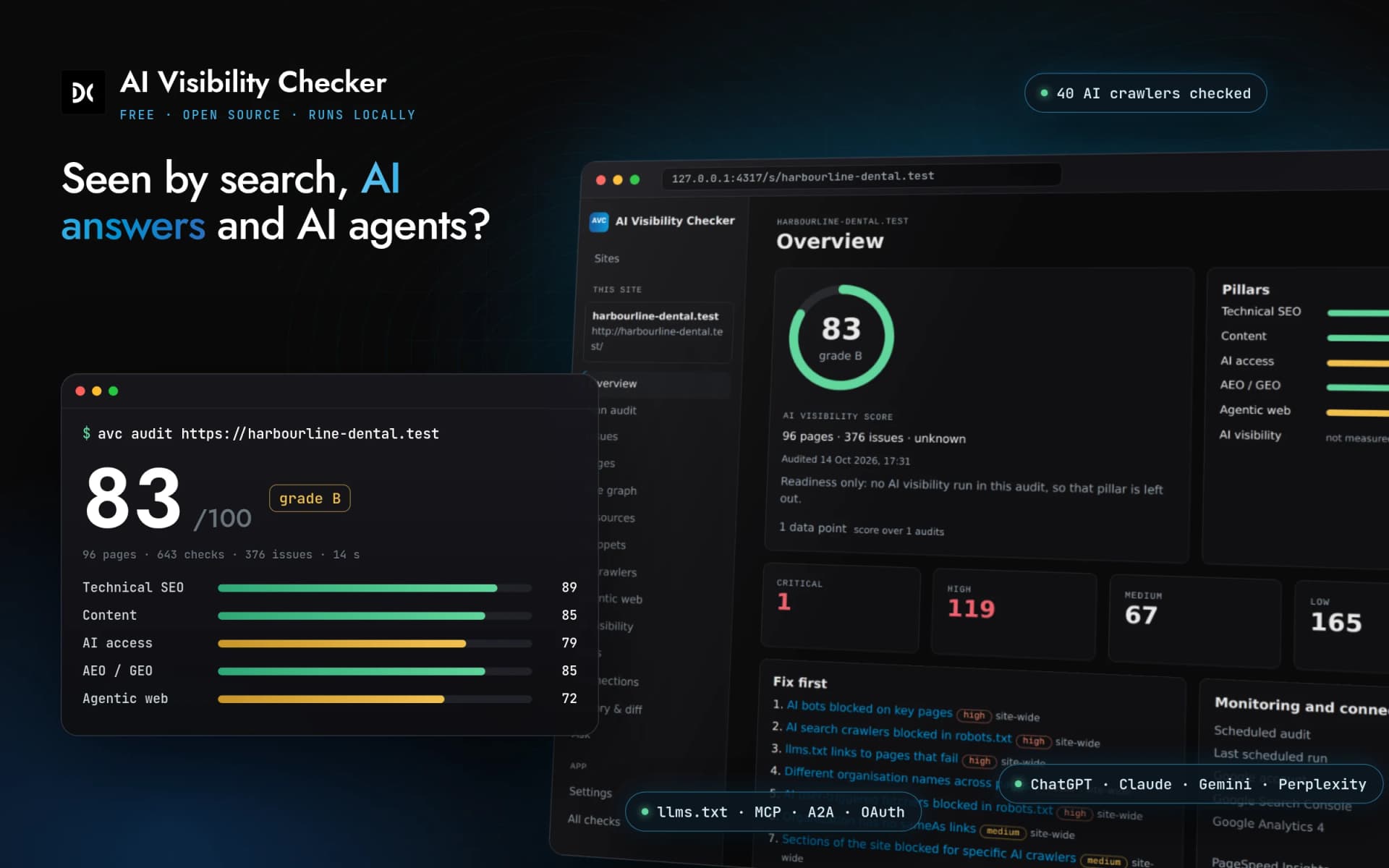
The AI Visibility Checker app: a terminal audit scoring a demo site 83 out of 100 across technical SEO, content, AI access, AEO/GEO and agentic web, in front of the local dashboard overview.
checks on every page and site-wide
640+checks on every page and site-wide
AI and search crawlers checked
40AI and search crawlers checked
AI providers you can track
4AI providers you can track
free and open source
$0free and open source

See it run

A full audit, start to finish

One command audits every page. The dashboard explains each issue, shows the exact robots.txt line that blocks each AI crawler, checks what AI agents can find, and writes the fixes for your stack. Recorded on the benchmark’s demo site, which has planted issues; the AI answers shown use the app’s sample mode.

What it is

One app, four ways to use it

The app is a single command, avc. Use it from a terminal, open its dashboard, let an AI coding assistant drive it, or run it in CI. Everything it finds is stored on your machine.

  • avc

    Command line

    Run audits, AI visibility checks, fixes and reports from a terminal or a CI job.

  • avc ui

    Dashboard

    A local web dashboard at http://127.0.0.1:4317. Only your own machine can open it.

  • avc mcp

    MCP server

    Lets Claude Code, Cursor or Claude Desktop run audits and apply fixes for you.

  • .github/workflows

    GitHub Action

    Runs the audit in CI on a schedule and reports issues to GitHub code scanning.

What it checks

  • Full-site technical SEO

    Crawls every page, up to your limit, and runs 400+ technical and content checks on each.

    • Crawlability, indexing, redirects and canonicals
    • Titles, meta descriptions, headings, duplicate and thin content
    • Internal links and orphan pages, images, sitemaps and pagination
    • Structured data validation, hreflang, mobile, performance and security headers
    • Accessibility, and JavaScript rendering per page in headless Chrome
    • WordPress and Shopify specifics
  • AI crawler access

    Whether 40 AI and search crawlers are allowed in, and whether the ones that fetch pages actually get in.

    • The robots.txt line that decides each crawler
    • A live fetch as each crawler, compared with a browser
    • Firewall and CDN challenge detection on key pages
  • AEO and GEO on every page

    How easy each page is for an answer engine to quote, with a GEO score per page.

    • Answer-first content, question headings and FAQs
    • Freshness and authorship
    • Organization and entity schema, and sameAs links
  • Agentic-web readiness

    Whether AI agents, not only crawlers, can find and use your site.

    • llms.txt graded against the format
    • MCP server card, A2A agent card and OAuth discovery
    • Web Bot Auth, markdown content negotiation and WebMCP
    • Agent commerce protocols
  • AI visibility tracking

    Real answers from the engines, on your keys and your prompts.

    • OpenAI, Anthropic, Google and Perplexity keys, or one Vercel AI Gateway key
    • Your own prompts, repeated runs, mentions and share of voice
    • Competitors, cited pages, sentiment and fact-checks
    • “Why not you” gaps, spend caps, and a free mock mode
  • Fixes you can apply

    Each failing check comes with the change to make, for the stack you run.

    • Steps naming the file, for Next.js, WordPress, Shopify, Astro, Webflow and more
    • Copy-paste code and a ready prompt for Claude Code or Cursor
    • Generators for llms.txt, robots.txt, JSON-LD and an agent card
    • Auto-apply to WordPress with one-click rollback, or to a local repo as a patch
  • Connected data

    Numbers only you can see, read with your permission.

    • Google Search Console, including URL Inspection
    • AI-assistant referral traffic from GA4
    • PageSpeed Insights and CrUX, Bing Webmaster and IndexNow
    • Server logs: real AI crawler visits, checked against published IP ranges
  • Monitoring

    The same audit on a schedule, so you see what changed.

    • Scheduled audits and AI visibility runs, with history and diffs
    • Alerts by Slack or Discord webhook, or by email
    • A GitHub Action with SARIF output

How it differs from the free web checker

The web checker at the top of this page is still the quickest way to test any public site, including a competitor’s. The app is for a site you control.

Who it is for

Web checkerAnyone checking any public website, their own or someone else’s.

AppSite owners, developers and agencies working on a site they control.

Pages covered

Web checkerThe page you enter, plus a sample of 10 to 20 pages from your sitemap.

AppEvery page it can reach, up to the limit you set.

Checks

Web checkerAI access, readability, rendering gap, schema and llms.txt.

App640+ technical SEO, AEO/GEO and agentic-web checks, run across every page.

AI crawlers

Web checkerrobots.txt rules for 24 crawlers and a live fetch as 19 of them.

App40 AI and search crawlers, with the deciding robots.txt line, plus a live fetch as each of the 25 that fetch pages and challenge detection on key pages.

AI visibility

Web checkerChatGPT, Claude, Gemini and Perplexity, asked eight questions each that we choose, once.

AppThe same engines, with your own prompts, run as often as you like and tracked over time.

Connected data

Web checkerNone. Everything is measured from outside your site.

AppSearch Console, GA4, PageSpeed Insights, Bing Webmaster and your own server logs.

Fixes

Web checkerWhat to change for each failing check.

AppSteps for your stack naming the file, copy-paste code, generators, and auto-apply to WordPress or a local repo.

Monitoring

Web checkerOne report at a time, with a link to share.

AppScheduled audits, history, diffs, alerts and a GitHub Action.

Where it runs

Web checkerOn devs-core.com.

AppOn your machine, in CI or on your own server. Data stays in a local SQLite file.

Price

Web checkerFree. The AI scan needs a verified work email.

AppFree and open source (AGPL-3.0). AI scans use your own API keys, with spend caps.

Open benchmark · 13 October 2026

AVC vs other free audit tools

Five tools, one test site with 121 planted defects, the same machine and rules written before any tool ran. Pick an area to see how much each tool caught.

Planted defects found by each tool: All areas, 121 defects
ToolFound · All areasPrecisionFalse alarms
AI Visibility Checker1.0
121/121
88%0
Scrawly1.0
58/121
20%45
Google Lighthouse13.5
31/121
51%1
Unlighthouse0.19
27/121
46%2
python-seo-analyzer2025.4.3
7/121
13%5

Found: share of the planted defects a tool reported. Precision: share of its findings that point at a real defect. False alarms: issues reported on 12 clean control pages. We built both the app and the test site; commercial tools were not tested. Method, raw outputs and how to rerun it

Before you start

Requirements

  • Required

    Node.js 22.5 or newer

    Check with node --version. If it is older, install the current LTS from nodejs.org.

  • Required

    Git

    npm uses it to fetch the app from GitHub. Most developer machines already have it.

  • Optional

    Chrome or Chromium

    Optional. With it, the app renders each page the way a browser does and measures what exists only after JavaScript runs.

  • Optional

    Docker

    Optional. An alternative to installing Node.js, if you would rather keep the app in a container.

Install

Install on macOS, Windows, Linux or Docker

Pick your system. Each route ends with the same avc command. To try it once without installing anything, run npx github:Devs-Core-Company/ai-visibility-checker audit https://yoursite.com.

macOS

  1. 01

    Open Terminal and run the installer. It installs the avc command and connects it to the Claude app, Claude Code and Cursor if you have them.

    curl -fsSL https://raw.githubusercontent.com/Devs-Core-Company/ai-visibility-checker/main/install.sh | bash
  2. 02

    Or, if you already have Node.js 22.5 or newer, install it with npm.

    npm install -g github:Devs-Core-Company/ai-visibility-checker
  3. 03

    Set up your site.

    avc init

Windows

  1. 01

    Open PowerShell and run the installer. It installs the avc command and connects it to the Claude app, Claude Code and Cursor if you have them.

    irm https://raw.githubusercontent.com/Devs-Core-Company/ai-visibility-checker/main/install.ps1 | iex
  2. 02

    Or install Node.js 22.5 or newer from nodejs.org, then install the app with npm.

    npm install -g github:Devs-Core-Company/ai-visibility-checker
  3. 03

    Open a new PowerShell window so the avc command is on your path, then set up your site.

    avc init

Linux

  1. 01

    Run the installer in a terminal. It installs the avc command and connects it to the Claude app, Claude Code and Cursor if you have them.

    curl -fsSL https://raw.githubusercontent.com/Devs-Core-Company/ai-visibility-checker/main/install.sh | bash
  2. 02

    Or install with npm, using Node.js 22.5 or newer from your package manager, nvm or nodejs.org.

    npm install -g github:Devs-Core-Company/ai-visibility-checker
  3. 03

    Set up your site.

    avc init

Docker

  1. 01

    Build the image straight from the GitHub repository.

    docker build -t avc https://github.com/Devs-Core-Company/ai-visibility-checker.git
  2. 02

    Run an audit. The avc volume keeps your history between runs.

    docker run --rm -v avc:/data avc audit https://yoursite.com

First run

Your first audit, the dashboard, then Claude

avc audit crawls your site, runs every check on every page and saves the result. Without any keys or connections you get the full technical, AI crawler, GEO and agentic-web audit, with fixes.

avc ui opens the same results in a dashboard at http://127.0.0.1:4317, where you can browse issues by page, see fixes, connect data sources and schedule runs.

  1. 1

    Check you have Node.js 22.5 or newer

    Run node --version in a terminal. If it is older, install the current LTS from nodejs.org.

  2. 2

    Install the app

    Run npm install -g github:Devs-Core-Company/ai-visibility-checker, or the one-line installer for macOS, Linux or Windows.

  3. 3

    Set up your site

    Run avc init and follow the prompts.

  4. 4

    Run your first audit

    Run avc audit https://yoursite.com. The app crawls the site, runs every check and saves the result locally.

  5. 5

    Open the dashboard

    Run avc ui and open http://127.0.0.1:4317 in your browser.

  6. 6

    Use it in Claude (optional)

    Run avc setup-claude (the one-line installer already does this). It connects the app to the Claude desktop app, Claude Code and Cursor. Fully quit the Claude app and open it again, then ask: audit https://yoursite.com with avc.

Claude app, Claude Code and Cursor

Ask Claude to audit and fix your site

The app includes an MCP server. avc setup-claude connects it to the Claude desktop app, Claude Code in every folder, and Cursor, in one step. The one-line installer runs it for you.

Then fully quit the Claude app (closing the window is not enough) and open it again. In a new chat, ask in plain words, for example: “Audit https://yoursite.com with avc and tell me what to fix first.”

Claude app, Claude Code and Cursor: one step
npm install -g github:Devs-Core-Company/ai-visibility-checker
avc setup-claude
Only Claude Code, in every folder
claude mcp add --scope user avc -- npx -y github:Devs-Core-Company/ai-visibility-checker mcp

claude mcp add alone only reaches Claude Code, not the Claude app’s chat. Manual setup for each app: MCP guide.

Connect your site

Each connection is optional and adds one thing

Connect what you have, from the dashboard or with avc connect. Keys can also be set as environment variables. Nothing is connected until you set it up.

  • Google Search Console

    Unlocks Clicks, impressions and queries per page, index coverage, and URL Inspection for the pages the audit flags.

    • Sign in with Google from the dashboard or with avc connect.
    • Or use a service account: create one in Google Cloud, download its JSON key, and add its email as a user on your Search Console property.
  • Google Analytics 4

    Unlocks Visits referred by AI assistants such as ChatGPT, Perplexity, Gemini and Copilot, per landing page.

    • Use the same Google sign-in, or give the service account Viewer access to your GA4 property.
    • Pick the property you want to read.
  • PageSpeed Insights and CrUX

    Unlocks Lab scores and real-user Core Web Vitals for your key pages.

    • Create an API key in Google Cloud and enable the PageSpeed Insights API.
    • Paste it into the dashboard, or set PSI_API_KEY.
  • Bing Webmaster Tools and IndexNow

    Unlocks Bing crawl and index data, and sending changed URLs to search engines through IndexNow.

    • In Bing Webmaster Tools, open Settings, then API access, and generate a key.
    • Paste it into the dashboard, or set BING_WEBMASTER_API_KEY.
  • Server logs

    Unlocks Real AI crawler visits: which bots came, how often and to which pages, verified against each operator’s published IP ranges so faked user agents are not counted.

    • Point the app at an access log file or a folder of them, for example your Nginx or Apache logs.
    • Logs are read on your machine and never uploaded.
  • WordPress

    Unlocks Applying fixes to your WordPress site directly, with one-click rollback.

    • In WordPress, open Users, then your profile, and create an Application Password.
    • Enter your site address, username and that password, or set AVC_WP_APP_PASSWORD.
    • Use an account that can edit the content you want fixed.
  • Local code repository

    Unlocks Fixes written as a patch against your own code, for example a Next.js or Astro site. You review it; nothing is committed for you.

    • Give the app the path to the repository on your machine.
  • AI API keys

    Unlocks AI visibility tracking: your prompts, sent to the engines you choose, with mentions, share of voice, citations, sentiment and fact-checks.

    • Set any of OPENAI_API_KEY, ANTHROPIC_API_KEY, GOOGLE_GENERATIVE_AI_API_KEY and PERPLEXITY_API_KEY, or one AI_GATEWAY_API_KEY for the Vercel AI Gateway.
    • Set a spend cap per run and per month with AVC_MAX_RUN_USD and AVC_MAX_MONTH_USD.
    • Each run is billed by your AI provider, on your account.
  • Mock mode

    Unlocks The full AI visibility report with made-up answers, so you can see how it works before adding keys.

    • Set AVC_LLM_MOCK=1. No keys, no spend.

Monitoring

Scheduled audits and the GitHub Action

  • Scheduled runs

    Run audits and AI visibility checks on a schedule with avc monitor or from the dashboard. Every run is kept, so you can see history and a diff of what changed.

  • Alerts

    Send a message to Slack or Discord with AVC_WEBHOOK_URL, or by email with AVC_ALERT_EMAIL and your SMTP details, when something gets worse.

  • GitHub Action

    Run the audit in CI and upload the results as SARIF, so issues show in GitHub code scanning. The workflow file is in the repository README.

Privacy

Your data stays with you

  • The app runs on your machine, in your CI or on your own server.
  • Results are stored in a local SQLite file. There is no Devs Core account and nothing is sent to us.
  • It only calls the services you configure: your website, the AI providers whose keys you add, and the Google, Bing or WordPress connections you set up.
  • The code is open source under the AGPL-3.0 licence, so you can read exactly what it does.

Licence: AGPL-3.0. Source: github.com/Devs-Core-Company/ai-visibility-checker

Questions

Questions about the app

Straight answers, including the ones where the honest answer is “nobody can measure that”.

Is the AI Visibility Checker app free?

Yes. It is open source under the AGPL-3.0 licence and costs nothing to download or run. Using it on your own or your clients' sites carries no obligations; if you change it and offer it to others, including as a hosted service, you must share your source. The only cost is the AI visibility tracking, which sends your prompts to OpenAI, Anthropic, Google or Perplexity on your own API keys. Your provider bills you directly, and you can set a spend cap per run and per month. Mock mode shows the full report with made-up answers at no cost.

How is the app different from the free web checker?

The web checker at the top of this page tests any public URL from outside, on a sample of pages, and asks four AI engines a fixed set of questions once. The app runs on your machine for a site you control. It crawls every page up to your limit, runs 640+ technical SEO, AEO/GEO and agentic-web checks, tracks your own prompts over time, reads Search Console, GA4 and your server logs, and can apply fixes to WordPress or a local repository.

Do I need API keys to use it?

No. Site audits, AI crawler checks, GEO scores and fixes work without any keys. Keys are only needed for AI visibility tracking, which asks ChatGPT, Claude, Gemini and Perplexity your prompts. You can use keys from each provider, or one Vercel AI Gateway key for all of them. Set AVC_LLM_MOCK=1 to try the tracking reports without keys.

Does my data leave my computer?

Only to the services you configure. The app crawls your website, and calls the AI providers, Google, Bing or WordPress only if you connect them. Results stay in a local SQLite file. There is no Devs Core account and the app does not send anything to Devs Core.

Which operating systems does it run on?

macOS, Windows and Linux, with Node.js 22.5 or newer. You can also build and run it with Docker. Chrome or Chromium is optional and is used to render pages that build their content with JavaScript.

Can Claude Code or Cursor use the app?

Yes. The app includes an MCP server. Run avc setup-claude (the one-line installer does it for you) and it is added to the Claude desktop app, Claude Code in every folder, and Cursor. Quit the Claude app fully and reopen it, then ask in plain words: audit your site, explain a failing check, or apply a fix to the repository you have open.

Which platforms do the fixes cover?

Fixes name the file to change for Next.js, WordPress, Shopify, Astro, Webflow and other common stacks, with copy-paste code and a prompt you can hand to Claude Code or Cursor. On WordPress the app can apply a fix for you and roll it back with one click. On a local code repository it writes a patch for you to review.

Can Devs Core do the fixes for me?

Yes. If you would rather not do the work yourself, Devs Core builds server-rendered sites AI can read, fixes crawler access and structured data, and connects your logs and analytics. Book a discovery call and bring your report.

Want us to do it for you?

Bring your report. Devs Core builds server-rendered sites AI can read, fixes crawler access and structured data, and connects your logs and analytics.

Not your site, or just a quick look? Check any URL with the free web checker.