
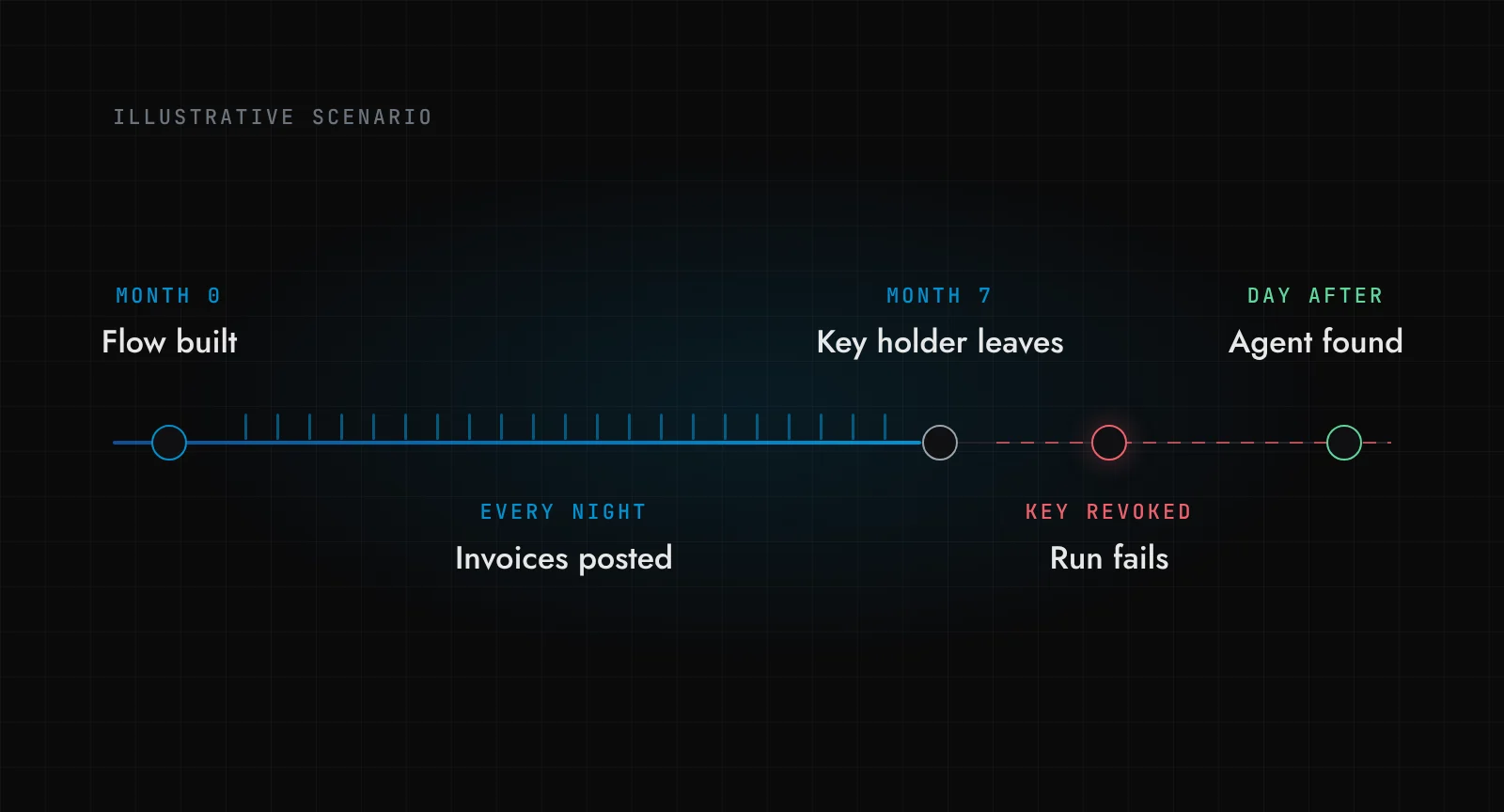
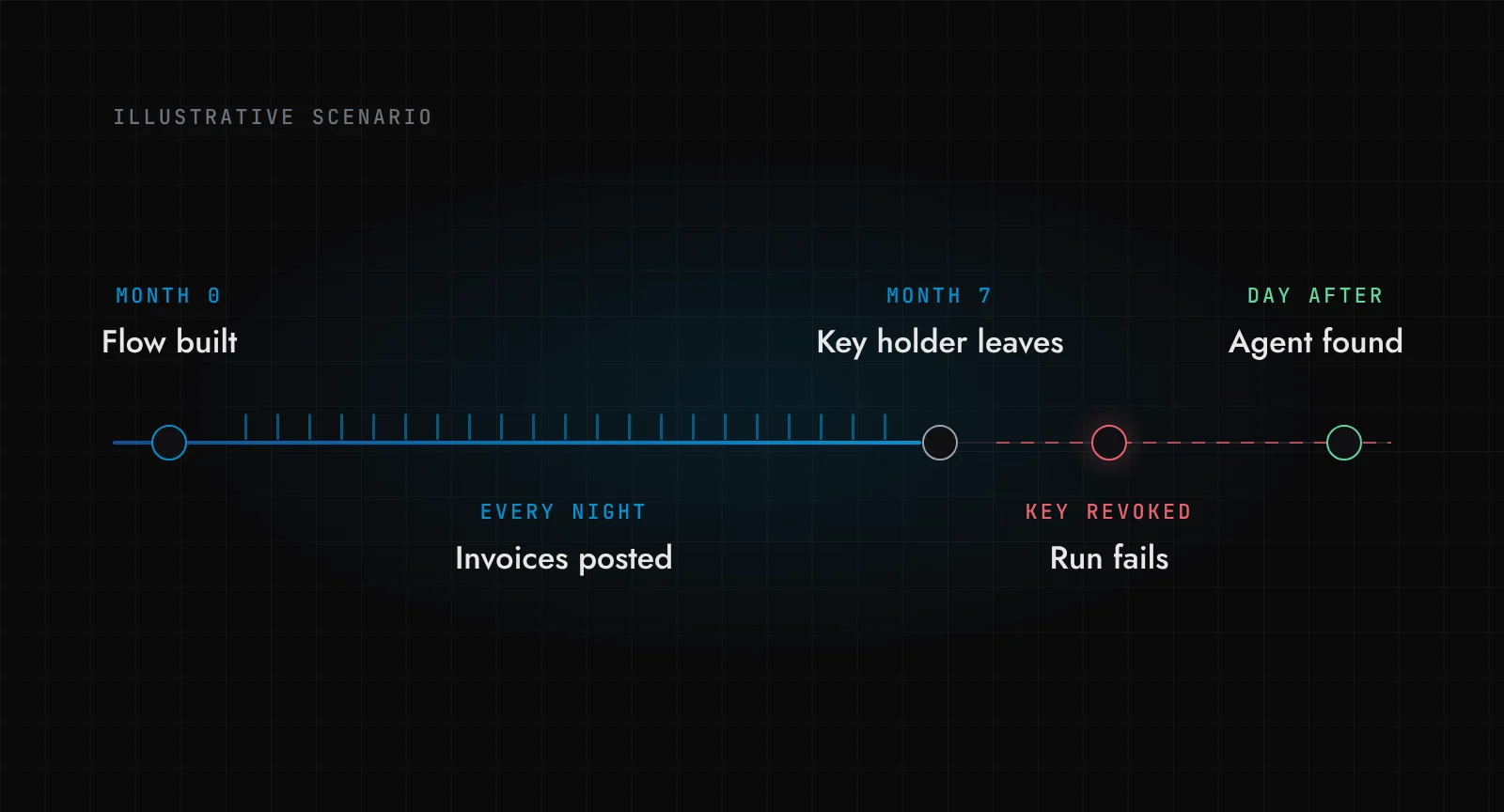
Here is a story. Call her Rina. She is a finance manager, and she is made up for this post, but nothing in what follows is unusual.
Rina is tired of keying supplier invoices from the accounts payable inbox into the ERP. One Friday she builds a flow in n8n. It reads the inbox through an OAuth connection she approved with her own Microsoft 365 account, sends each email to a model with her personal OpenAI key (billed to her corporate card), and posts the extracted invoice into the ERP using an API token IT once gave her for a CSV import. The token can set the status field, so the flow posts invoices as approved. It works. It runs every night for seven months. Nobody asks about it, because nothing breaks.
Then Rina takes a job elsewhere. IT disables her account, which kills the mailbox connection, and cancels her corporate card. The next night the run fails silently. Two weeks later a supplier chases an unpaid invoice, and the AP team finds out that part of their invoice entry had been done by an agent nobody knew existed, approving its own work.
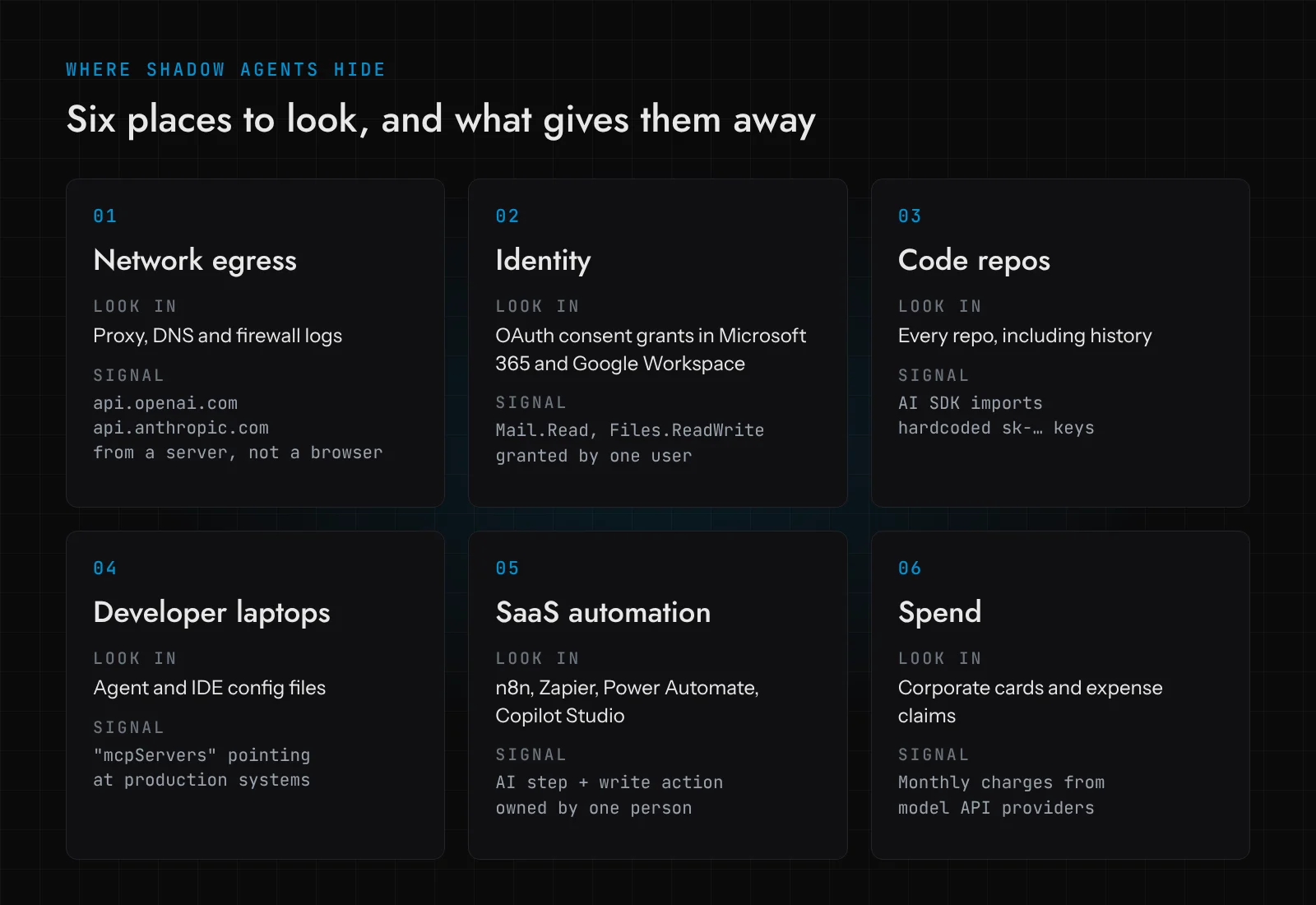
A shadow AI agent is any automation that calls an AI model and acts on company systems without being on anyone's inventory, with no named owner and no reviewed permissions. You find them by looking where their traces are unavoidable: model API traffic in proxy and DNS logs, OAuth consent grants, keys and AI SDK imports in code, MCP configs on laptops, flows in SaaS automation tools, and AI charges on corporate cards.
Key takeaways
- Most companies have shadow agents already. In a 2026 survey, 82% found at least one agent that IT or security did not know about.
- Every agent leaves traces in at least one of six places. None of them needs a new product to start searching.
- Finding an agent is the easy half. Each one needs an owner, a signed list of what it may do, and a kill switch you have actually tested.
- If the sanctioned path is slower than building it yourself, people will keep building it themselves. Gartner says the same.
How common are shadow AI agents?
More common than the people responsible for them believe. In April 2026 the Cloud Security Alliance and Token Security published Autonomous but Not Controlled, a survey on agent incidents. Two numbers sit awkwardly next to each other: 68% of organisations said they had high visibility into their AI agents, and 82% had discovered at least one agent or workflow in the past year that security or IT did not previously know about. 65% had an AI agent security incident in the same period.
The surprise agents turned up most often in internal automation and scripting, LLM platforms, SaaS automation tools and developer workflows. Rina's flow ticks three of the four.
OneTrust's 2026 AI-Ready Governance survey of 1,200 senior leaders found the same shape. 87% encourage agent use; 47% say that use has clear governance and controls. And a third had employees using unapproved AI tools because approved options or processes were not available quickly enough. Hold on to that last one; we will come back to it.
Then there is scale. Gartner's April 2026 press release on agent sprawl predicts that by 2028 the average global Fortune 500 enterprise will have over 150,000 agents in use, up from fewer than 15 in 2025, and that only 13% of organisations think they have the right agent governance in place. A mid-size firm will never have 150,000 agents. The second number is the one that applies to everyone.
Why is a shadow agent worse than shadow IT?
Shadow IT was mostly data in the wrong place. A shadow agent does things: it reads, decides and writes, at night, with somebody's credentials. Rina's flow runs on borrowed identity, so every action looks like hers. It can approve when it only needed to draft. And its life is tied to one person, so it breaks the day they leave, or, worse, keeps running on a key nobody rotates.
Blocking does not fix this. Max Goss, the Gartner analyst behind that press release, put it plainly: if employees cannot work in the sanctioned tools, "they will likely go around the organization's controls and start using shadow AI which presents far greater risks." Rina was not reckless. She was efficient in the only way available to her.
Where do shadow AI agents hide?
An agent has to reach a model, reach your data and run somewhere. Each leaves a trace. Here are six places to look.
1. Model API traffic in proxy and DNS logs
Hosted models live at a few hostnames: api.openai.com, api.anthropic.com, generativelanguage.googleapis.com, api.mistral.ai, plus Azure OpenAI and Bedrock endpoints in your own cloud. Search proxy, DNS or firewall logs for them and group by source host and hour. A browser on a laptop is someone chatting. A server calling at 02:15 every night is an agent. This misses flows that run entirely in a vendor's cloud, which is why there are five more places.
2. OAuth consent grants in Microsoft 365 and Google Workspace
When Rina connected n8n to the AP mailbox, she clicked "Accept" on a consent screen, and that grant is recorded. Microsoft documents how to review permissions granted to enterprise applications, in the admin centre or through Microsoft Graph. A starting query (a sketch; I have no live tenant to run it against here):
GET https://graph.microsoft.com/v1.0/oauth2PermissionGrants?$filter=consentType eq 'Principal'
Principal means a single user consented for themselves. Those are the grants to read first, especially any with Mail.Read, Mail.ReadWrite, Files.ReadWrite.All or offline_access held by an automation platform. Microsoft's consent grant investigation playbook covers the rest.
In Google Workspace the equivalent is the list of accessed apps under API controls and app access control, plus the OAuth Token audit log, which shows which users authorised which third-party apps. Restricting unconfigured apps there would have turned Rina's flow into a request IT could see.
3. Keys and AI SDK imports in code repositories
Here I can show real tools running. I built a small sample repository, acme-ops, with typical traces: a Python cron script that extracts invoices with the OpenAI SDK and a hardcoded key (the code version of Rina's flow), a TypeScript ticket summariser using the Anthropic SDK with a fallback key in the source, and a shell helper that curls the Anthropic API directly. Then I "fixed" the Python key by moving it to an environment variable in a second commit, as people do. The keys are random strings in the right format.
gitleaks (v8.30.1, built from source) scans the whole git history, not just the current files:
gitleaks git -v .
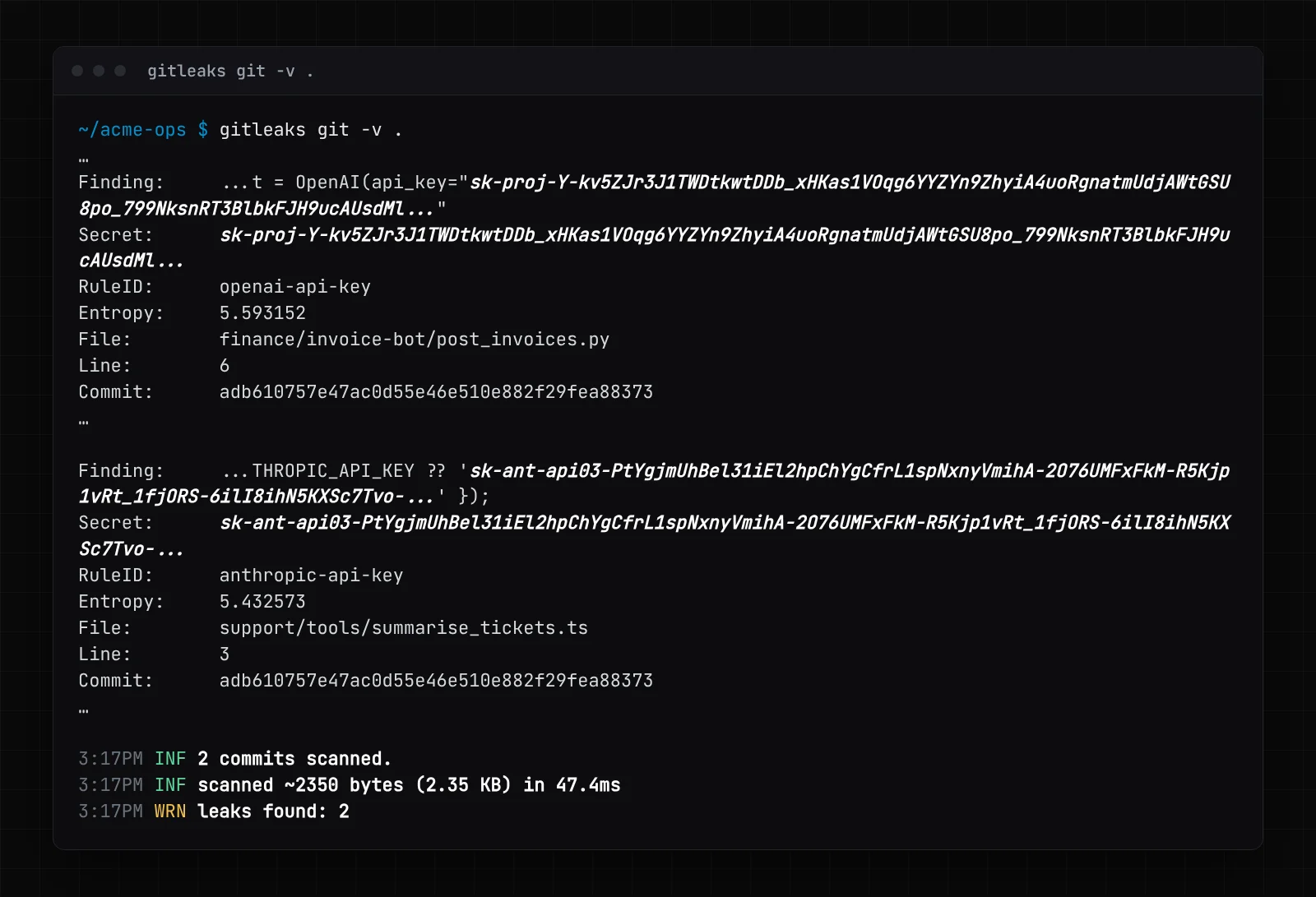
Look at the first finding. The OpenAI key was removed in the second commit, and gitleaks still found it in commit adb6107, because deleting a secret from a file does not delete it from history. It stays live until someone revokes it at the provider.
Keys tell you about credentials. To find agents, you also want every place that imports a model SDK or calls a model endpoint, keys or not. I wrote three Semgrep rules for that. This is the exact file I ran:
rules:
  - id: ai-sdk-import
    languages: [python]
    severity: INFO
    message: AI SDK in use ($MOD). Who owns this, and which key does it use?
    patterns:
      - pattern-either:
          - pattern: import $MOD
          - pattern: from $MOD import $X
      - metavariable-regex:
          metavariable: $MOD
          regex: ^(openai|anthropic|langchain\w*|google\.genai|mistralai|litellm)$
  - id: ai-sdk-import-js
    languages: [typescript, javascript]
    severity: INFO
    message: AI SDK in use ($PKG). Who owns this, and which key does it use?
    patterns:
      - pattern: import $X from "$PKG"
      - metavariable-regex:
          metavariable: $PKG
          regex: ^(openai|@anthropic-ai/sdk|ai|@ai-sdk/.*|langchain|@langchain/.*)$
  - id: model-api-endpoint
    languages: [generic]
    severity: WARNING
    message: Direct call to a hosted model API
    pattern-regex: https://(api\.openai\.com|api\.anthropic\.com|generativelanguage\.googleapis\.com|api\.mistral\.ai)[^\s"']*
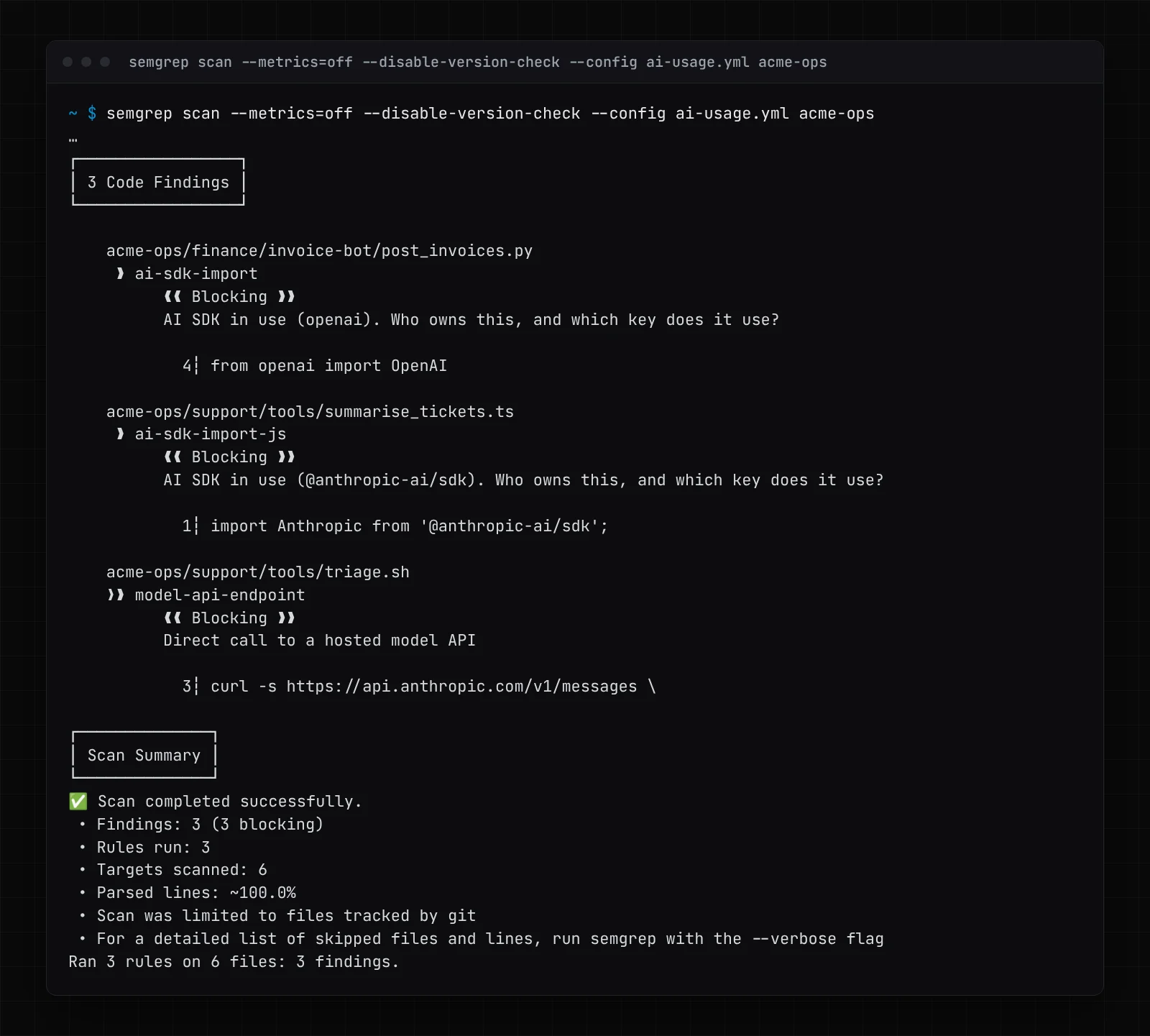
Three findings, one per agent, including the shell script no secret scanner would flag. One honest note: my first version of the Python rule put metavariable-regex beside pattern-either instead of inside patterns, and it reported import json as an AI SDK. Test rules on a repo where you know the answer first. And note the message: this output is not a list of bugs, it is a list of questions for whoever owns the code.
4. MCP and agent configs on developer laptops
Developers wire coding agents into internal systems through the Model Context Protocol, configured in a JSON file: ~/.cursor/mcp.json for Cursor, .vscode/mcp.json in a VS Code workspace, claude_desktop_config.json for Claude Desktop, .mcp.json in a Claude Code project. All have an mcpServers key. I put two in the sample repo under dev-laptop/ and ran ripgrep:
rg --hidden -n -g '*.json' -e '^\s*"[\w-]+": \{' -e '"args"' acme-ops
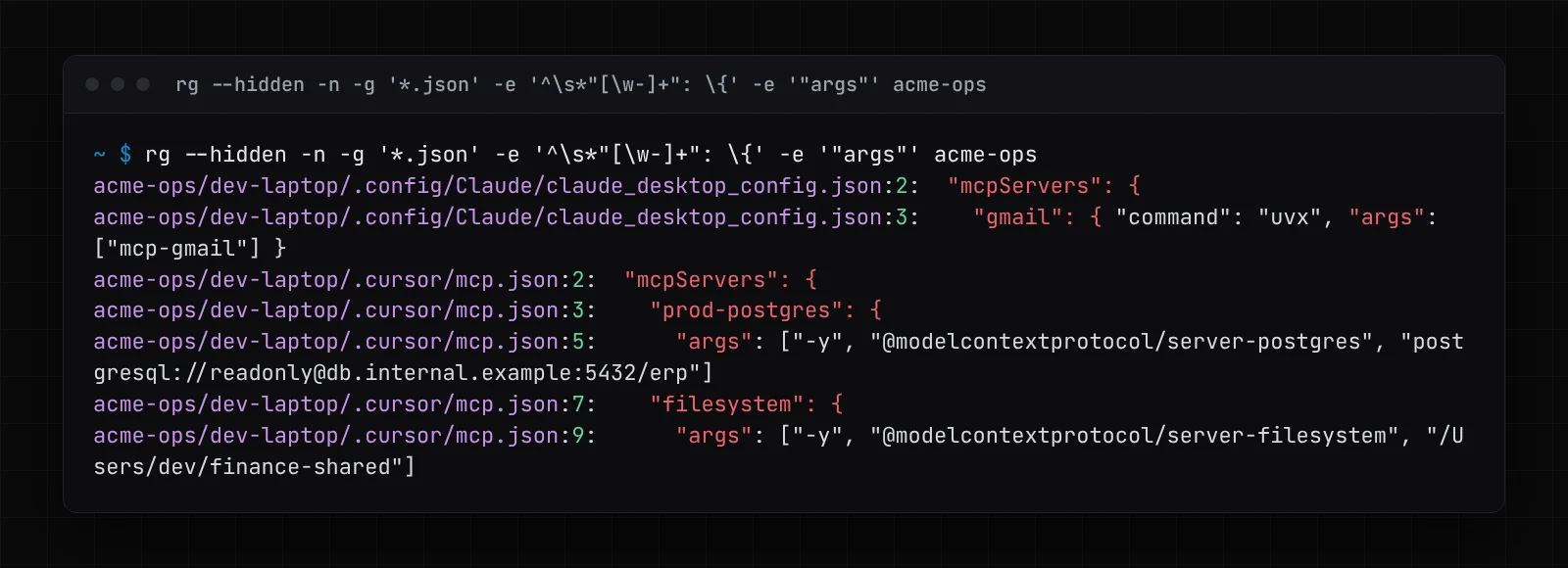
The finding worth a conversation is prod-postgres: a coding agent connected to the ERP database. Read-only, but nobody outside that laptop knew. On a real fleet, run the same search through your endpoint management tool. If MCP itself is new to you, our MCP security checklist covers what to check before anyone connects one.
5. Flows in SaaS automation platforms
This is where Rina lived. n8n, Zapier, Make, Power Automate and Copilot Studio all let a non-engineer combine an AI step with a write action. Ask each platform's admin for every flow with an AI step, its owner and its connected accounts. Read first the ones that combine an AI step, a write to a system of record, and one human owner.
6. Spend on corporate cards
Finance is the most underrated discovery tool there is. Ask for every card charge and expense claim from model API providers over the last year. A recurring API charge on a finance manager's card is not a chat subscription; it is something running. This would have found Rina's flow in month one.
What should you do with an agent once you find it?
Finding agents is a weekend of grep. Governing them is the work. I would put every agent you find through the same five gates, and let it leave at any of them.
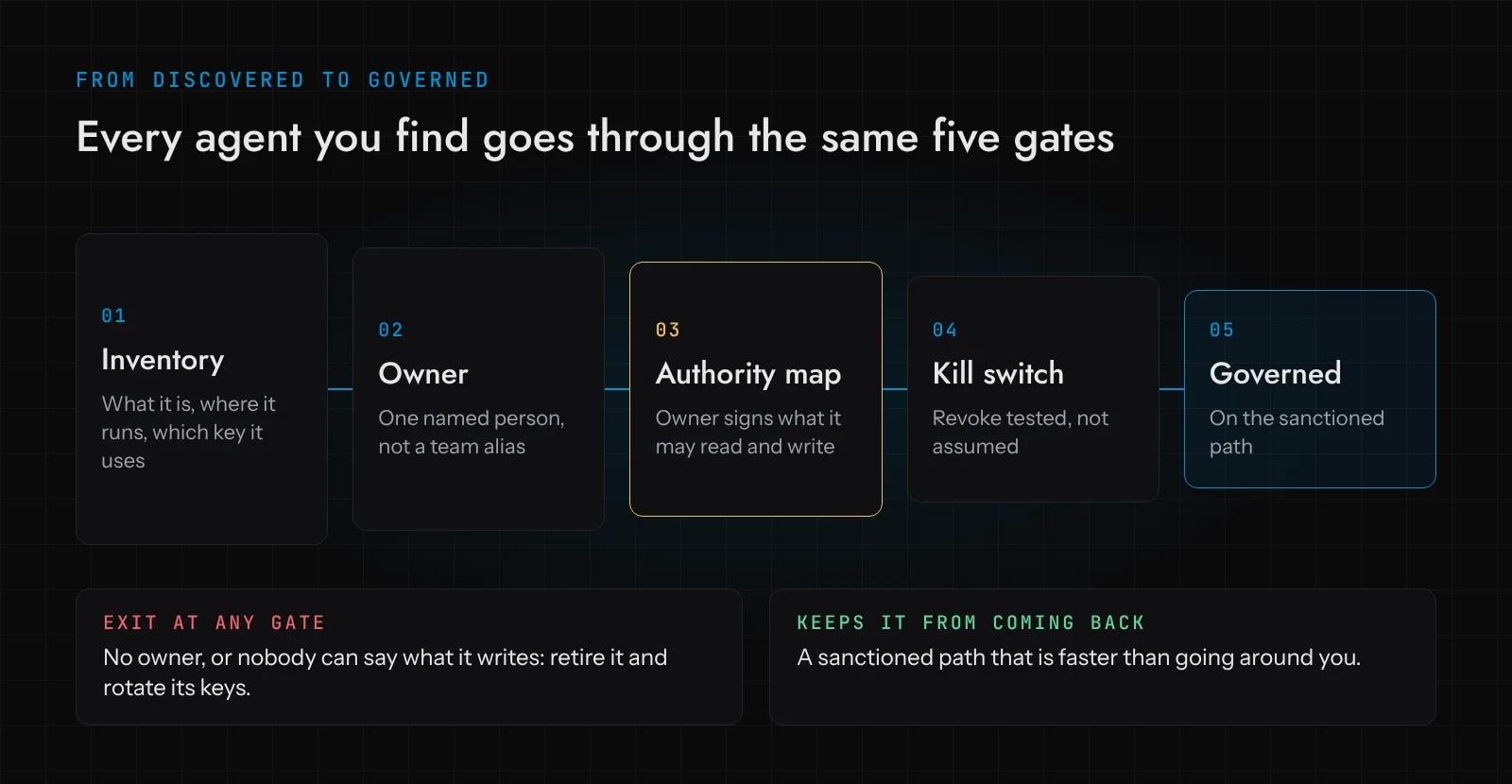
Inventory. One row per agent: what it does, where it runs, which model, which credentials, which systems it reads and writes. A spreadsheet is fine to start.
Owner. One named person, not "Finance". If nobody will put their name to it, retire it and rotate its keys.
Authority map. The owner signs a list of exactly what the agent may read and write, and which actions need a human. Rina's flow should have been allowed to draft invoices and never to set approved. This is the core of how we build agents at Devs Core: the model proposes, deterministic code decides, and the authority map is signed before anything is built. On our Autonomy Ladder, a rescued shadow agent should restart at L1 Propose, where it drafts and a person acts, however long it has been running unsupervised.
Kill switch. Revoke the key, pull the OAuth grant, disable the flow, and confirm the next run fails. On Ware, our demonstration warehouse, we test Stop by sending it together with an action, in both orders, and check nothing runs after it. A Zapier flow does not need that rigour, but you do need to have tried it once.
Sanctioned path. Move it onto a service identity, not a person, with keys in a secrets manager. Our post on keeping secrets away from AI agents goes into the mechanics.
Why do shadow agents keep coming back?
Because the reason they exist has not changed. A third of OneTrust's respondents saw people use unapproved AI because the approved route was too slow. Gartner calls blocking "not a long-term solution". The CSA's advice opens with "do not shut down innovation".
The only durable fix is a sanctioned path faster than going around you: a company AI gateway key anyone can get in a day, with a budget attached; an approved automation platform with the AI step already connected; a one-page form (what it reads, what it writes, who owns it) answered within the week. If Rina could have had that by Monday, she would not have built it on Friday with her own card. Then re-run discovery every quarter, and aim for new agents to reach the inventory before they reach production.
Do you need a governance platform for this?
Not to start. Everything above works with logs you already have and three open-source tools. At hundreds of agents, the vendors are aiming at exactly this, and here is what each says it does:
- Microsoft Agent 365, generally available since May 2026, includes discovery of agents and shadow AI using Microsoft Defender and Intune, for local and cloud agents, with an agent registry in the Microsoft 365 admin centre.
- ServiceNow AI Control Tower describes itself as auto-discovering agents, models, copilots, MCP servers and datasets into a unified inventory tied to the CMDB. (ServiceNow's US product page now brands it Super Intelligence Control Tower.)
- IBM watsonx.governance documents governing discovered shadow AI assets: scans of agent platforms are mapped against the governed inventory, so you learn which agents, tools, MCP servers and models are not governed.
- Credo AI lists AI registry and discovery, including shadow AI discovery and classification.
The caveat: each discovers what it has connectors for. A cron job on a jump box with a personal key is invisible to most of them until it shows up in network logs or on a card statement. Buy a platform for the inventory and the workflow; keep the scrappy searches for the edges.
If you would like a second pair of eyes on what you find, our AI readiness audit starts with exactly this kind of inventory, and our post on securing enterprise AI agents covers what a governed agent's access should look like afterwards.
Frequently asked questions
What is a shadow AI agent?
An automation that calls an AI model and takes actions in company systems without being on any inventory, with no named owner and no reviewed permissions. It is usually built by a well-meaning employee on a no-code platform, a script or an AI assistant, using their own credentials.
What is the difference between shadow AI and agent sprawl?
Shadow AI is AI use the organisation cannot see. Agent sprawl is having more agents than you can govern, approved ones included. Sprawl hides shadow agents in the crowd.
How do I build an AI agent inventory?
Start with a spreadsheet: one row per agent with what it does, where it runs, its model, its credentials, the systems it reads and writes, and its owner. Fill it from proxy and DNS logs, OAuth consent grants, code scans for AI SDKs and keys, MCP config searches, automation platform exports and card spend. Re-run the searches quarterly.
Should we just block AI APIs at the firewall?
Blocking alone pushes people to tools you cannot see at all, which is Gartner's point. Block unknown model traffic from servers if you like, but pair it with a sanctioned route that is quicker to use than the workaround.