
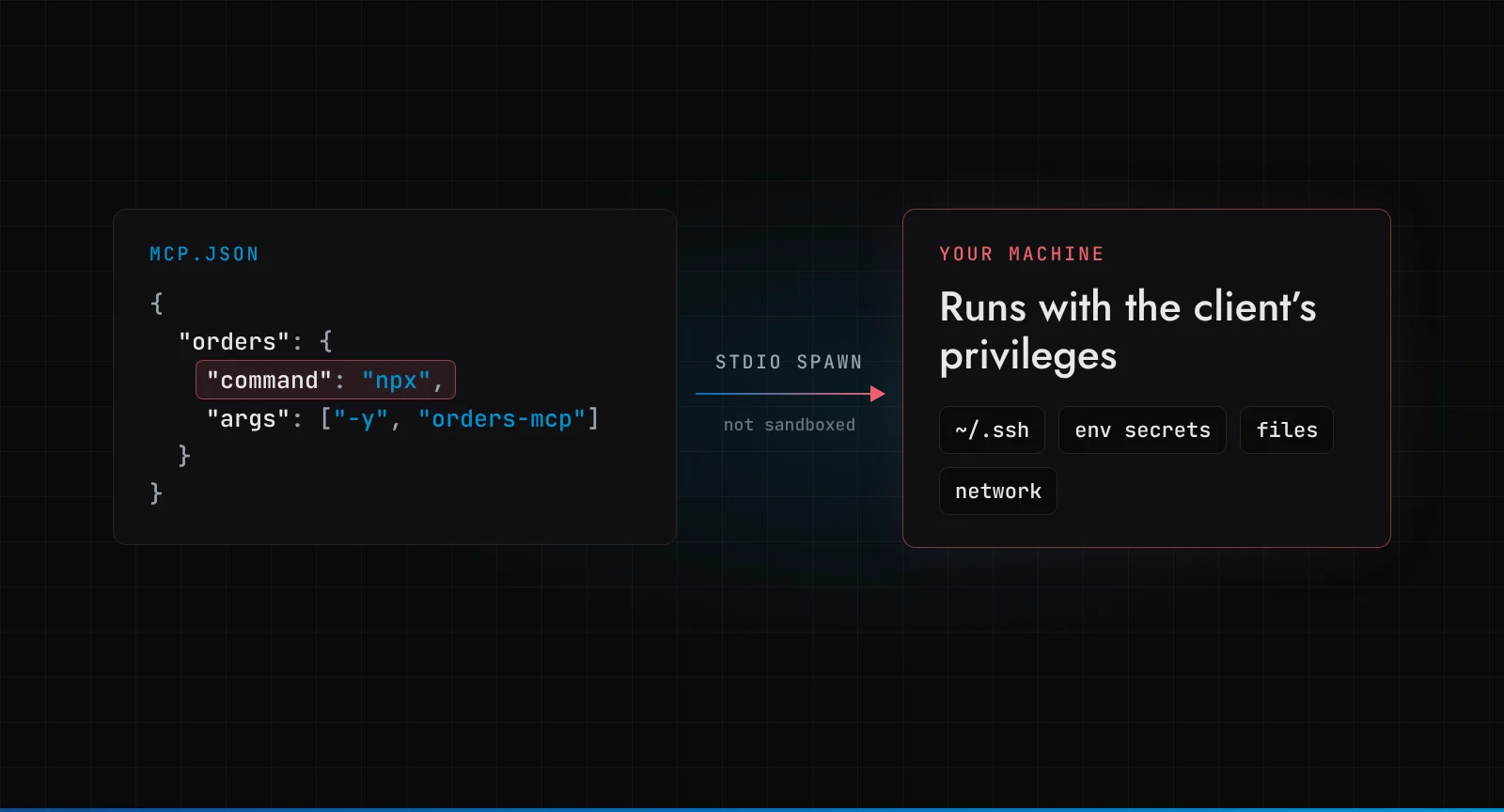
On 15 April 2026, OX Security published research with a title that did not try to be subtle: The Mother of All AI Supply Chains. Their claim: the Model Context Protocol, the standard most AI tools now use to plug into other software, turns configuration into code execution by design. They counted more than 150 million package downloads, 7,000+ publicly reachable servers and up to 200,000 vulnerable instances. Anthropic, who created MCP, looked at it and said the behaviour was expected.
So, is MCP safe? MCP is as safe as the least trusted person or process that can write an MCP server configuration. With the STDIO transport, a server config is a command line, and the official SDKs run it. If an attacker can influence that config, they can run code on your machine. Everything else in this post follows from that one sentence.
MCP comes up in nearly every conversation we have about connecting an agent to a client's systems. This is the post I wish I could send people before they click "Add server".
Key takeaways
- The STDIO transport launches whatever
commandandargsthe config names. A web form, a cloned repo or an agent that can edit that config is a remote code execution path. - At least 14 CVEs have landed in downstream projects (LiteLLM, Flowise, Agent Zero, LangChain-ChatChat, Windsurf and more). The protocol itself did not change.
- Prompt injection through tools is a separate problem with the same root: an MCP server gives the model reach, and the model reads untrusted text.
- The fixes are boring and they work: pin what you install, never accept server configs from users, sandbox local servers, use OAuth 2.1 for remote ones, allow-list tools, log every call, and put a person in front of writes.
What did OX Security actually find?
STDIO is MCP's local transport: the client starts the server as a child process and talks to it over standard input and output. So an MCP config names a command, some args and maybe some env. The Cloud Security Alliance's research note summarised the problem well: the reference SDKs do not treat that launch command as a trust boundary, and the command executes even if the intended server process then fails to start.
On a developer laptop where you typed the config yourself, that is fine. It is the same trust you give a shell script. The trouble starts when the config comes from somewhere else.
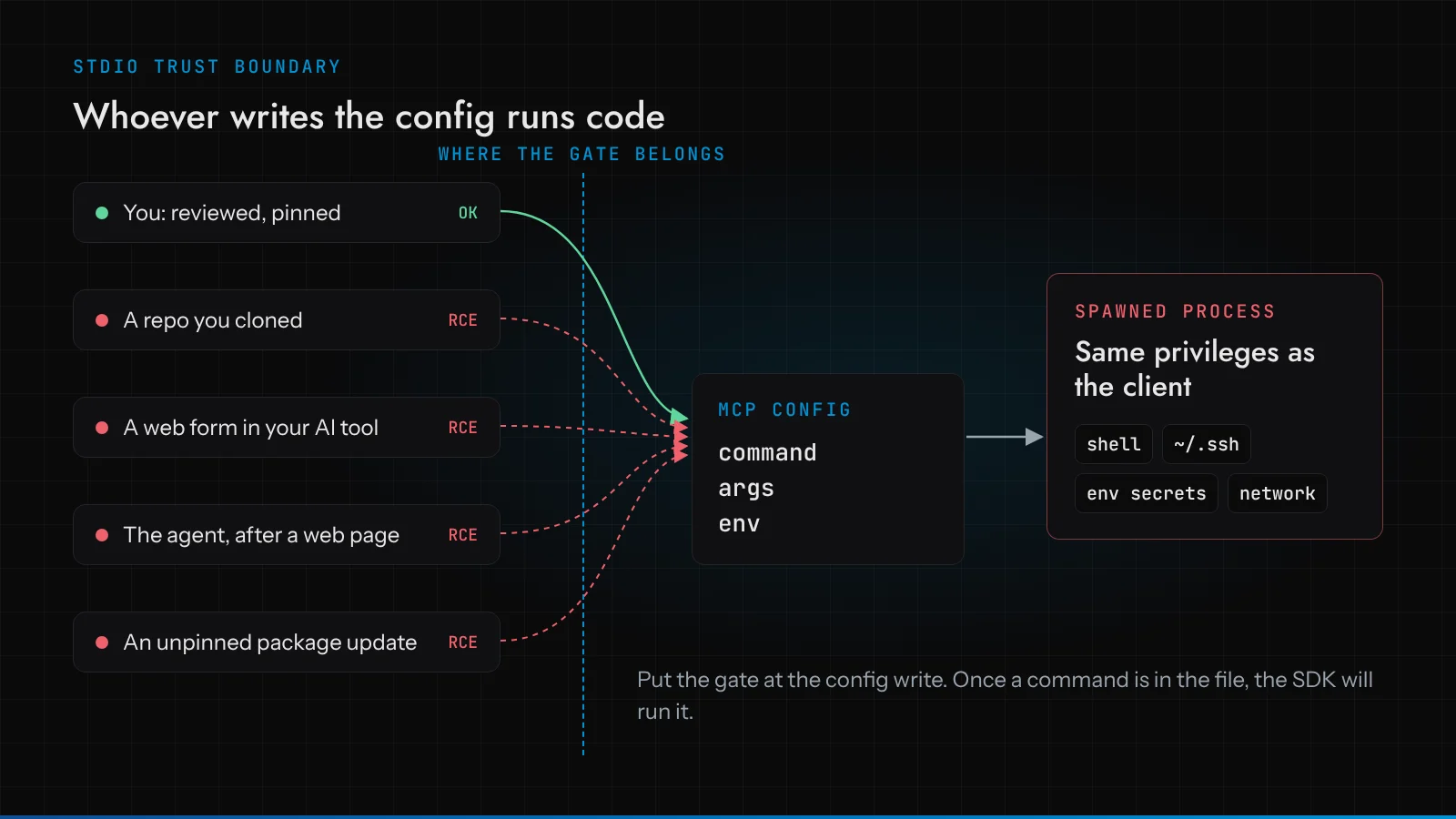
OX's full advisory groups what they found into four families. I'll skip the payloads; they are not the interesting part.
AI platforms with an "add MCP server" screen. Many agent builders let a user paste an MCP server definition into the UI. If that definition can be STDIO, the user has just typed a command the server will run. LiteLLM (CVE-2026-30623, fixed in v1.83.7-stable), Agent Zero (CVE-2026-30624), LangChain-ChatChat (CVE-2026-30617), Bisheng, GPT Researcher and DeerFlow are all in this group. Some needed a login. Some did not.
Allow-lists that allowed too much. Flowise (CVE-2026-40933) and Upsonic had already restricted the command to a few "safe" programs such as npx and npm. OX showed that those programs accept arguments that run something else. An allow-list of interpreters is not an allow-list.
Coding assistants editing their own config. Windsurf (CVE-2026-30615) could be steered by attacker-controlled web content into registering a malicious STDIO server with no further click from the user. Claude Code, Cursor, Gemini CLI and GitHub Copilot ask for at least one approval before the config file changes, which their vendors did not count as a vulnerability.
Hidden STDIO support. DocsGPT (CVE-2026-26015) only showed HTTP options in its UI, but the backend still accepted a request that switched the transport to STDIO.
By the time CSA wrote its note on 23 April, the count was at least 14 CVEs, from more than 30 disclosures.
Why does "expected behaviour" matter?
OX says they repeatedly recommended a root fix to Anthropic, such as manifest-only execution or a command allow-list in the official SDKs, and that Anthropic declined, calling the behaviour expected and placing sanitisation on developers. According to The Register, Anthropic did update its security guidance to say STDIO adapters should be used with caution. OX's response: "This change didn't fix anything."
I have some sympathy for Anthropic's position. A STDIO server config is, by definition, "run this program". You cannot sanitise your way out of a feature whose job is to start processes. The bug in LiteLLM was that untrusted users could reach that feature, and that is LiteLLM's bug.
But defaults decide outcomes. When the same mistake turns up in ten unrelated projects, the mistake is in the shape of the API. A StdioServerParameters that happily accepts any string invites people to wire a form field into it.
Here is the part most coverage missed. For you, the argument does not matter. If the protocol owner says it is working as designed, the protocol will not save you. Every team that adopts MCP has to put the trust boundary in itself. Plan as if that is permanent.
Isn't prompt injection the bigger MCP risk?
It is the other half of the picture, and it predates the STDIO story. In May 2025, Invariant Labs showed an attack on the official GitHub MCP server. An attacker opened an issue on a public repository with instructions hidden in the text. A user then asked their assistant (Claude Desktop with Claude 4 Opus in the demo) to look at open issues. The agent read the issue, followed the instructions, pulled data from the user's private repositories and published it in a pull request on the public one.
No server was buggy there. The GitHub MCP server did exactly what its token allowed. The model read untrusted text, and the token could read every repository the user owned. Invariant's point was that this is not specific to one model or client.
Notice the common root with the STDIO flaw: in both cases, text from an untrusted source ends up deciding what runs. In one it is a config field; in the other it is an issue body. That's why our governance approach starts from "the model proposes, deterministic code decides". Whether a tool call runs, and with what scope, is decided somewhere the model's input cannot reach. More in our post on prompt injection in AI agents.
What does a safe, boring MCP server look like?
I wanted real screenshots, not mock-ups, so I wrote the smallest useful server I could with the official TypeScript SDK (@modelcontextprotocol/sdk 1.32.2) and pointed the official MCP Inspector (v2.13.0) at it. One tool, read-only, fixed data, no shell, no network:
import { McpServer } from '@modelcontextprotocol/sdk/server/mcp.js';
import { StdioServerTransport } from '@modelcontextprotocol/sdk/server/stdio.js';
import { z } from 'zod';

const ORDERS = {
  'SO-10421': { customer: 'Demo Distributor Ltd', status: 'picked', lines: 3, warehouse: 'DHK-1' },
  'SO-10422': {
    customer: 'Sample Trading Co',
    status: 'awaiting_stock',
    lines: 1,
    warehouse: 'DHK-1',
  },
};

const server = new McpServer({ name: 'orders-readonly', version: '0.1.0' });

server.registerTool(
  'lookup_order',
  {
    title: 'Look up a sales order',
    description: 'Returns status for one sales order by ID. Read-only.',
    inputSchema: { orderId: z.string().regex(/^SO-\d{5}$/) },
    annotations: { readOnlyHint: true, destructiveHint: false, openWorldHint: false },
  },
  async ({ orderId }) => {
    const order = ORDERS[orderId];
    if (!order) {
      return { isError: true, content: [{ type: 'text', text: `No order ${orderId}` }] };
    }
    return { content: [{ type: 'text', text: JSON.stringify({ orderId, ...order }) }] };
  },
);

await server.connect(new StdioServerTransport());
Then, from the same folder:
npx @modelcontextprotocol/inspector node server.mjs
Two things I noticed before I even connected. The Inspector served its UI on 127.0.0.1 and printed a random auth token that the browser URL must carry. That is not decoration: Inspector versions before 0.14.1 had no session token at all, which Oligo Security turned into CVE-2025-49596, a remote code execution bug in a tool whose whole job is starting STDIO servers. It also warned that, with no OS keychain in my sandbox, it would store any secrets unencrypted in a file under my home directory. Read your tools' startup output.
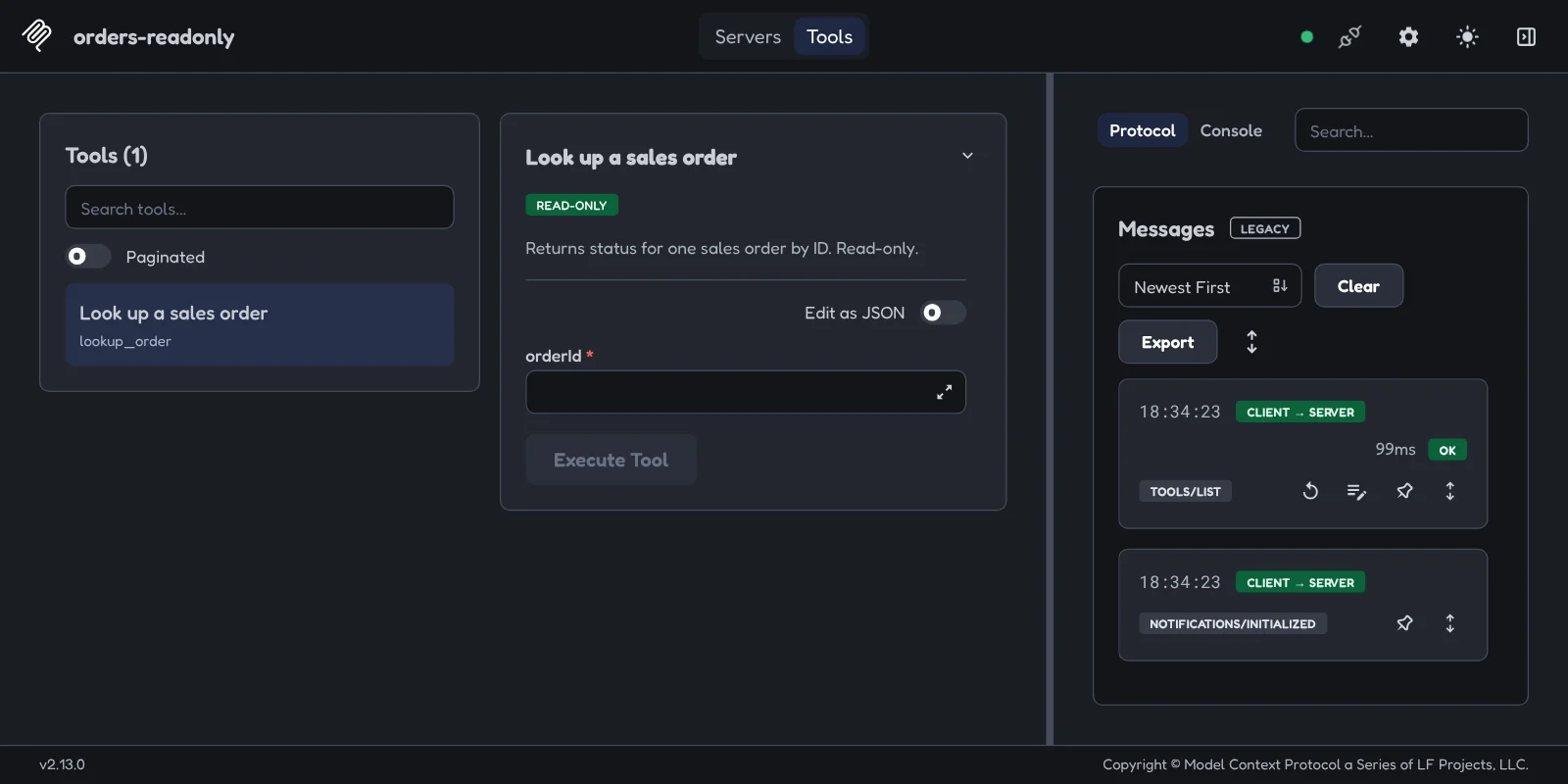
The READ-ONLY badge comes from the readOnlyHint annotation. It is a hint the server makes about itself; a malicious server can label a delete tool read-only. Trust the annotation as much as you trust the server's author.
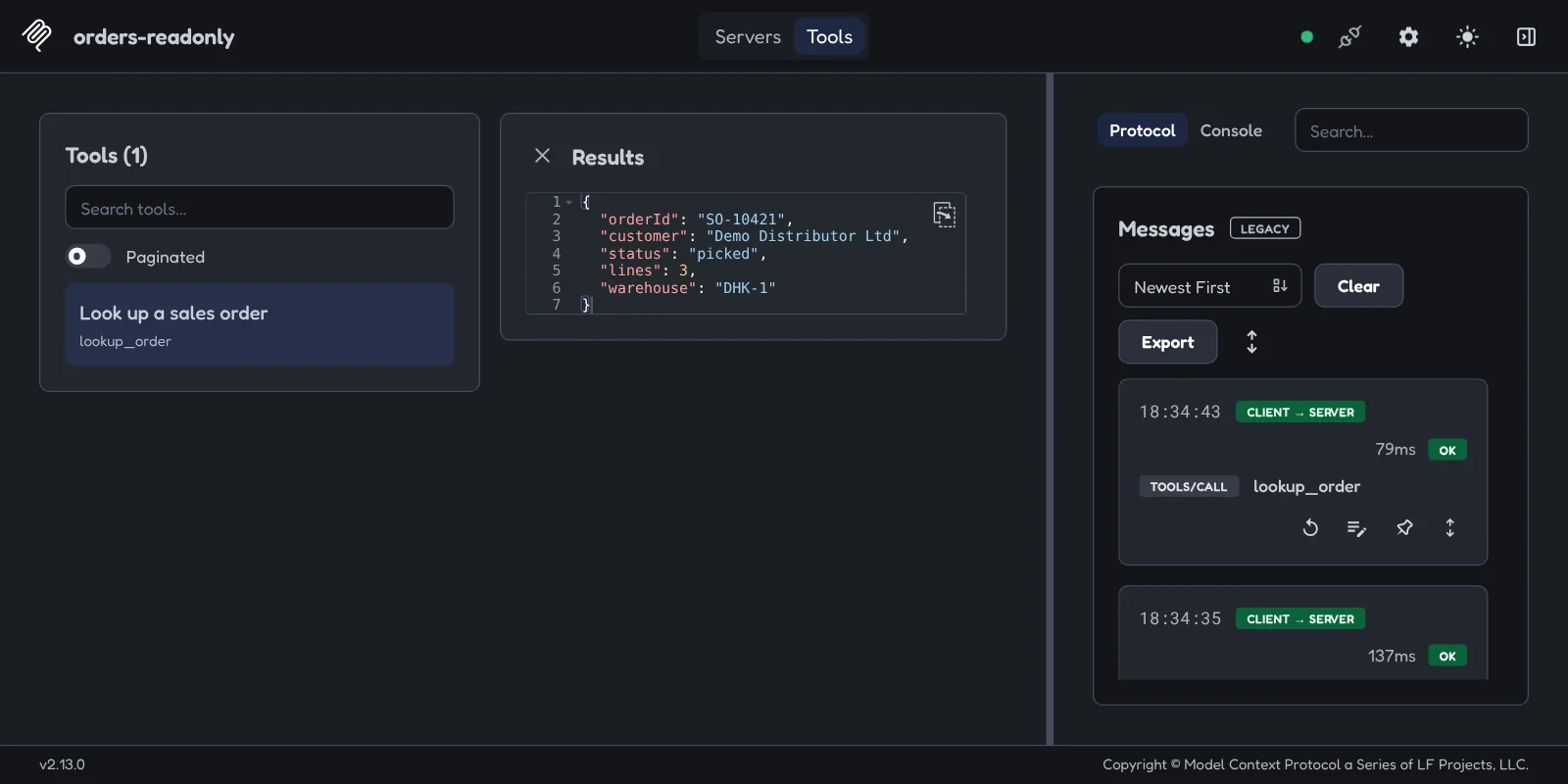
A valid call returns the order, and the protocol log on the right records the tools/call with timing:
And an order ID with shell characters appended never reaches my code, because the input schema rejects anything that is not SO- plus five digits:
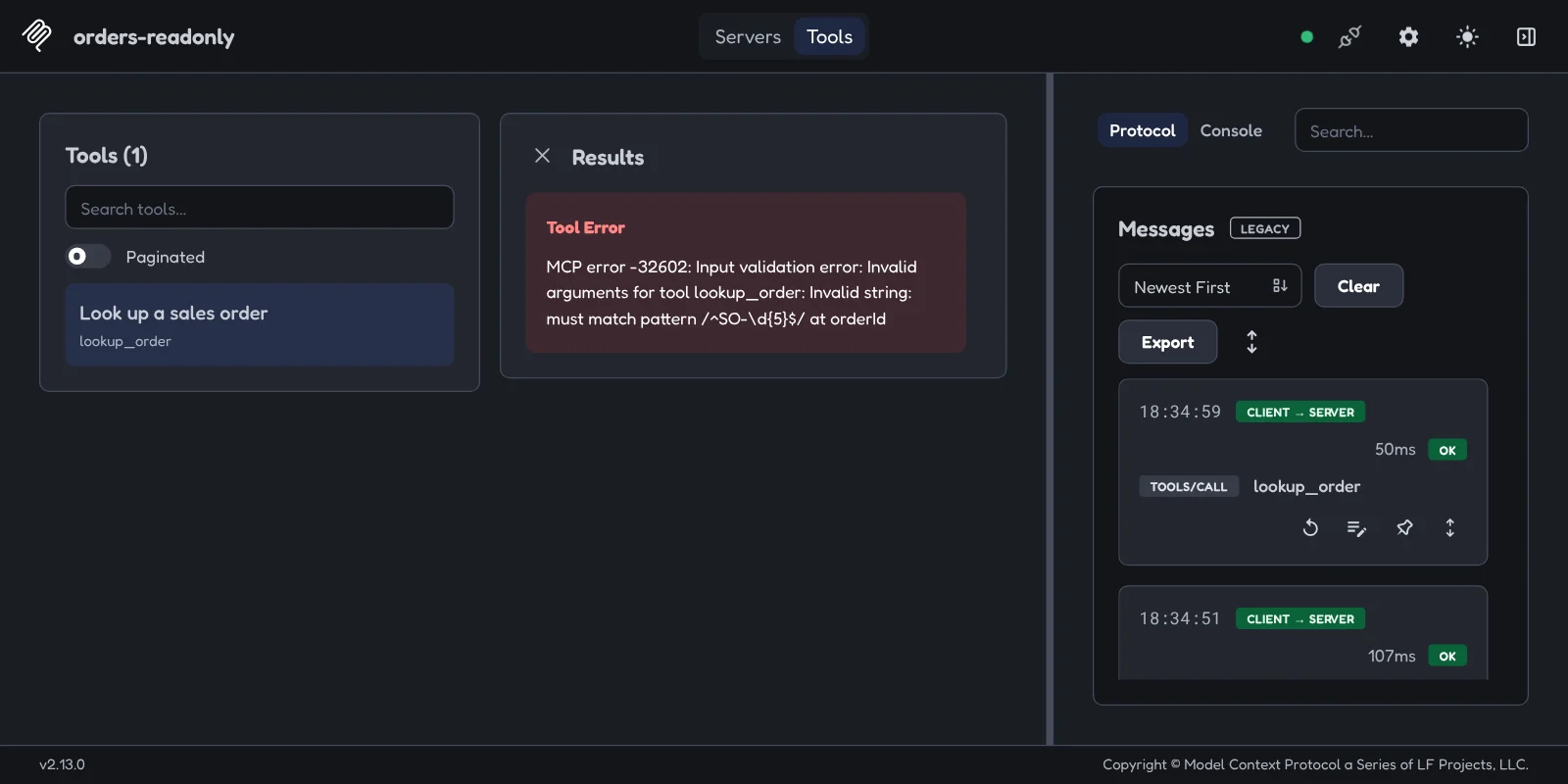
None of this makes the server "secure". It makes it small. A tool with one narrow input, no side effects and no access to anything else has very little to abuse, even when the model calling it has been talked into something. That property is much easier to design in than to bolt on.
What should you check before connecting an MCP server?
Here is the checklist we work through. None of it is clever.
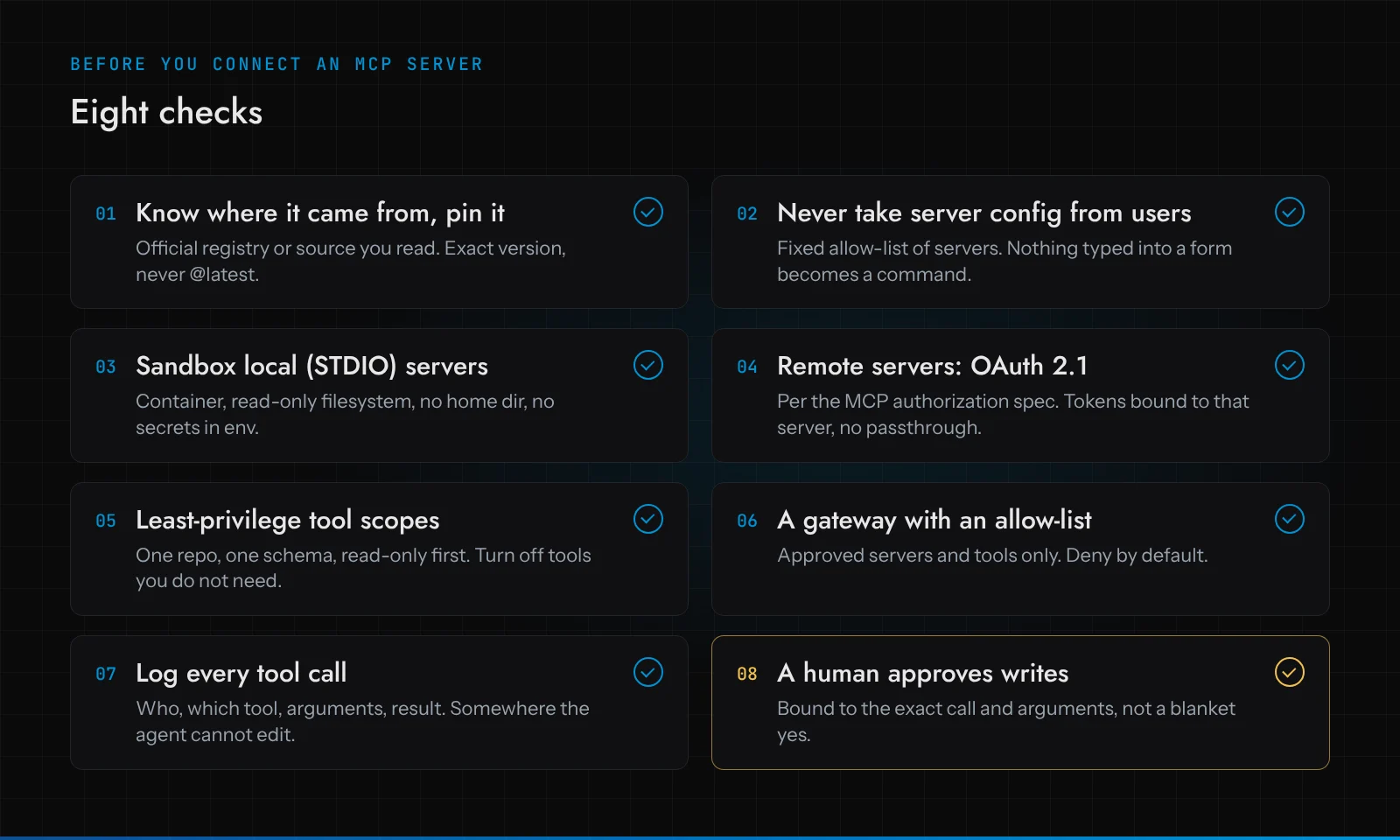
1. Know where it came from, and pin it
An MCP server is a dependency that runs with your privileges, so treat it like one. Install from the official MCP registry or from source you have read. Pin an exact version and check the lockfile in. npx -y some-server in a config means "run whatever is published under that name today", which is how you inherit someone else's compromised release. OX reported that 9 of the 11 MCP registries they tried accepted their test package, so "it's on a registry" is not a review.
2. Never accept server configs from users
If you are building a product on top of MCP, the server list is code, not data. Keep a fixed set of approved servers in your repository, reviewed like any other change. Users can choose which approved server to enable; they cannot supply a command, args, a transport type or a URL. Validate on the backend, because the UI hiding an option is not a control (ask DocsGPT).
3. Sandbox local STDIO servers, and keep secrets out of their environment
The MCP spec's own security best practices say clients should run local servers sandboxed with minimal default privileges, and that one-click installs must show the exact command, untruncated, before running it. Do it even when you trust the author: a container with a read-only filesystem, no mount of your home directory, no host network unless it needs one, and a non-root user. This is a sketch rather than something I ran for this post:
docker run --rm -i --read-only --network none --user 10001 \
  --cap-drop ALL orders-mcp:0.1.0
The authorization spec tells STDIO servers to retrieve credentials from the environment. Read that as "this process can see whatever you give it", and give it one narrowly scoped key, not your shell's whole environment. Our sibling post on keeping secrets away from AI agents goes deeper.
4. Remote servers: OAuth 2.1, done properly
For servers over HTTP, the MCP authorization spec (2026-07-28 revision) is built on OAuth 2.1. The parts that matter most in practice: clients must send a resource indicator (RFC 8707) naming the server, servers must check the token was issued for them, and servers must not accept or pass through any other tokens. That last rule is the one people break, by forwarding a user's broad API token straight to the upstream service. Authorization is optional in the spec, which means a remote server with no auth at all is spec-compliant. Don't connect to one.
5. Least-privilege tool scopes
The GitHub attack worked because one token could read every repository. Give the server a token for the one repository, schema or mailbox the task needs. Turn off tools you won't use; many servers expose dozens. Start read-only and add write tools one at a time, with a reason. We call this earning autonomy per operation, and it's the idea behind the Autonomy Ladder.
6. Put a gateway with an allow-list in front
Once you have more than a couple of servers, put them behind one place that decides which servers and which tools an agent may call, and denies everything else. That place should be code you control, not a system prompt. Our Access Layer package is this idea applied to client systems.
7. Log every tool call
Who triggered it, which server, which tool, the arguments, the result, and how long it took. Write it somewhere the agent cannot edit. When we tested our own demo, Ware, in October, one of the three weaknesses we found was that the audit log could be edited or deleted without anyone noticing. It is now append-only and hash-chained.
8. A human approves writes, bound to the exact call
Anything that changes state goes to a person first. And the approval has to cover exactly what runs: the same tool, the same arguments, the same state the person saw. Another Ware finding was an approval checked in one transaction and executed in another, so a change in between went unseen. More on the pattern in human-in-the-loop AI agents.
So should you use MCP at all?
Yes, with your eyes open. MCP solved a real problem: one way to connect tools instead of a custom integration per model. What it did not do is decide trust for you, and after April it's clear it won't. The STDIO flaw is the old lesson about letting input become a command, wearing a new protocol. The GitHub attack is the old lesson about least privilege, with a language model as the confused deputy.
If you run an AI platform that lets users add MCP servers, check today whether any of those fields reach a process launcher. If your developers use coding assistants, look at what is in their MCP config files and where each entry came from. Those two questions cover most of the CVE families above.
Frequently asked questions
Is MCP safe to use?
It can be, if no untrusted party can write your server configuration, local servers run sandboxed, remote servers use OAuth 2.1 with tokens bound to that server, and write actions need human approval. Out of the box, with STDIO servers installed from unpinned packages, it is not.
What is the MCP STDIO vulnerability?
Disclosed by OX Security on 15 April 2026, it is a design issue in how the official MCP SDKs launch local servers: the command in a STDIO config is executed as given. Any app that lets untrusted input reach that config gives the attacker code execution. At least 14 CVEs followed in downstream projects.
Did Anthropic fix the MCP STDIO flaw?
No protocol change was made. Anthropic called the behaviour expected and said sanitising input is the developer's job; it later updated guidance to advise caution with STDIO. Fixes have shipped project by project, for example LiteLLM in v1.83.7-stable.
How do I check if an MCP server is safe before connecting it?
Read its source or install it from the official registry, pin the exact version, look at which tools it exposes and turn off the ones you don't need, give it a narrowly scoped credential, and run it in a sandbox. Connecting it to the MCP Inspector first, as shown above, is a cheap way to see its full tool list and test inputs before any model touches it.