
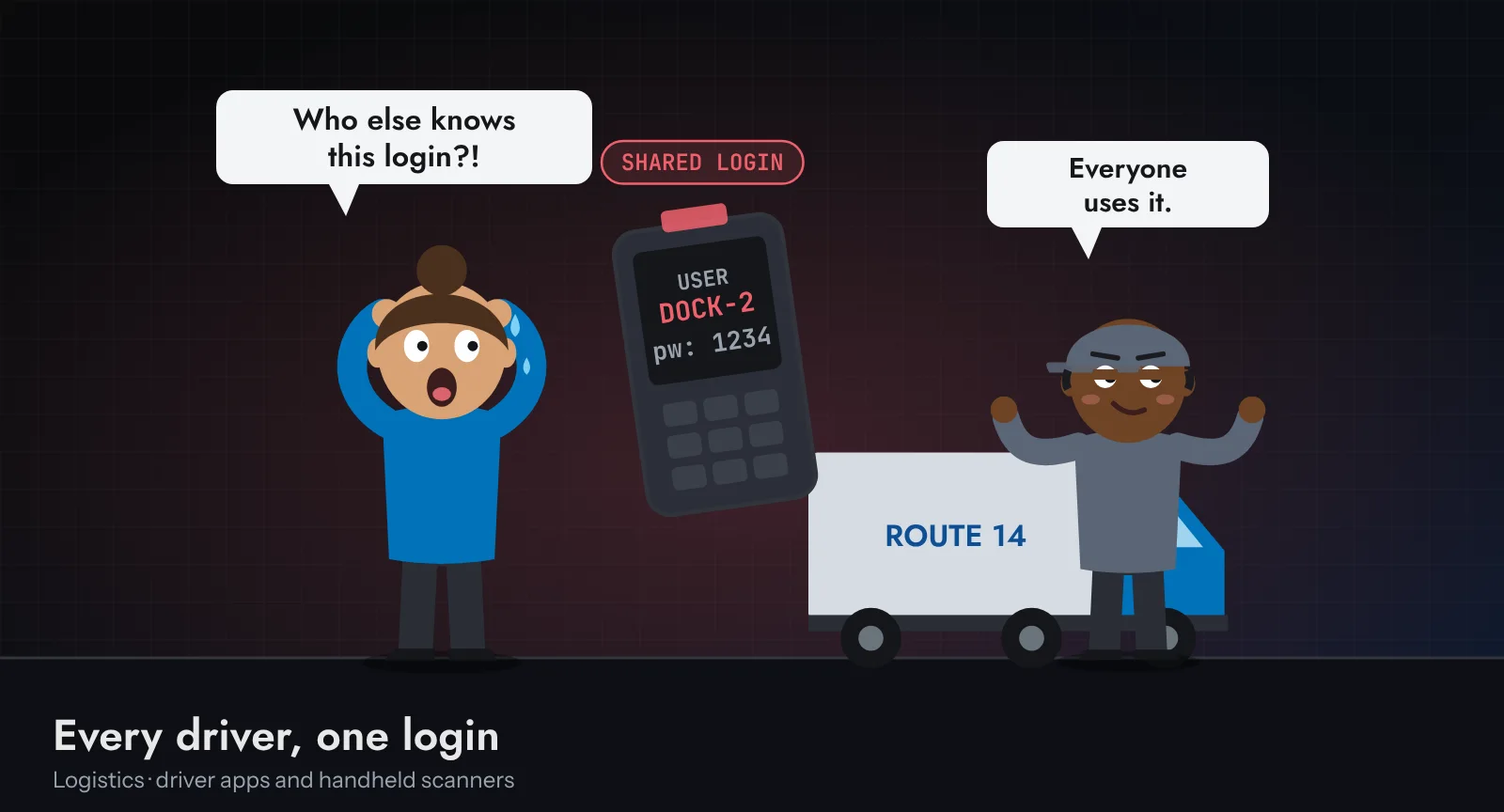
Call her Priya. She runs operations for a regional 3PL with 40 trucks and two cross-docks. She is made up for this post, but nothing that happens to her is unusual.
On Monday a driver quits after an argument. On Wednesday a scan appears on his old route, logged in as DOCK-2, the shared account every handheld in the building uses. Nobody knows who scanned it. The password is on a sticky note inside the charging cabinet. It has been the same for three years. And the driver app on his personal phone is still signed in, because the app keeps you signed in for a year so drivers stop ringing the help desk.
That is the mobile edge of a logistics business: driver apps, rugged handheld scanners, tablets in cabs. In November 2026 it became news, when an extortion gang said it had taken nearly 30,000 driver records and almost 28,000 device records from a platform Maersk inherited.
To secure driver apps and handheld scanners, enrol every device in mobile device management, give every driver their own account, store passwords as slow hashes, cut access the day someone leaves, and keep only the driver and device data you actually need. None of this needs new hardware. It needs an owner and a runbook.
Key takeaways
- WhiteArmor claims it took 29,297 driver profiles and 27,842 mobile device records from a Maersk legacy platform; Maersk says the password claims are not accurate and that the stolen codes were single-use and have expired.
- In the 2026 Verizon DBIR, 48% of breaches involved a third party, and exploiting vulnerabilities (31%) overtook stolen credentials (13%) as the top way in.
- Shared scanner logins like "DOCK-2" make every scan unattributable and every leaver a risk; one account per driver is the cheapest fix on this list.
- A missing device or a departing driver should be locked out within 15 minutes and fully revoked within the hour, signed off by a named person.
What did the Maersk attackers say they took?
On 11 November 2026 Maersk published a short IT security incident advisory. It said it had found unauthorised access and data extraction from "one of our local legacy systems from a previous acquisition", that findings so far "strongly suggest no sensitive data has been disclosed", and that there was no sign of impact on other Maersk systems or on customer systems connected through APIs and EDI.
The claims came from a new group called WhiteArmor. According to Computing's report, citing Container News and the Danish outlet Ingeniøren, the group says it holds about 100 GB from a platform formerly run by LF Logistics, which Maersk bought in 2022. The claimed haul: 29,297 driver profiles, 16,093 of them with plaintext passwords, and 16,123 employee accounts, 33 with admin rights. Bitdefender adds that the group claims 27,842 mobile device records containing phone numbers, email addresses and IMEI numbers, and a ransom equivalent to US $5 million.
Maersk disputes the most damaging part. A spokesperson told Cybernews: "The claims about passwords are not accurate. Passwords for the system are stored in protected form." According to Maersk, the attackers took single-use codes that have since expired.
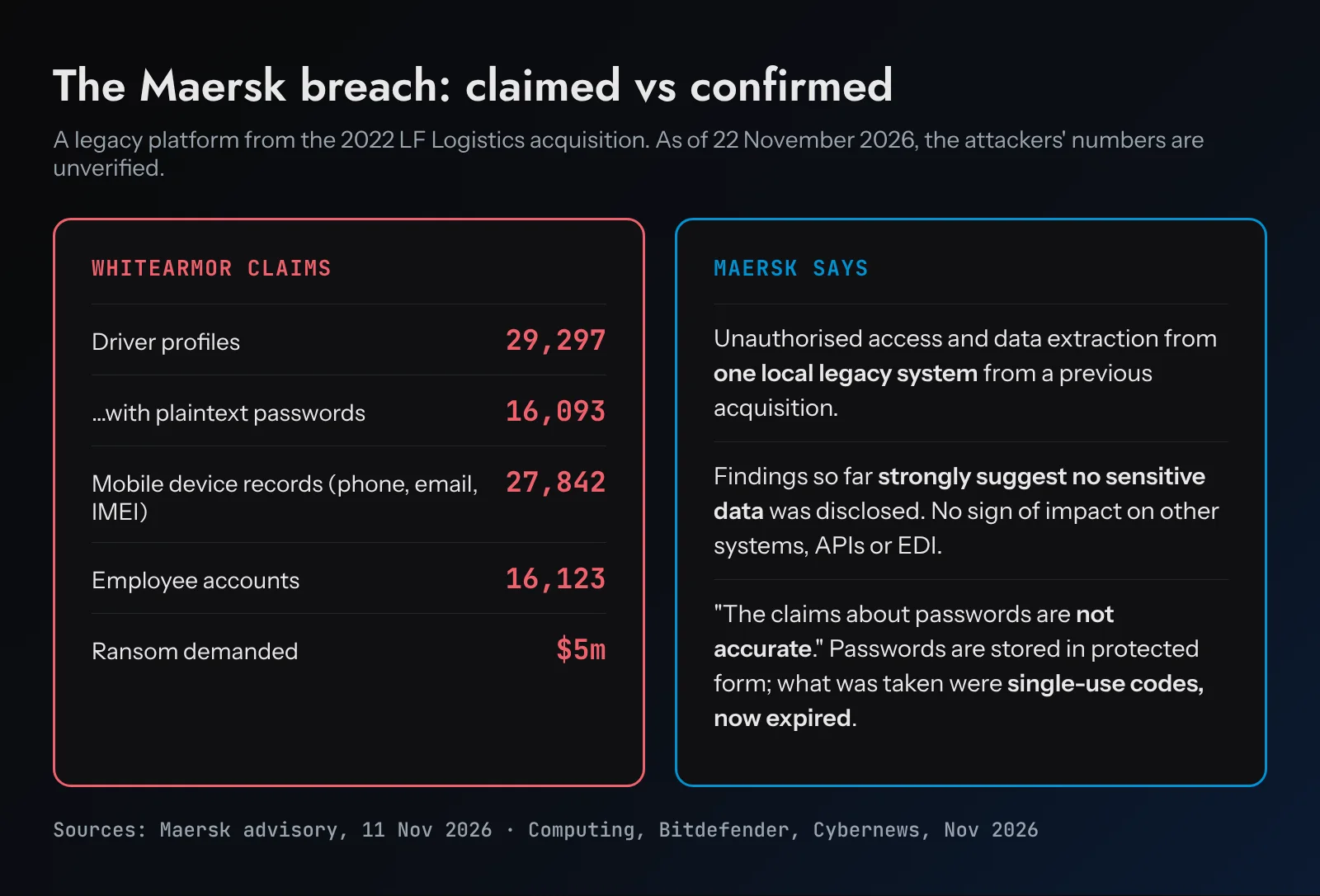
So treat the numbers as claims. But notice what kind of data was claimed. Not shipping manifests. Drivers and their devices. If you bought a company, its old platform is a risk in its own right; we cover that angle in the acquisition you made years ago is your breach risk. This post is about the devices and apps themselves.
Why are driver apps and scanners such an easy target?
Because they sit where security is weakest and churn is highest.
WhiteArmor is not only after Maersk. Nick Harris, CISO at Assured, lists claims in its first fortnight against J.B. Hunt, Ryder and Echo Global Logistics, and notes that the Ryder listing claims driver PII, cleartext API keys and FTP and telematics configurations. He also reports the group's offer to buy access to VPNs and identity tools, and its recruitment of insiders in transport and logistics. FreightWaves reports that all three US firms now face employee lawsuits, and quotes the NMFTA's director of cybersecurity saying the group has targeted transport companies "ranging from very large national fleets and logistics companies down to several smaller regional fleets". Again: these are the gang's claims, and the companies have confirmed little.
Four things make the mobile edge soft in most fleets:
- Shared logins. Scanners pass between shifts, so one account per dock is the norm. Nobody can tell who did what, and nobody changes the password when someone leaves.
- High churn. Drivers, agency pickers and owner-operators come and go weekly. Offboarding is a form in HR, not a switch in IT.
- Long sessions and keys. Driver apps stay signed in for months. API keys for telematics and carrier portals sit in config files, which is exactly what the Ryder claim describes.
- Data nobody deletes. Phone numbers, IMEIs, licence scans and home addresses of drivers who left years ago.
The wider data points the same way. The 2026 Verizon Data Breach Investigations Report found third-party involvement in 48% of breaches, ransomware in 48% and the human element in 62%. For transportation it counted 689 incidents, 652 with confirmed data disclosure, and credentials were among the data taken in 27% of those breaches. Verizon's 2025 Mobile Security Index adds that 85% of organisations reported increasing mobile attacks, and of the organisations that ran smishing tests, 39% found up to half their staff clicked the malicious link.
A stolen list of driver phone numbers is a ready-made smishing list. "Your load has changed, confirm in the app" is an easy message to fake.
What does a secure setup for driver apps and handheld scanners look like?
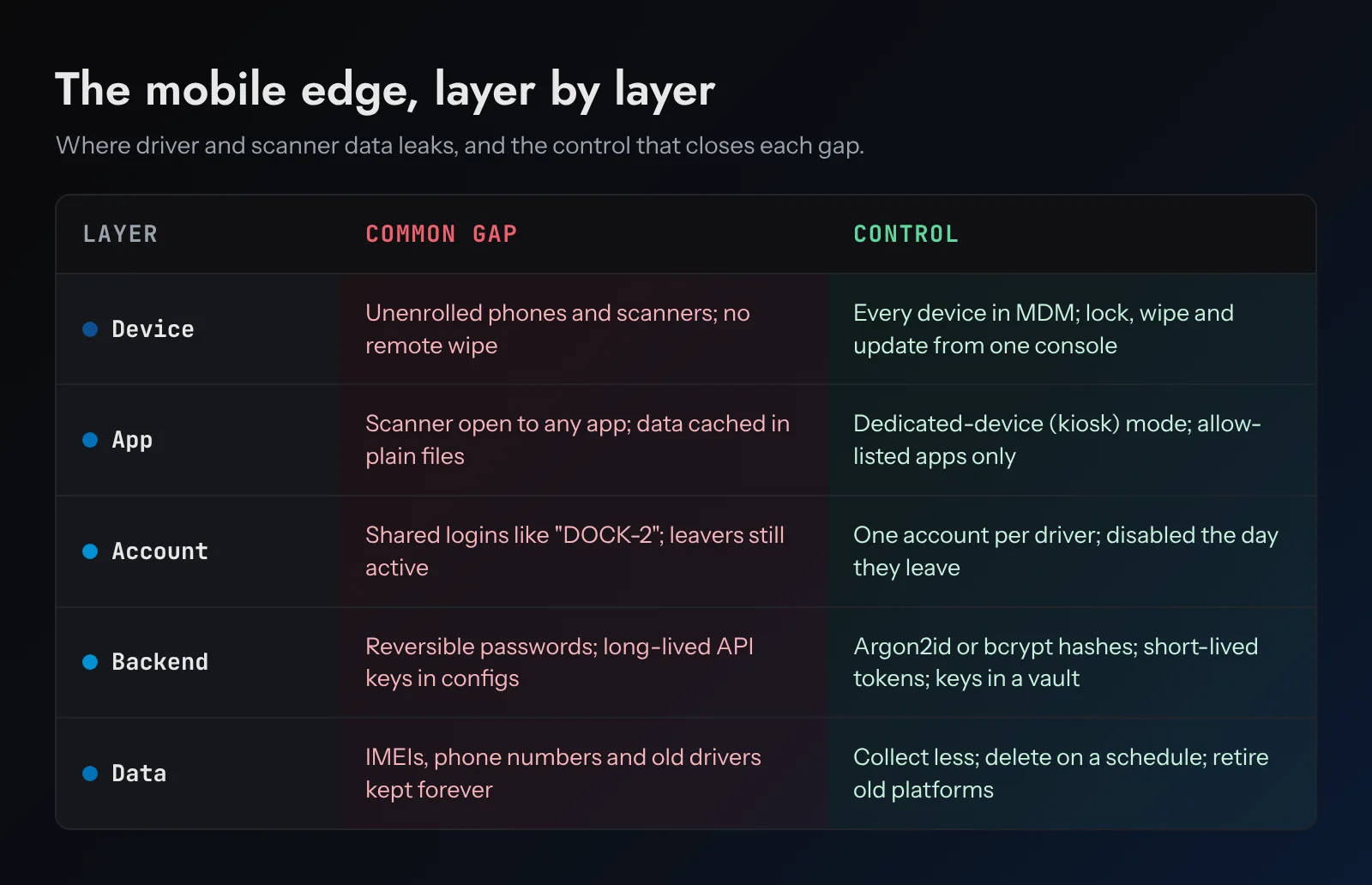
Think in five layers: the device, the app on it, the account using it, the backend it talks to, and the data that piles up behind it.
1. Put every device in mobile device management
Mobile device management (MDM) is the console that lets you enrol, configure, update, lock and wipe phones and scanners remotely. The UK NCSC's MDM guidance says company-owned devices should use zero-touch enrolment, that MDM should enforce automatic updates and detect jailbroken devices, and that the MDM itself must be protected because it "hold[s] the keys to unlock, decrypt and remote wipe all the devices". NIST's SP 800-124 Rev. 2 covers the full device lifecycle, from deployment to disposal, for both company-owned and personal devices.
If a device is not in MDM, you cannot wipe it when it goes missing. Start by counting: how many scanners, phones and cab tablets do you own, and how many are enrolled?
2. Lock scanners to the job
A handheld scanner does not need a browser or an app store. Android Enterprise calls these dedicated devices, naming "inventory management, field service management, transport and logistics" as typical uses. Lock task (kiosk) mode limits the device to an allow-listed set of apps, and shift workers can share a device through separate, temporary user sessions instead of one shared account. Most rugged-device MDMs support this. Ask whether yours is switched on.
3. One account per driver. No shared logins
This is the cheapest fix on the list and the one most fleets skip. Every driver and picker signs in as themselves, with a short PIN or badge tap on a shared scanner. The shared DOCK-2 account goes. You gain two things at once: every scan has a name on it, and switching off one person does not lock out the whole shift.
For the driver app, prefer an authenticator app or passkeys over SMS codes. CISA's mobile communications guidance is written for highly targeted individuals, but its point applies widely: SMS codes are not encrypted and are not phishing-resistant. Expect a fallback for drivers without smartphones, and make that fallback a supervised reset, not a shared password.
4. Store passwords properly and keep keys off the device
Whatever happened at Maersk, the claim itself is the warning: plaintext passwords are a finding no vendor should survive. The OWASP Password Storage Cheat Sheet says passwords should never be stored in plain text, and recommends Argon2id, then scrypt, with bcrypt for legacy systems and PBKDF2 where FIPS-140 compliance is needed. Encryption is not enough, because it can be reversed.
The same goes for API keys. Telematics, fuel-card and carrier-portal keys belong in a secrets vault on the server, issued as short-lived tokens, never baked into the app or a config file on the device. We cover the pattern in keeping secrets away from AI agents; it applies just as much to a driver app.
5. Collect less, delete on a schedule
Do you need a driver's IMEI after they leave? Their home address on the scanner? Ask what each field is for, how long you keep it, and who deletes it. Data you do not hold cannot be ransomed. Set a retention rule (for example, delete driver device records a set number of days after offboarding, once any legal hold is checked) and run it monthly.
How do you offboard a driver or handle a lost scanner in under an hour?
Most damage happens in the gap between "he left" and "IT knew". Write the runbook down, give each step an owner, and make the first step something a shift supervisor can start at 2 a.m.
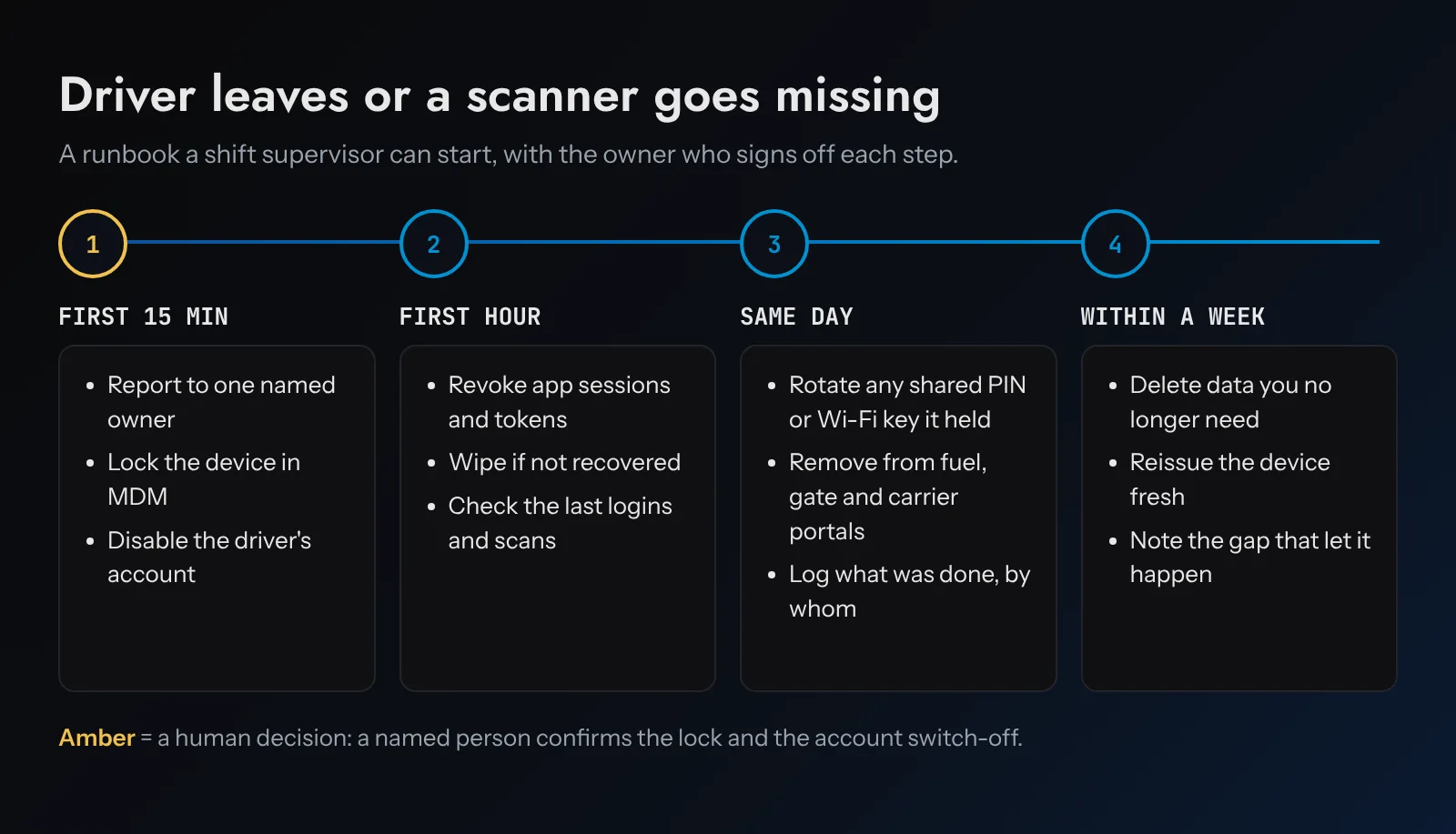
| When | Do this | Who signs off |
|---|---|---|
| First 15 min | Report to one named owner; lock the device in MDM; disable the account | Shift supervisor, then IT on call |
| First hour | Revoke app sessions and refresh tokens; wipe if not recovered; check last logins and scans | IT |
| Same day | Rotate any PIN or Wi-Fi key the device held; remove fuel, gate and carrier-portal access | IT and fleet manager |
| Within a week | Delete data you no longer need; reissue the device fresh; record what let it happen | Operations director |
Two tests tell you whether it works. Pick a driver who left last month and check: can their account still sign in? Pick a scanner at random and check: could you wipe it from the console right now?
What should you ask your driver-app or telematics vendor?
Much of the mobile edge is run by vendors. Given that 48% of breaches in the DBIR involved a third party, send these questions this month and keep the answers on file:
- How are driver passwords stored? Name the algorithm.
- Does every driver get a unique account, and can we switch one off without affecting others?
- How long do sessions and tokens last, and can we revoke them centrally?
- Where are API keys for our integrations kept, and how often are they rotated?
- What driver and device data do you hold for us, and how do we get it deleted?
- Which legacy or acquired systems hold our data, and when will they be retired?
- How fast will you tell us about a breach, and what will you tell us?
A vendor that cannot answer question 1 in a sentence has answered it.
What can you do this week?
- Monday: count devices and compare against MDM enrolment.
- Tuesday: list every shared login on scanners and in the driver app. Pick one dock to move to individual accounts.
- Wednesday: pull last quarter's leavers and check their accounts and sessions are dead.
- Thursday: send the seven vendor questions.
- Friday: run the lost-scanner drill once, start to finish, and time it.
Where does automation help, and where does it not?
Offboarding fails because it spans five systems owned by four teams: HR, MDM, the driver app, fuel cards, carrier portals. That is where governed automation earns its keep. An agent can read the roster, spot a leaver, and draft every revocation across those systems; a named person approves, and every action is logged. Reads run freely, changes wait for a human. That is how we build agents at Devs Core, through a permissioned access layer where the agent is granted operations, not logins. The same least-privilege thinking applies to the people on your docks, which we explain in least-privilege access for AI agents.
What automation does not do is replace the basics above. An agent cannot fix a password column stored in plain text. Do the basics first.
If you want a second pair of eyes on where your driver, scanner and warehouse systems connect, our two-week AI Readiness Audit maps those systems and ends in a written build plan. More on our work with fleets and warehouses is on the distribution and logistics page.
Frequently asked questions
Do handheld scanners need mobile device management?
Yes. A scanner holds work data, connects to your network and can go missing like any phone. MDM lets you update it, lock it to the scanning app and wipe it remotely. Without MDM, a lost scanner is a lost credential you cannot cancel.
Is it safe for drivers to share one login on a scanner?
No. A shared login means no scan can be traced to a person, and the password usually outlives everyone who knows it. Give each driver or picker their own sign-in, even if it is a short PIN or badge tap on a shared device.
Did hackers steal Maersk drivers' passwords?
The WhiteArmor gang claims it took 16,093 driver passwords in plaintext. Maersk says those claims are not accurate, that passwords are stored in protected form and that the stolen items were single-use codes that have expired. As of 22 November 2026 the gang's figures have not been independently verified.
How quickly should we cut off a driver who leaves?
Lock the account and devices within 15 minutes of HR or a supervisor knowing, and revoke sessions, tokens and portal access within the hour. The same steps apply to agency staff and owner-operators. Have a named person confirm each step and keep a log.
What driver data should a logistics company keep?
Only what you need for a stated purpose, for a stated time. Driver phone numbers, device IMEIs and licence details are useful while someone works for you and a liability after they leave. Set a retention period, check legal holds, and delete on a schedule.