
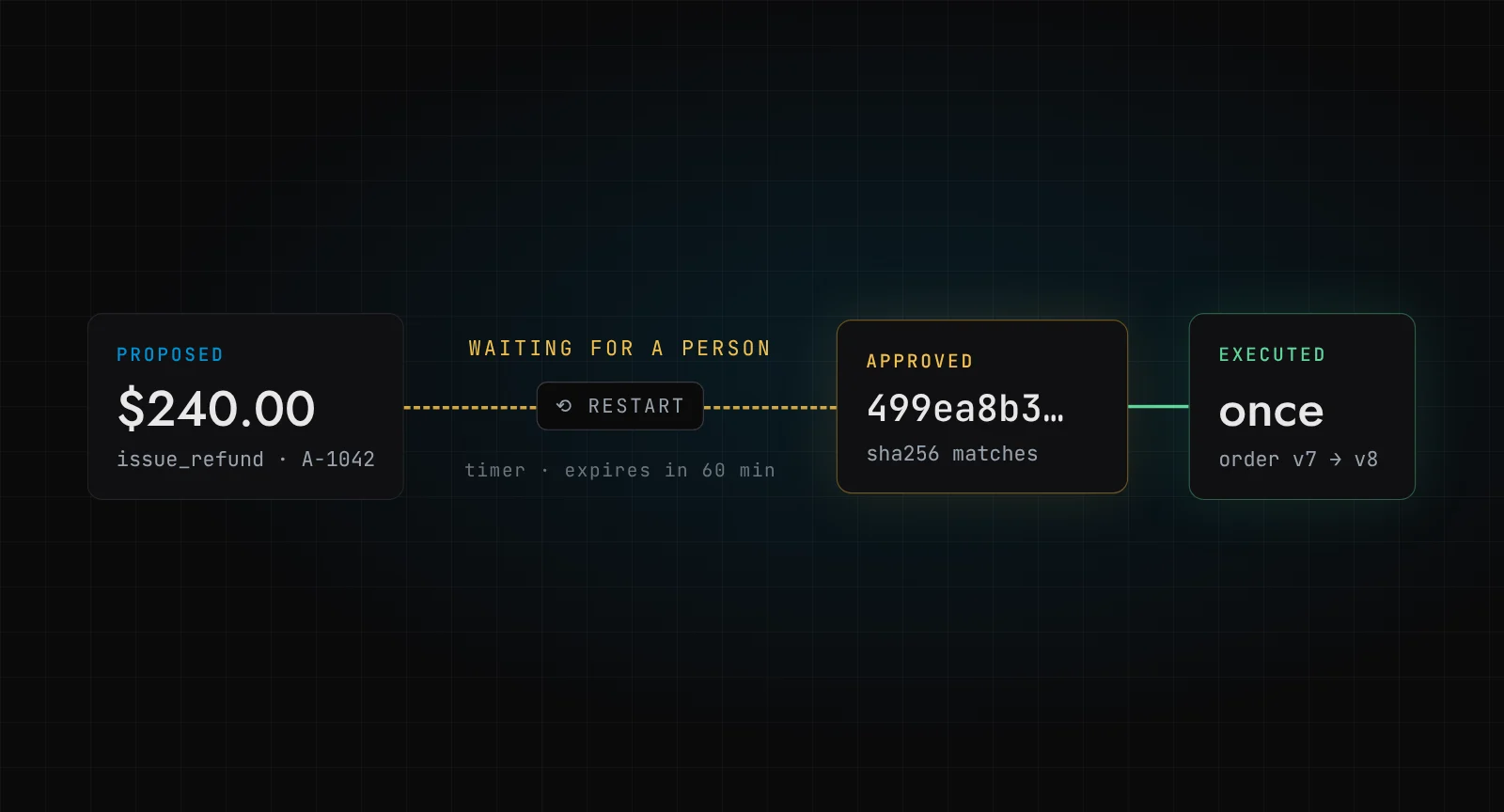
A support agent wants to refund $240 on order A-1042. The order arrived smashed, the policy allows it, and the model has done its job: it has proposed the right tool call. Now it needs a person. Say the person is Priya in finance, who has just left for lunch. She will be back in an hour. In that hour, somebody deploys, and the server the agent was running on restarts.
What should happen when Priya comes back and clicks approve?
The short answer: in LangGraph, call interrupt() inside a node with the exact action you want approved, compile the graph with a persistent checkpointer, and resume it later with Command(resume=...) on the same thread_id. Bind the approval to a hash of the tool, its arguments and the record version it was planned against, and refuse to run if that hash has changed. For waits measured in hours, run the graph inside a Temporal workflow, which waits on a signal and expires the approval with a timer.
I wrote about the idea of reviewed write queues in human in the loop AI agents. This post is the code. Everything below ran on my machine, with a scripted fake model so you need no API key, and the screenshots are the real output.
Key takeaways
interrupt()pauses a node and saves the graph state; nothing is held in memory, so the process can die while you wait.- On resume, the interrupted node runs again from the top. Keep anything before
interrupt()free of side effects. - An approval should be for one exact action. Hash the tool, the arguments and the record version, and check the hash again in the same transaction that executes.
- Temporal adds the parts LangGraph leaves to you: a signal to deliver the decision, a timer to expire it, and a history that survives a full restart.
What does LangGraph interrupt() actually do?
interrupt() is a function you call inside a node. LangGraph stops the run, writes the state through its persistence layer, and hands the value you passed to whoever invoked the graph. It then waits indefinitely. When you invoke the graph again with Command(resume=value) and the same thread_id, that value becomes the return value of interrupt().
Two details matter more than the docs make them sound.
First, you need a checkpointer. InMemorySaver is fine for a notebook, and useless for Priya's lunch break, because a restart wipes it. I used SQLite (langgraph-checkpoint-sqlite); in production you would use the Postgres saver.
Second, the reference says it plainly: on resume, the graph "resumes from the start of the node, re-executing all logic". If your approval node sends a Slack message before it calls interrupt(), Priya gets two messages. If it charges a card, you have a much worse problem.
Here is the graph. Three nodes: the agent proposes, the approval node pauses, the execute node acts.
def action_hash(tool: str, args: dict, order_version: int) -> str:
    """Bind an approval to one exact action and the state it was planned against."""
    canonical = json.dumps(
        {"tool": tool, "args": args, "order_version": order_version},
        sort_keys=True,
        separators=(",", ":"),
    )
    return hashlib.sha256(canonical.encode()).hexdigest()


def agent(state: State) -> State:
    model = FakeMessagesListChatModel(responses=SCRIPTED)  # scripted: no API key
    msg = model.invoke([HumanMessage(state["ticket"])])
    call = msg.tool_calls[0]
    version = order_version(call["args"]["order_id"])
    return {"proposal": {
        "tool": call["name"], "args": call["args"], "order_version": version,
        "sha256": action_hash(call["name"], call["args"], version), "reason": msg.content,
    }}


def approval(state: State) -> State:
    print("  [approval] node started")  # runs again on resume: keep this node side-effect free
    decision = interrupt(state["proposal"])
    return {"decision": decision}
The scripted model is FakeMessagesListChatModel from langchain_core: it returns the same issue_refund tool call every time. Swap in a real chat model later and nothing else changes.
How do you pause in one process and resume in another?
This is the test that matters, so I split it into two scripts. propose.py runs the graph until it pauses, prints what an approval screen would show, and exits. approve.py is a fresh process: it opens the same SQLite checkpoint file, reads the pending interrupt, and resumes.
# approve.py
with SqliteSaver.from_conn_string("checkpoints.db") as saver:
    graph = build().compile(checkpointer=saver)
    snap = graph.get_state(config)
    shown = snap.interrupts[0].value  # what the approval screen displayed
    out = graph.invoke(
        Command(resume={"approved": True, "approver": approver, "sha256": shown["sha256"]}),
        config,
    )
The run:
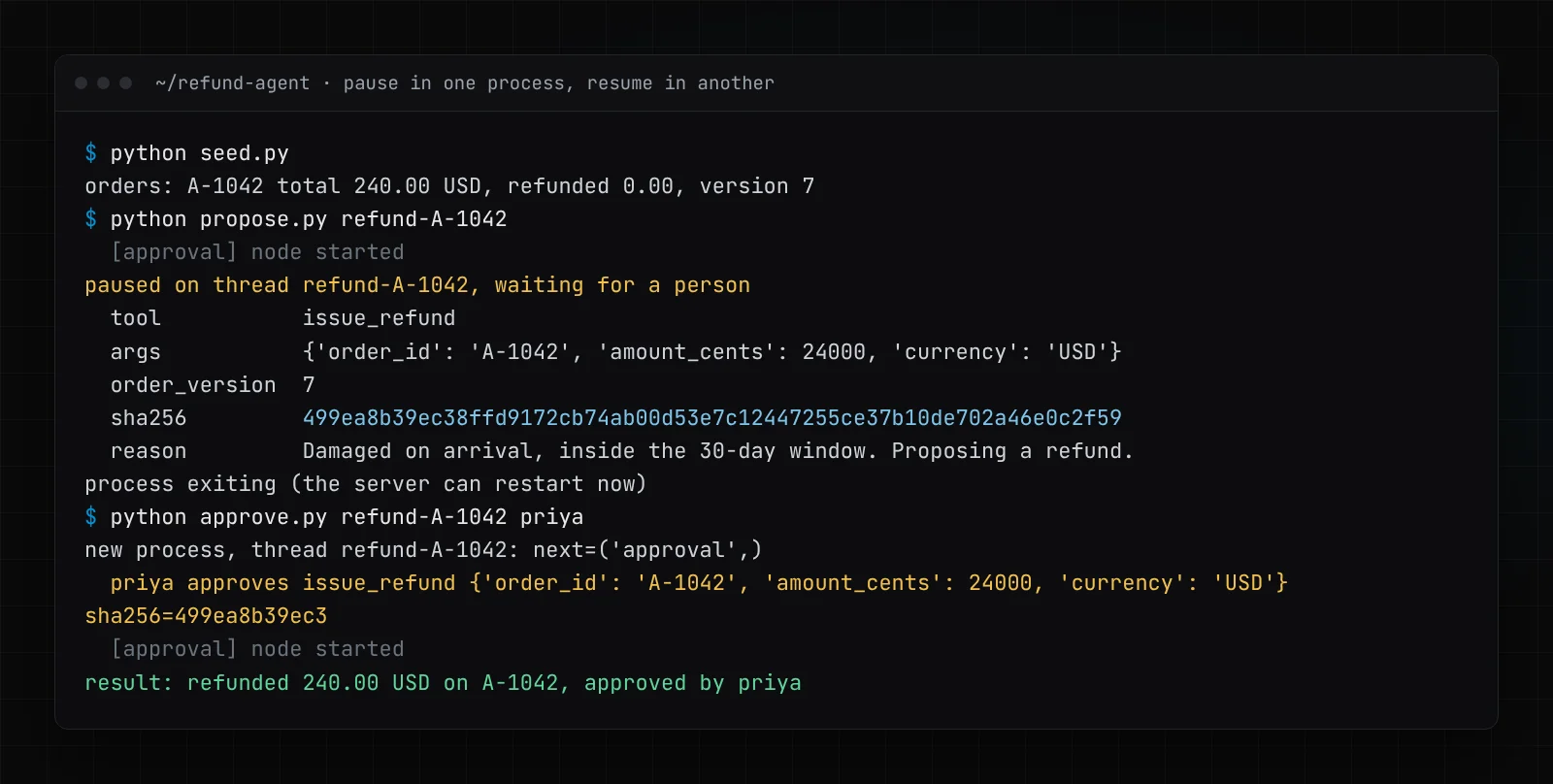
Look at the grey [approval] node started line. It prints twice: once when the graph paused, once when it resumed. That is the re-execution the reference warns about, and it is why the node does nothing but call interrupt().
The first process is gone by the time Priya approves. The only thing connecting the two halves is a row in checkpoints.db and a thread_id.
Why must the approval be bound to the exact action?
Now the less comfortable run. Same proposal, same hash. While Priya is at lunch, someone on the support desk refunds $40 of shipping on the same order by hand. The order moves from version 7 to version 8. Priya comes back and approves the $240 refund she was shown.
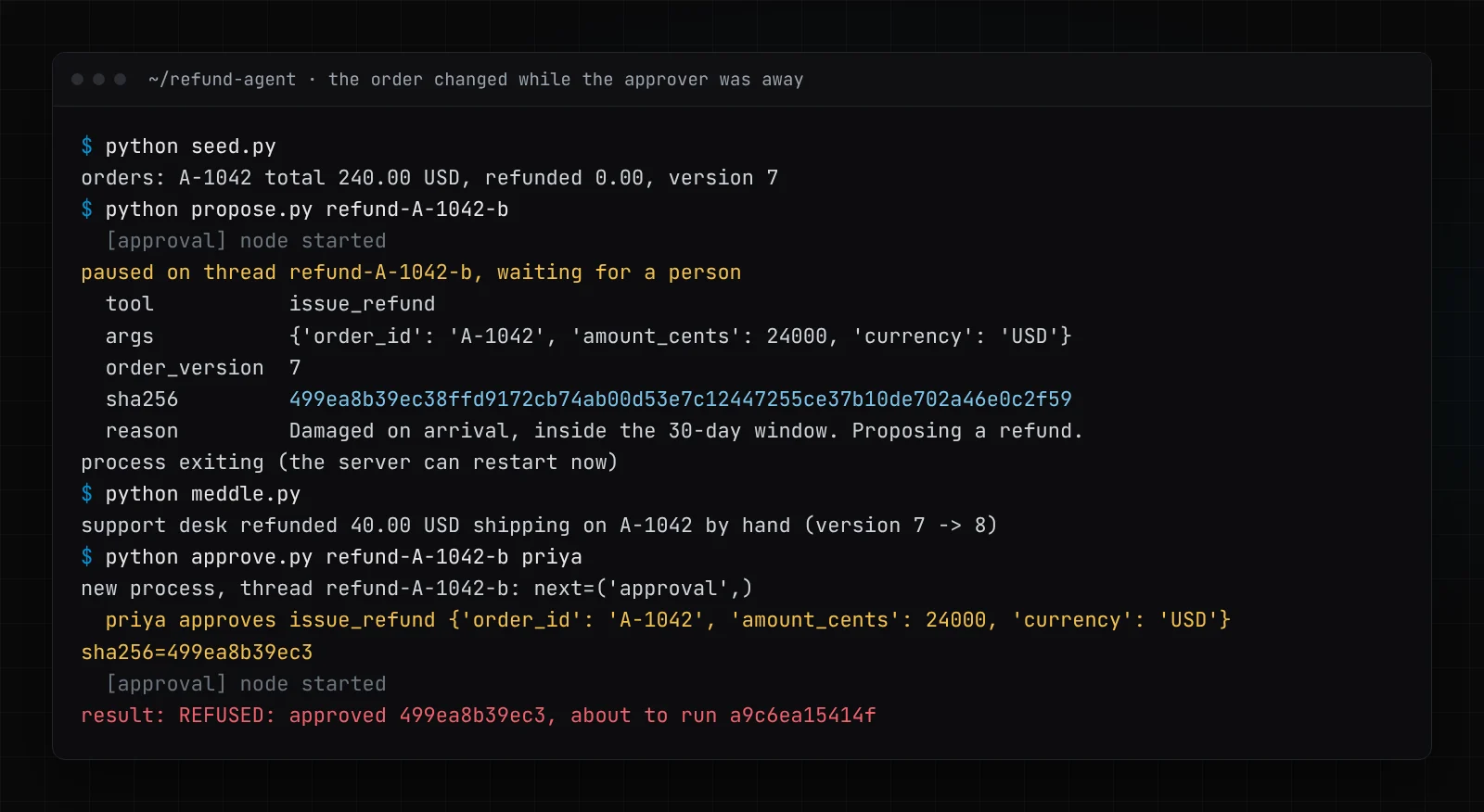
Refused. The customer would otherwise have got $280 back on a $240 order. Priya approved a refund against an order that no longer exists in that shape, and the hash is how the code knows.
The execute node does the check inside the same transaction as the write:
def execute(state: State) -> State:
    p, d = state["proposal"], state["decision"]
    if not d.get("approved"):
        return {"result": f"rejected by {d.get('approver')}"}
    with sqlite3.connect(SHOP_DB) as db:
        db.execute("BEGIN IMMEDIATE")
        (version,) = db.execute(
            "SELECT version FROM orders WHERE id = ?", (p["args"]["order_id"],)
        ).fetchone()
        now = action_hash(p["tool"], p["args"], version)
        if now != d.get("sha256"):
            return {"result": f"REFUSED: approved {d.get('sha256', '')[:12]}, about to run {now[:12]}"}
        db.execute(
            "UPDATE orders SET refunded_cents = refunded_cents + ?, version = version + 1 "
            "WHERE id = ?",
            (p["args"]["amount_cents"], p["args"]["order_id"]),
        )
    ...
This is the part most tutorials skip. They pass {"type": "approve"} back into the graph and call it human in the loop. But "approve" approves what? The state could have been edited with update_state, the model could have been re-run, the record could have changed. An approval that is not tied to the exact arguments is a signature on a blank cheque.
I can say this with some feeling because we got it wrong ourselves. In October we ran 12 independent tests on the governance of Ware, our simulated 3D warehouse with a real AI recovery agent. One finding: an approval was checked in one transaction and executed in another without re-checking, so a change in between went unseen and an approved spend ran on a different situation. Simulated money, real bug. The fix is what you see above: the approval carries the state it was approved against, and if that moved, nothing runs. It is one of the controls on our AI governance page.
Two smaller rules come with it. The hash goes on the approval screen, so what the person approves is literally what gets checked. And the approver's identity is checked against policy outside the model, so the agent can never approve its own request.
Where does LangGraph stop and Temporal start?
The SQLite version survives a restart. What it does not do is decide anything about time. Nobody tracks that thread refund-A-1042 has been waiting for three days. Nothing expires the approval. If Priya approves next Tuesday, the refund runs next Tuesday. You end up writing a scheduler, a "pending approvals" table and a sweeper job, and that system has to be at least as reliable as the agent.
Temporal is built for exactly that. It now has an official LangGraph plugin: Temporal announced it in Public Preview on 16 July 2026, and the package docstring still calls it experimental, so pin your versions. The integration docs describe the pattern: a node calls interrupt(), the workflow exposes the pending value through a query, an external process sends the decision as a signal, and the workflow resumes the graph with Command(resume=...). Each node runs as a Temporal Activity (you must set execute_in per node), and the docs say to use InMemorySaver inside the workflow because Temporal's own event history provides the durability.
I installed temporalio-langgraph 0.1.0 (Temporal Python SDK 1.35.0, LangGraph 1.2.18) and ran the Temporal CLI 1.9.0 dev server with temporal server start-dev. Here is the workflow, which reuses the same three nodes:
@workflow.defn
class RefundApproval:
    def __init__(self) -> None:
        self.proposal: dict[str, Any] | None = None
        self.decision: dict[str, Any] | None = None

    @workflow.query
    def pending(self) -> dict[str, Any] | None:
        return self.proposal

    @workflow.signal
    def decide(self, decision: dict[str, Any]) -> None:
        if self.proposal and decision.get("sha256") == self.proposal["sha256"]:
            self.decision = decision  # approval for anything else is ignored

    @workflow.run
    async def run(self, ticket: str, ttl_minutes: int) -> str:
        app = graph("refund").compile(checkpointer=InMemorySaver())
        config = RunnableConfig({"configurable": {"thread_id": workflow.info().workflow_id}})

        first = await app.ainvoke({"ticket": ticket}, config, version="v2")
        self.proposal = first.interrupts[0].value

        try:
            await workflow.wait_condition(
                lambda: self.decision is not None,
                timeout=timedelta(minutes=ttl_minutes),
                timeout_summary="approval expires",
            )
        except TimeoutError:
            return f"EXPIRED: no decision within {ttl_minutes} min, nothing ran"

        done = await app.ainvoke(Command(resume=self.decision), config, version="v2")
        return done.value["result"]
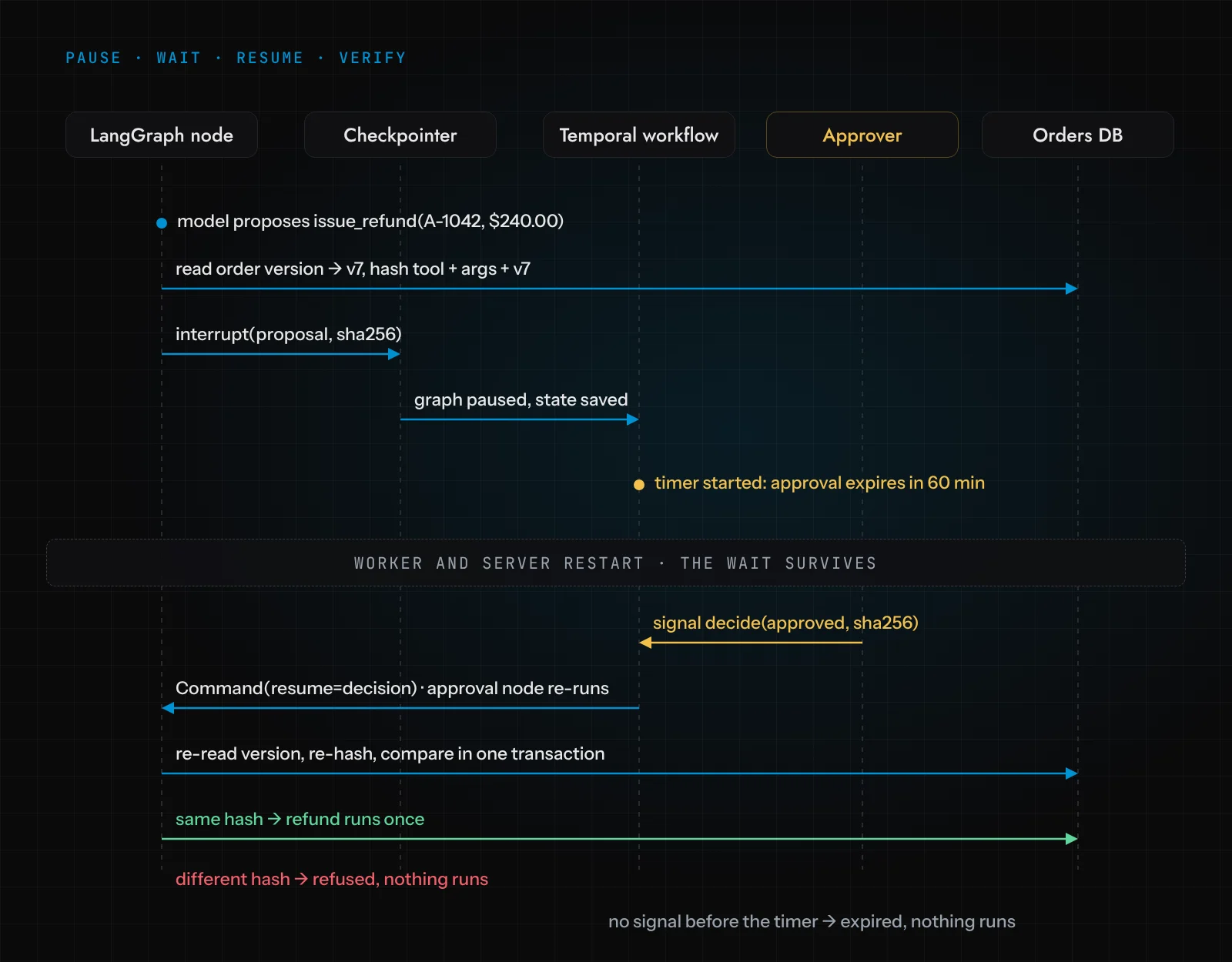
The timeout on wait_condition is a durable Temporal timer. It is not a sleep in a process; it is an event on the server. Here is the workflow waiting for Priya, with the timer started and an hour on the clock:
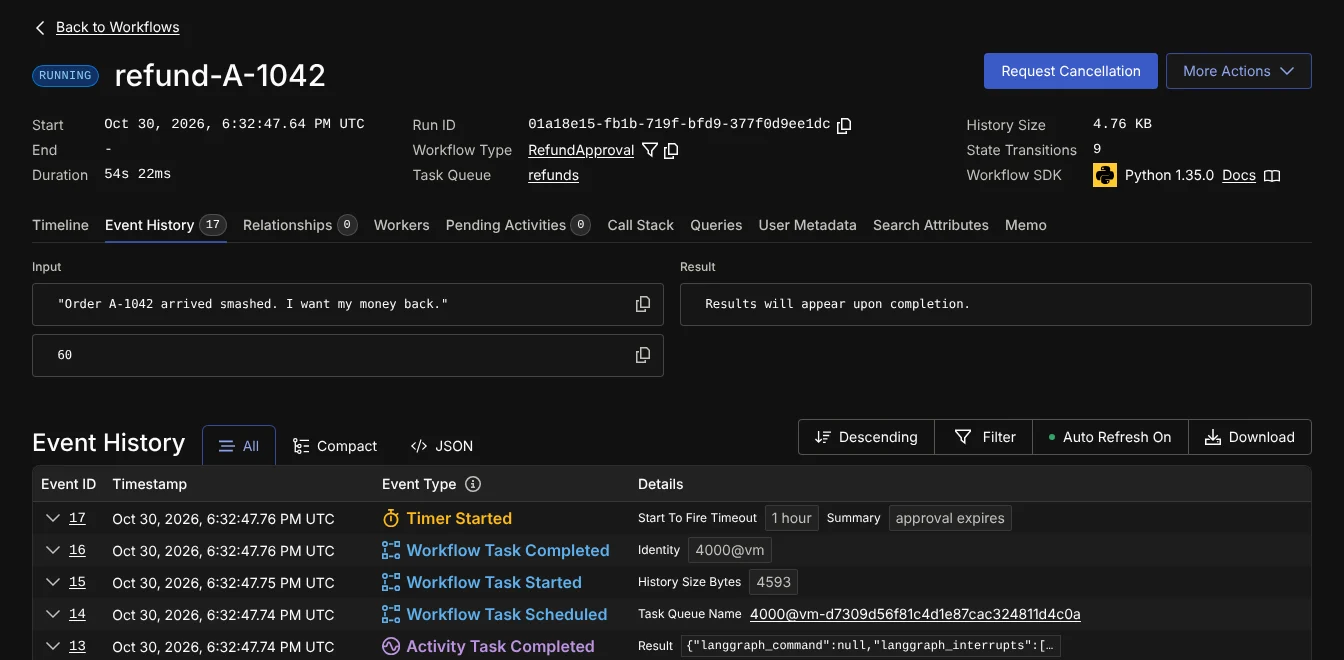
Then I did the unkind thing. I killed the worker. Then I killed the Temporal server itself, started it again on the same database file, and started a brand-new worker. Only then did I send the approval:
$ python decide.py refund-A-1042 priya
priya approves issue_refund {'amount_cents': 24000, 'currency': 'USD', 'order_id': 'A-1042'} sha256=499ea8b39ec3
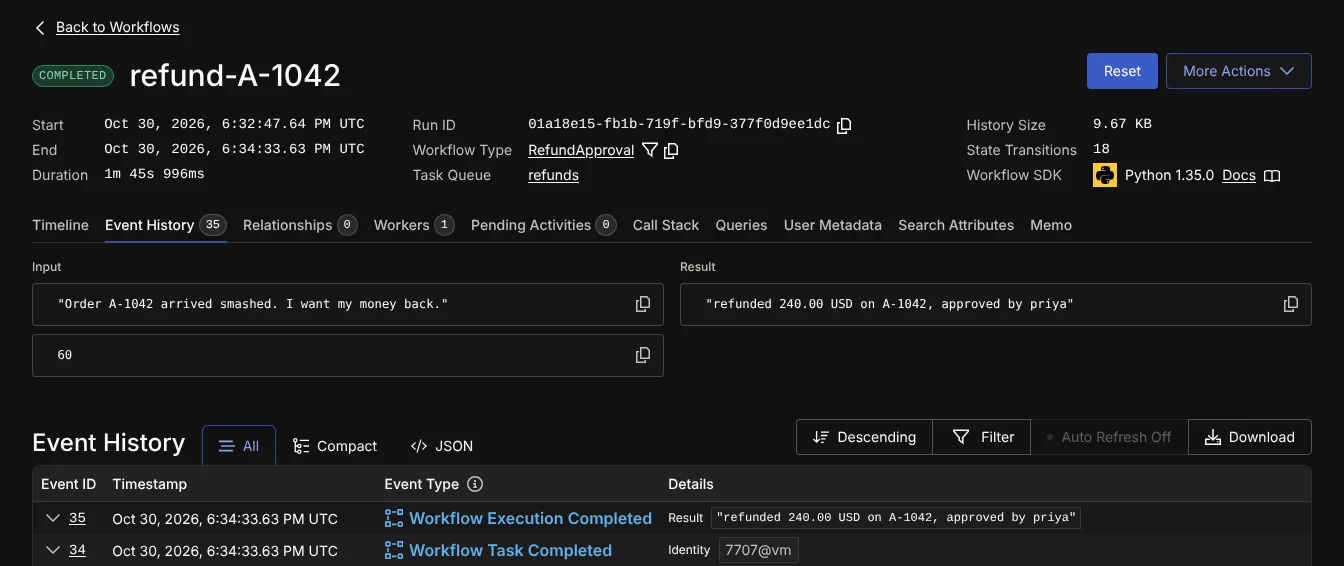
result: refunded 240.00 USD on A-1042, approved by priya
The new worker replayed the history, the signal released the wait, and the graph resumed at the approval node:
And the case nobody demos: Priya never comes back. I started a second workflow with a one-minute expiry and did nothing.
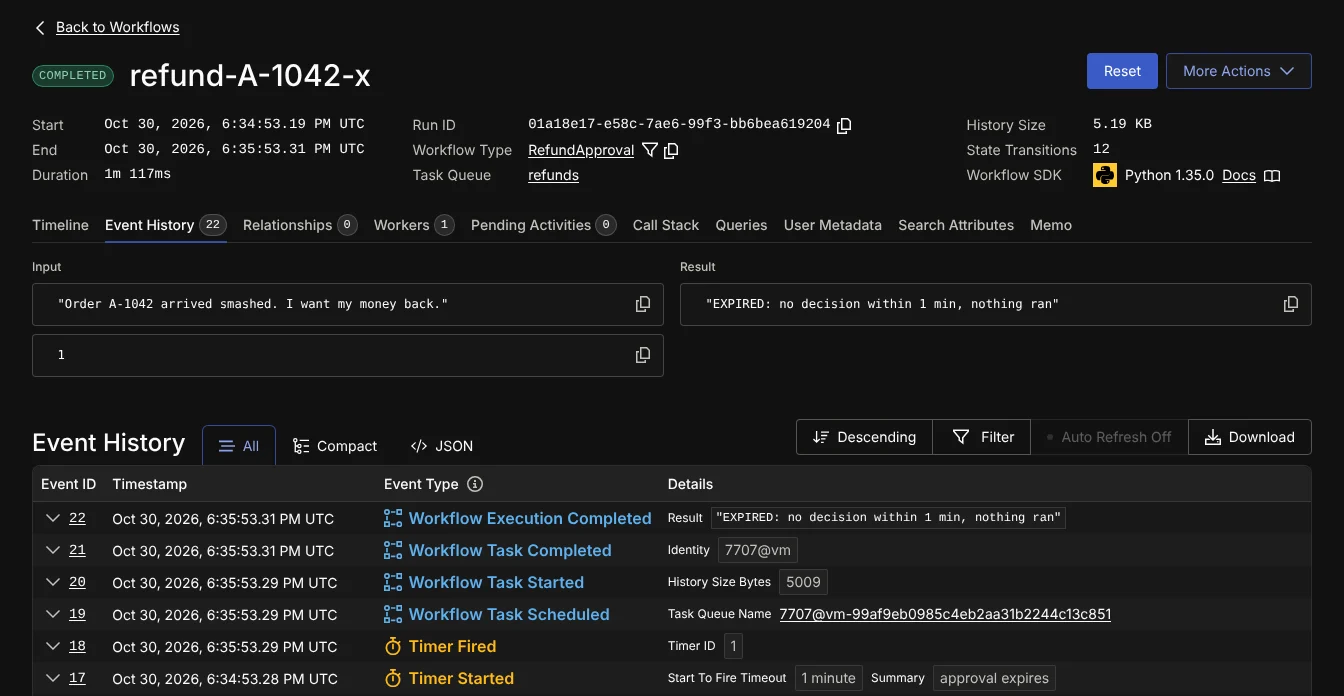
Timer Fired, result EXPIRED, nothing ran. An approval that sits for a week and then executes on a different world is worse than no approval, so in our builds approvals expire by default.
What would I change before this goes near real money?
Some honest notes, because a tutorial that works on my laptop is not a production system.
Retries on the money step. I set RetryPolicy(maximum_attempts=1) on the execute node so Temporal never retries a refund on its own. The better fix is making the payment call idempotent: the action hash is a natural idempotency key, since it is unique to one tool, one set of arguments and one record version. Then you can let Temporal retry.
The signal handler is quiet. Mine ignores a decision whose hash does not match. In a real system you want that logged as a refusal, and probably surfaced to the approver. An append-only audit trail is where it belongs.
Preview software. The Temporal plugin is new. The constraints are real: conditional edge functions must be async, nodes that do I/O must run as Activities, and LangGraph Store is not available inside Activities. Read the integration docs before you commit to it.
Do you need Temporal at all? If your approvals come back in minutes and you can live without expiry, LangGraph with the Postgres checkpointer is enough, and simpler. Temporal earns its place when waits are long, when you need deadlines, or when you already run it. It is not free to operate either.
None of this is exotic. It is the same pattern whether the action is a refund, a purchase order or a stock transfer: the model proposes, a person approves one exact action, deterministic code checks that the action has not changed, and the approval expires. Which operations deserve that treatment, and which can run unattended, is a decision you make per operation; we use an autonomy ladder for it. If you are building an agent that touches money or stock, this is the kind of plumbing we put in from the first week of AI agent development.
Frequently asked questions
Does LangGraph interrupt() need a checkpointer?
Yes. interrupt() relies on the persistence layer to save the graph state, and you resume with the same thread_id. Use InMemorySaver only for tests; a restart loses it. Use the SQLite or Postgres saver for anything that waits on a person.
Why does my node run twice after Command(resume=...)?
Because LangGraph re-executes the interrupted node from the start on resume. Keep the node that calls interrupt() free of side effects, or make anything before the call idempotent.
Does Temporal have a LangGraph integration?
Yes. The temporalio-langgraph package runs LangGraph nodes as Temporal Activities and supports interrupt() with Temporal signals and queries. Temporal announced it in Public Preview in July 2026.
How do I stop an approval from being used for a different action?
Hash the tool name, the arguments and the version of the record the action was planned against. Show that hash to the approver, store it with the decision, and recompute it in the same database transaction that executes. If it differs, refuse.
How do I make an AI agent approval expire?
In Temporal, wait for the decision signal with workflow.wait_condition(..., timeout=...). The timeout is a durable timer; if it fires first, end the workflow without running the action. Without Temporal, you need your own deadline stored with the pending approval and a job that voids it.