
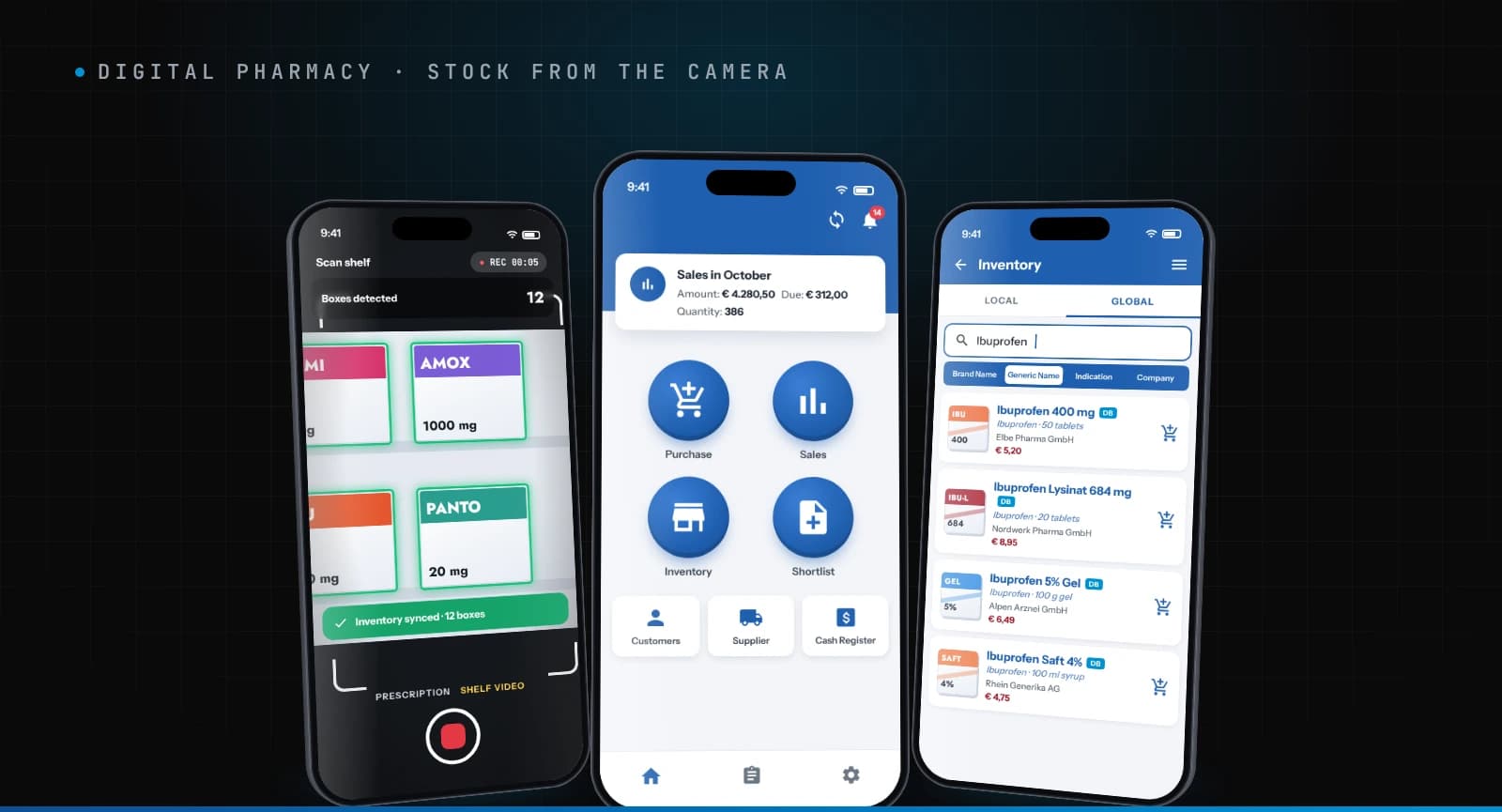
German pharmacies were tracking their stock on paper or in ageing legacy software, so every delivery, sale and prescription meant typing medicines in by hand. For Digital Pharmacy we built a native Android pharmacy management app where staff photograph a prescription or film a shelf, and the app recognises the medicines and updates stock itself. It also covers purchases, sales, customers, suppliers and the cash register, with separate views for pharmacy owners, staff and the platform's super admin. Ten pharmacies ran on it, and it processed more than 5,000 images with OCR.
Digital Pharmacy is a software company that sold the app to German pharmacies as a subscription (SaaS). We designed and built the product for them in four months, with a team of four.
At a glance
- Client: Digital Pharmacy, a SaaS company selling pharmacy software to pharmacies in Germany
- What we built: a native Android app with three role-based interfaces (pharmacy owner, staff, super admin), a Django backend, and computer vision that reads prescriptions and counts medicine boxes
- Replaced: paper stock books, and in some pharmacies older legacy software
- Connected to: Digital Pharmacy's large medicine database, Firebase Authentication and Firebase ML Kit
- Usage: 10 pharmacies and more than 5,000 images processed with OCR
- Timeline and team: four months, in 7-day sprints, with a UI designer, an Android developer, a backend developer and a project manager
- Stack: native Android, Django, Firebase (authentication and ML Kit OCR), Azure DevOps
The challenge: stock that only existed on paper
German pharmacies carry thousands of products, and the work of keeping track of them is heavy. In the PGEU Medicine Shortages Report 2025, German pharmacy teams reported spending more than 20 hours a week on medicine shortages alone, against a European average of 12 (ABDA, Zahlen Daten Fakten 2026). In ABDA's 2025 survey of 500 pharmacy owners, 93% named bureaucracy as a major daily frustration (ABDA, Apothekenklima-Index 2025).
The pharmacies Digital Pharmacy was selling to faced exactly that:
- Stock lived on paper. Most pharmacies kept stock books by hand. A few used legacy software that was hard to change.
- Every medicine was typed in. Deliveries, sales and prescriptions all meant finding the medicine and entering it line by line.
- No one view of the business. Sales, money owed, suppliers and cash were tracked in separate places, so owners had no single picture of how the pharmacy was doing.
The slowest part of pharmacy stock control isn't counting. It's turning what's on the box or the prescription into a line in the system.
Digital Pharmacy's idea was to remove that typing with a camera. Our job was to make it work.
What we built: one app, three roles
- Pharmacy owner app: a sales dashboard (amount, due and quantity for the month), purchases, sales, inventory, customers, suppliers and the cash register, for the whole pharmacy
- Staff app: the daily work, selling, receiving stock and scanning, without the owner-level controls
- Super admin: Digital Pharmacy's own view for running the platform and the pharmacies subscribed to it
- Computer vision: prescription OCR and video-based box detection that turn a photo or a shelf video into stock updates
- Django backend: one source of truth for stock, sales and cash across the three roles, with Firebase for sign-in
Everything runs on one backend, so the owner, the counter and the platform team all see the same stock.
For pharmacy staff: point the camera, not the keyboard
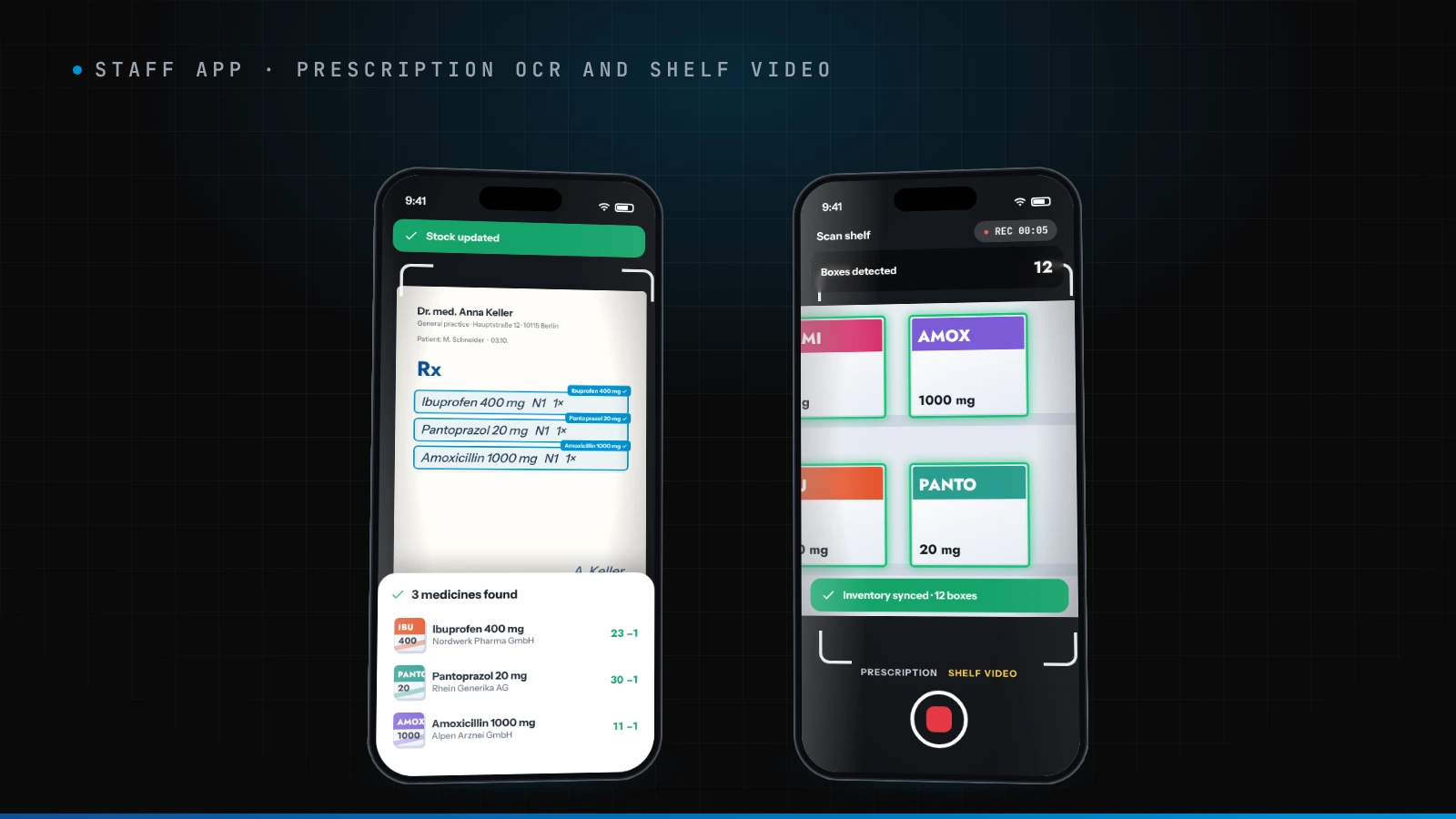
- Snap a prescription. Staff photograph a prescription, and OCR reads the medicine names and matches them to products in stock.
- Film the shelf. Instead of counting by hand, staff record a short video, and the app detects each medicine box and updates the count.
- Confirm with one tap. The app shows staff what it found, and stock only changes once they confirm it, so a misread never slips into the books.
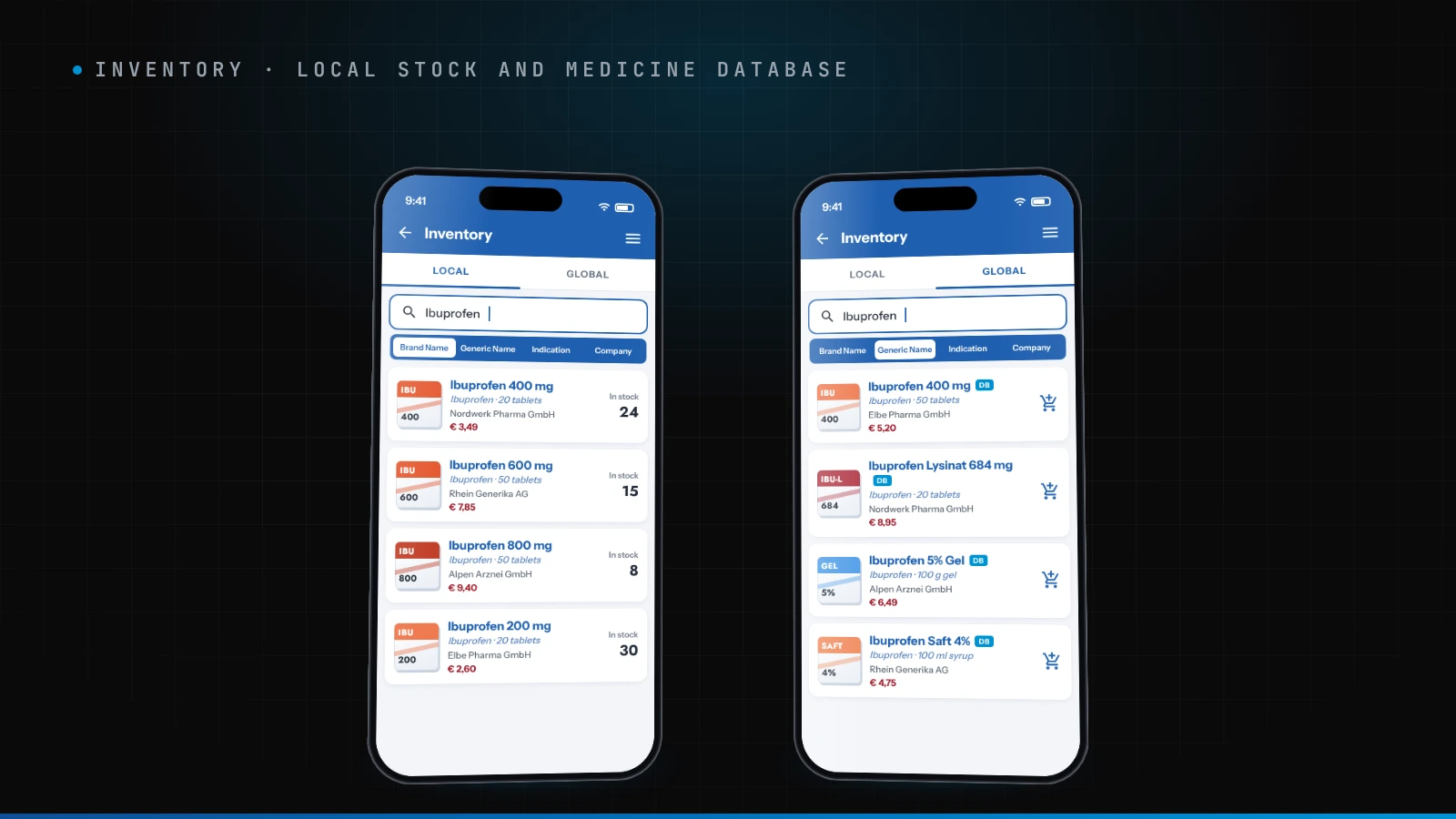
- Search the way pharmacists think. The inventory searches by brand name, generic name, indication or company, across the pharmacy's own stock (Local) and Digital Pharmacy's full medicine database (Global).
- Works offline. Recognition runs on the device when the connection drops, and uses Firebase ML Kit when the pharmacy is online.
For pharmacy owners: the whole pharmacy on one screen
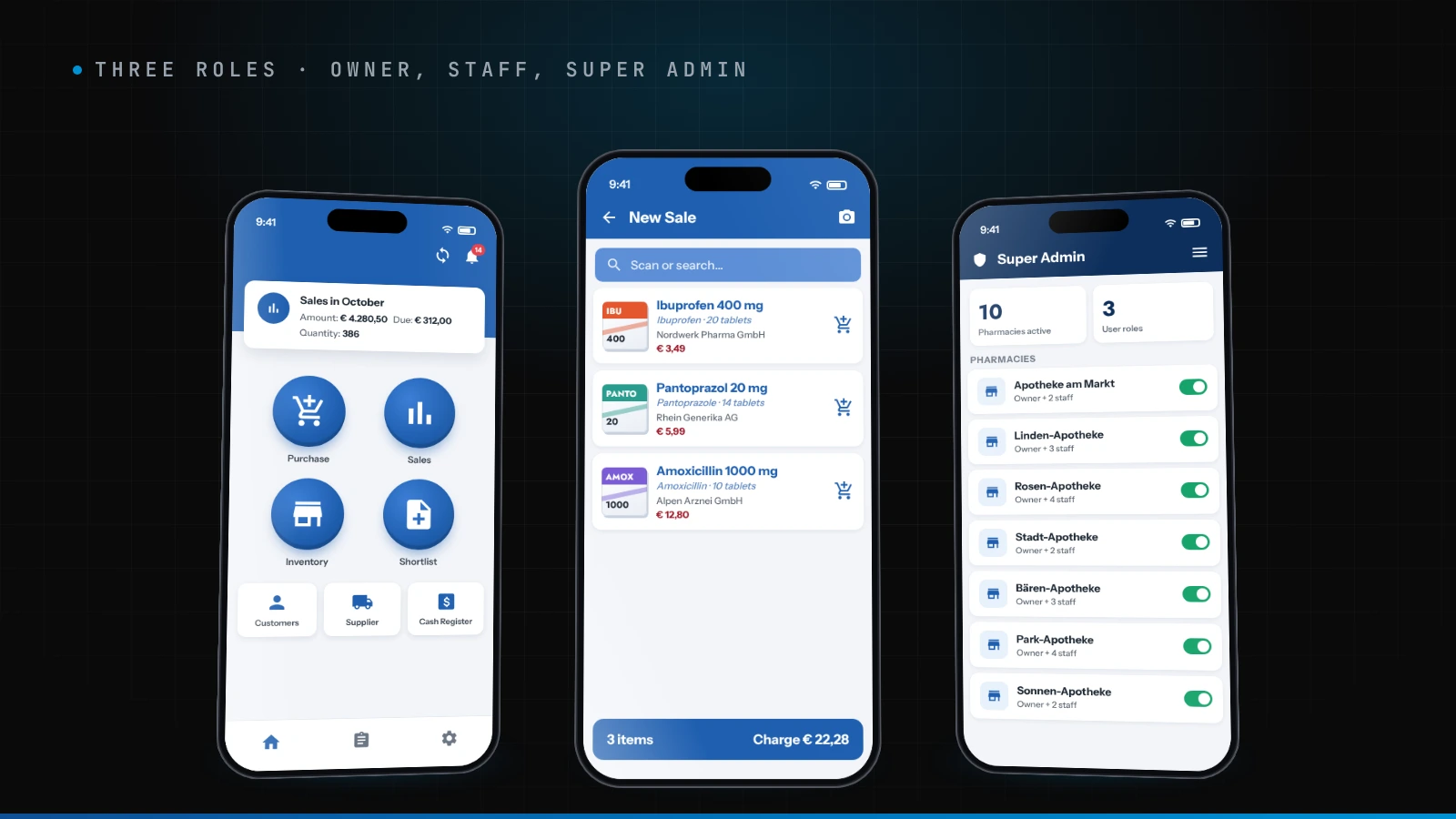
- Monthly sales at a glance: amount, money due and quantity sold, right on the home screen.
- Purchases and suppliers in one place, so it's clear what came in and from whom.
- A shortlist of medicines to reorder, built while staff work.
- Customers and dues, so money owed doesn't live in a notebook.
- A cash register for every amount received and paid, with date, type and remarks.
For Digital Pharmacy: a product it could sell
- Role-based access meant one product served the owner, the counter and the platform team.
- The super admin view let Digital Pharmacy onboard and manage pharmacies as a SaaS business.
- Their medicine database, built into the app, gave every pharmacy a full catalogue from day one, instead of starting from an empty stock list.
How we built it
Reading medicine names from a photo was the hardest part
OCR that reads text is easy to find. OCR that finds the right medicine is not. Medicine packs have small print on glossy, often curved surfaces that catch the light. The same medicine comes in several strengths and pack sizes whose names differ by a few characters, and one wrong character can point to a different product. Prescriptions add their own layouts and handwriting. So the job wasn't just reading the text: it was matching what the camera read to one product in a very large database.
Counting boxes in a video is harder than in a photo
In a shelf video, the same box appears in dozens of frames, so the app has to recognise it as one box, not thirty. Hand movement blurs frames, boxes overlap and hide each other, and different brands often use similar packaging. In our own testing, measured as successful detections against failures, box detection succeeded 92% of the time.
Offline first, cloud when available
A pharmacy can't stop selling because the Wi-Fi drops. We split recognition into an on-device path for offline work and Firebase ML Kit when online, so scanning never blocks the counter.
One-week sprints in Azure DevOps
A team of four (a UI designer, an Android developer, a backend developer and a project manager) ran the project in 7-day sprints, with the backlog, sprints and releases managed end to end in Azure DevOps.
The results
| Before | After |
|---|---|
| Stock kept in paper books or legacy software | One Android app for stock, sales and cash |
| Every medicine typed in by hand | Stock updated from a prescription photo or a shelf video, confirmed in one tap |
| Searching meant knowing the exact name | Search by brand, generic name, indication or company |
| Sales, dues and cash tracked separately | Owner dashboard with monthly sales, dues and quantity |
| A software idea | A SaaS product running in 10 pharmacies |
Across those ten pharmacies, the app processed more than 5,000 images with OCR.
What we'd do again
- Design for offline from day one. A shop counter can't wait for a network.
- Keep a person in the loop. A one-tap confirmation kept stock accurate without bringing back the typing.
- Match, don't just read. The value of OCR in a pharmacy is in linking text to the right product, not in the text itself.
- Keep sprints short when AI is involved. Seven days kept testing on real packs constant.
Frequently asked questions
Can computer vision really count pharmacy stock?
Yes, for boxed medicines on a shelf. In our own tests for Digital Pharmacy, video-based box detection succeeded 92% of the time. The hard parts are counting the same box only once across video frames and telling apart similar packaging.
Can OCR read prescriptions and medicine packs?
It can read the text. The harder step is matching that text to the exact product, because names differ by strength and pack size. We matched OCR results against Digital Pharmacy's full medicine database, and staff confirm each match before stock changes.
Does a pharmacy app need to work offline?
It should. A pharmacy keeps selling when the internet drops. Our app ran recognition on the device offline and used Firebase ML Kit when online.
How long does it take to build a pharmacy management app?
This one took four months from kick-off to launch, with a team of four working in one-week sprints. That covered three role-based interfaces, the backend and the computer vision.
Native Android or cross-platform for a pharmacy app?
We built native Android here because the app leans hard on the camera and on-device recognition. For simpler stock and sales apps, cross-platform is often enough.
Building something with a camera at its core? Book a call or see our computer vision development work.