
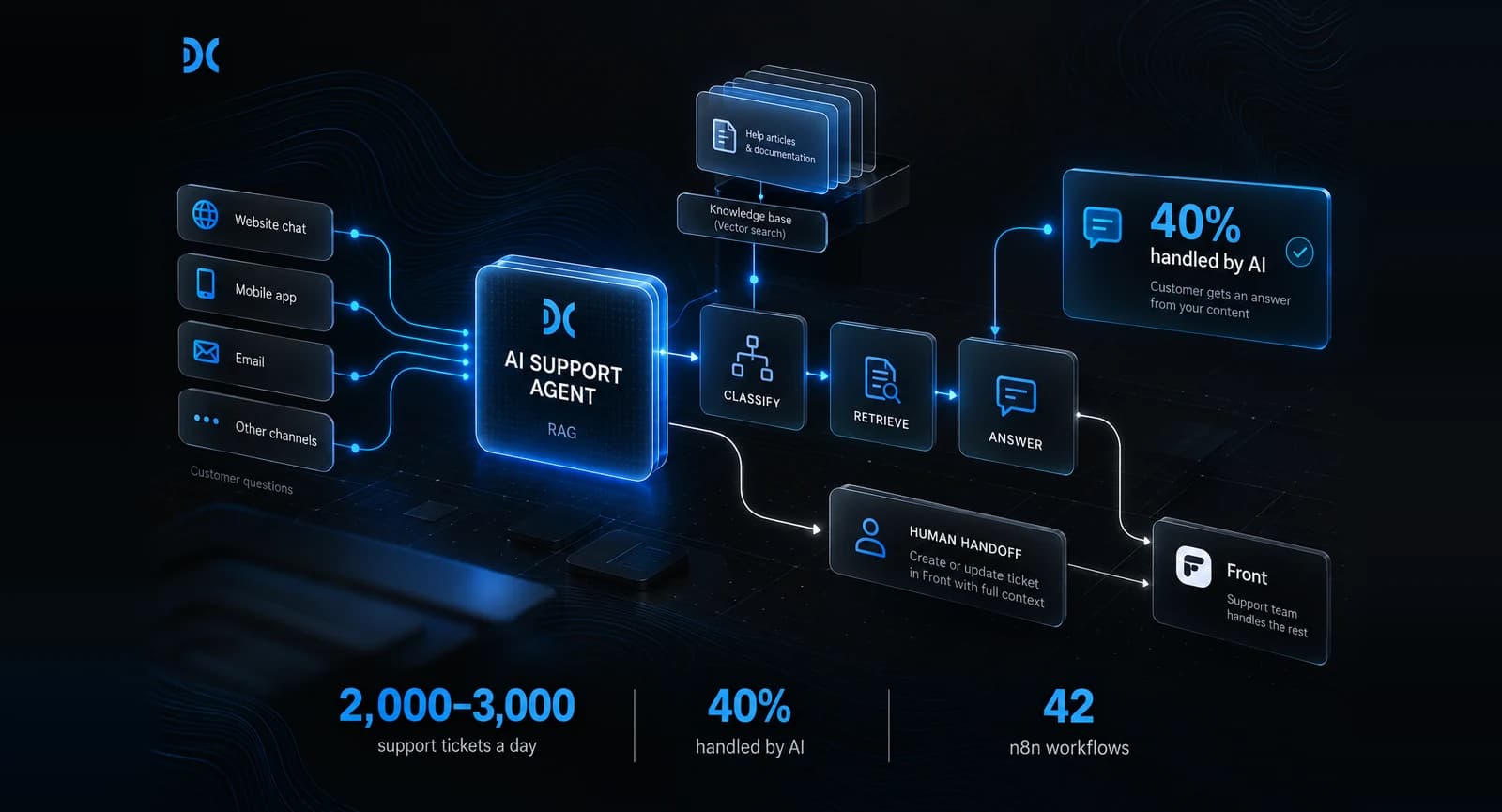
A US direct-to-consumer brand had 25–30 support agents answering 80–100 tickets each, every day. We built an AI support agent that sits in front of that team. It answers troubleshooting questions from the brand's own help articles using retrieval-augmented generation (RAG), answers simple questions from a company knowledge base, and passes everything else to a human in their helpdesk, Front. It now handles 40% of the volume on its own. It took 45 days from system design to launch and runs on 42 n8n workflows using GPT and Llama.
At a glance
- Client: a direct-to-consumer brand in the USA (anonymised)
- Volume: roughly 2,000–3,000 support tickets a day
- What we built: a RAG AI customer support agent in front of the human team
- Stack: n8n (42 workflows), GPT for customer-facing answers, Llama for classification and data preparation
- Connected to: Front (ticketing), the brand's database, their mobile app and their website
- Timeline and team: 45 days, a team of four
Results
| Metric | Before | After |
|---|---|---|
| Volume handled by AI | 0% | 40% |
| Chats needing a person | 2,000–3,000 a day | About 1,200–1,800 a day |
| Handoff to the team | — | Front ticket with context |
The challenge
The problem was volume, not quality. Each of the 25–30 agents was handling 80–100 tickets a day, so the team as a whole was working through about 2,000–3,000 conversations daily.
Most of those conversations fell into two groups:
- Troubleshooting questions. The answer already existed in a help article or product document, but an agent still had to find it, read it and rewrite it for the customer.
- Simple questions. Policies, shipping, account basics: things the company already knew and had written down somewhere.
Neither group needed a person's judgement. Both took a person's time. Hiring more agents would have kept pace with the volume without changing the work, so the brand wanted the repeatable questions answered before they reached the team.
What we built
We built a chat agent that sits in front of the human team as the first layer every customer meets, on the website and in the app. It does one of three things with each message:
- Troubleshooting: it retrieves the relevant documentation and help articles and gives the customer step-by-step instructions drawn from them.
- Simple questions: it answers from a company context system, a curated knowledge base of the brand's policies and facts.
- Everything else: it creates or updates a ticket in Front with the chat transcript and the detected category attached, so the human agent who picks it up has the context and the customer doesn't repeat themselves.
The agent only answers from the brand's own content. If retrieval doesn't find a confident match, the conversation goes to a person rather than to a guess.
The agent is only useful if it knows what the support team knows, so we connected it to four systems:
- Front, the brand's helpdesk, for handoffs and ticket context (Front's Core API)
- The brand's database, so the agent works from the same records the support team does
- Their mobile app and website, where customers start the chat
- A vector knowledge store holding the help articles and documentation, embedded with OpenAI's text-embedding-3-small so the agent can search them by meaning, not just keywords
How we built it
How does the agent decide what to do with each message?
It classifies the message first, then acts on the result. Classification decides more than the type of question. It also decides:
- which source to search: troubleshooting docs, help articles, or the company context system
- which filters to apply: for example, the product the question is about
- whether the message should go straight to a human
That makes classification the most important step in the pipeline. If a question is put in the wrong category, the agent searches the wrong place and gives a worse answer, however good the model writing the reply is. It is also where we learned the most after launch.
Why did we build it in n8n?
n8n let us build and change the orchestration visibly, with the integrations the project needed. The system runs as 42 n8n workflows, split by responsibility:
- content ingestion: bringing help articles and documentation into the knowledge store and keeping them current
- classification and routing: deciding what each message is and where it goes
- retrieval and answers: finding the right content and writing the reply
- integrations: Front, the database, the app and the website
- human handoff: creating or updating the Front ticket with context
- monitoring: watching what the agent answers and where it fails
n8n supports RAG natively, with vector stores connected to agent workflows (n8n's documentation on retrieving relevant context), so we spent the 45 days on the brand's specifics rather than on plumbing. Separate workflows also meant anyone could see, in plain view, which step handled what. When something needed changing after launch, we changed one workflow, not the whole system.
Which jobs went to GPT and which to Llama?
We split the work by what each job needed:
- Llama handles the preparation work that RAG depends on: formatting incoming data, classifying each message, and deciding which data to fetch and which filters to apply. These are high-volume, behind-the-scenes steps, and Llama gave us the room to customise its behaviour for the brand's categories and data.
- GPT writes the final answer the customer reads. That is the one step where tone and clarity matter most, so it went to the model we trusted most for customer-facing replies.
Using two models kept the customer-facing quality high without sending every internal step through the most expensive model. For a team fielding thousands of conversations a day, that split matters for running costs.
Time and team
It took 45 days from system design to deployment. Four people built it:
- A system designer owned the architecture: how retrieval, classification, routing and the human handoff fit together, and which model did which job.
- A project manager worked with the brand's support team to map ticket types, agree what the agent should and shouldn't answer, and run testing and rollout.
- An AI engineer built the retrieval pipeline: preparing and indexing the help content, tuning retrieval, the prompts and guardrails, and the GPT and Llama split.
- A second AI engineer built the n8n workflows and the integrations with Front, the database, the app and the website, including the handoff to a human.
What went wrong after launch?
Our categories were too narrow for real customers. We designed the classification from historical tickets, and it worked well in testing. Real customers phrase the same problem in many more ways than any historical sample shows, and after launch the agent met query variations its categories couldn't place.
Because classification also chose which data to fetch and which filters to apply, a wrong category meant a weaker retrieval, not just a wrong label. We refined the categories and the retrieval rules after launch, based on real conversations and what real customers actually asked.
Plan for a tuning phase after go-live. The first weeks of real traffic teach you more about your categories than any test set.
The results
The AI agent handles 40% of incoming support volume on its own. At 2,000–3,000 conversations a day, that is roughly 800–1,200 conversations a day that no longer need a person.
The remaining 60% reach the team as Front tickets with the conversation and its category already attached, and the team spends its time on the questions that need judgement.
What we'd do again
- Put the agent in front of the team, not beside it. Every conversation meets the agent first, so the 40% it resolves never reaches a person, and the rest arrive already sorted.
- Split the models by job. Preparation and classification don't need the same model as the reply a customer reads.
- Keep the workflows small and separate. Forty-two workflows sounds like a lot, but each one does a single job. That made the post-launch fixes quick and safe.
- Hand over with context. A customer who has to repeat themselves to a human erases most of the goodwill the agent earned.
Frequently asked questions
How much does an AI customer support agent cost to build?
A system like this one, connected to a helpdesk, a database, an app and a website, typically costs in the range of $20,000 to $30,000 and takes around six weeks. Cost depends mostly on the number of systems it must connect to and how much content it retrieves from. A narrower first version can start smaller; our AI agent pilots start from $6,500.
Can n8n run a production RAG system?
Yes. This system runs on 42 n8n workflows and handles thousands of conversations a day. What makes it production-ready is the design around it: small single-purpose workflows, monitoring, a clear handoff to humans, and a tuning phase after launch.
Will an AI support agent replace the support team?
Not in this case, and that wasn't the goal. The agent handles 40% of volume: the repeatable troubleshooting and simple questions. People handle the rest, with better context, and spend their time on the conversations that need judgement.
What is the difference between ticket deflection and resolution?
Deflection means a customer didn't open a ticket; resolution means their problem was actually solved. The number that matters is what the agent actually handles end to end, because a deflected customer who comes back angry through another channel isn't a saving.
If your support team spends its day answering questions your documentation already answers, we can look at your ticket mix and tell you what share an agent could realistically take on, including when the answer is "not much". Book a 30-minute call, or read how we approach AI agent development and AI integration.